After update error

Hello
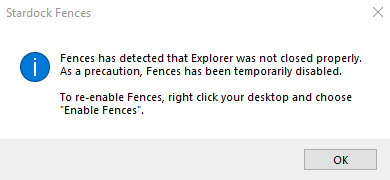
I just updated to the latest version which i believe is V3.1  It won't let me check that. but now when i boot my computer i get this message as attached.
I tried rebooting again and that won't help. When i right click on the desktop and select enable fences the fences come back up for about 10 seconds, then my screen goes black for about 5 seconds and when the screen comes back up the fences are gone and the same message comes back up. Also i don't use internet explorer and windows explorer was shut down properly. Why would it do this ?
Of course now i need to download a previous version so where could i go for that ?
 
2,982 views 4 replies +2 Loading…
Reply #1 Top

Having the SAME issue. And now my Fences install is botched. Cannot uninstall/ reinstall. 

Win 7 (not Win 10).  (Support Please help).

Reply #2 Top


Hello
I just updated to the latest version which i believe is V3.1 It won't let me check that. but now when i boot my computer i get this message as attached.
I tried rebooting again and that won't help. When i right click on the desktop and select enable fences the fences come back up for about 10 seconds, then my screen goes black for about 5 seconds and when the screen comes back up the fences are gone and the same message comes back up. Also i don't use internet explorer and windows explorer was shut down properly. Why would it do this ?
Of course now i need to download a previous version so where could i go for that ?
End of quote

Please refer to this thread. https://forums.stardock.com/505007/get;3806834


Quoting GeorgeBoyce, reply 1

Having the SAME issue. And now my Fences install is botched. Cannot uninstall/ reinstall.

Win 7 (not Win 10). (Support Please help).
End of GeorgeBoyce's quote

Hello,
Please try purge and reinstall steps as mentioned here: https://forums.stardock.com/486084/fences-support-faq#reinstalling. Just make sure to re-download the v3.09 version from the link I posted above. Reboot after the purged. Reinstall, and Reboot again after the installation. Retest it. Report back here.

Thank you,

Basj,
Stardock Community Assistant

Reply #3 Top

I saved the V3 when i purchased and installed that and working fine now. I'll leave V3.1 alone for now thanks