Icons Scaling themselves

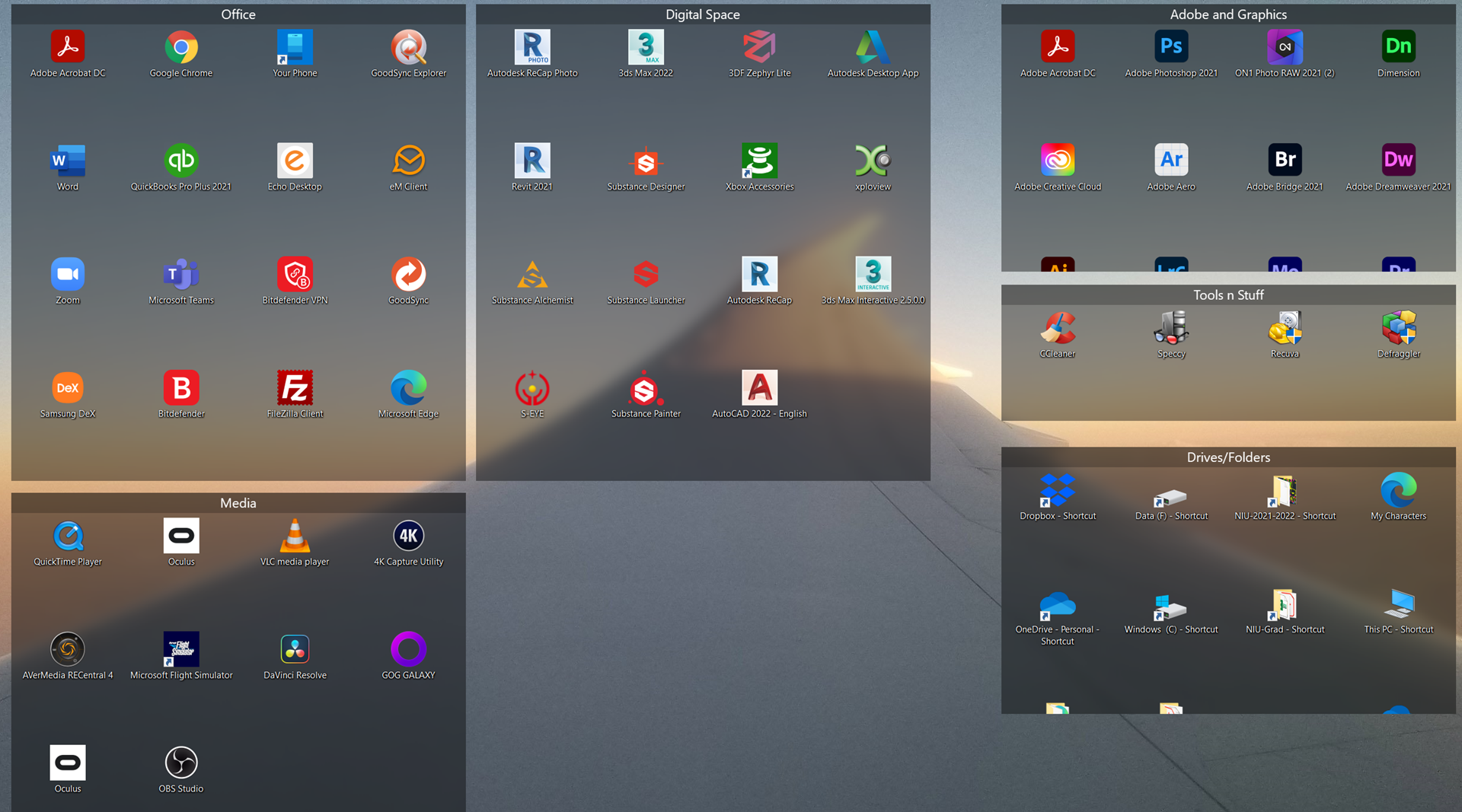
I have a laptop with a high resolution screen, 3840x2160.  When I setup Fences the icons were closer together to each other than they are now.   They were that way this morning.  However, now they automatically respaced (rescaled???) themselves and now look like the attached screen shot.  They used to fit on the screen with about 1/3 to 1/2 of the bottom of the screen blank.  But now they overfill the screen.  When I tried restoring an arrangement from yesterday when they all looked correct but it did not work.  What can I do to fix this?

thank you

10,330 views 12 replies
Reply #2 Top

Hello,

Sorry to hear you are having issues.

Right- Click on desktop to View

scroll down to Classic Icons and check.

see if that works for you .


AzDude
Stardock Community Assistant

Reply #4 Top

Hello,
Sorry to hear you are having issues. Need to know more on your system.

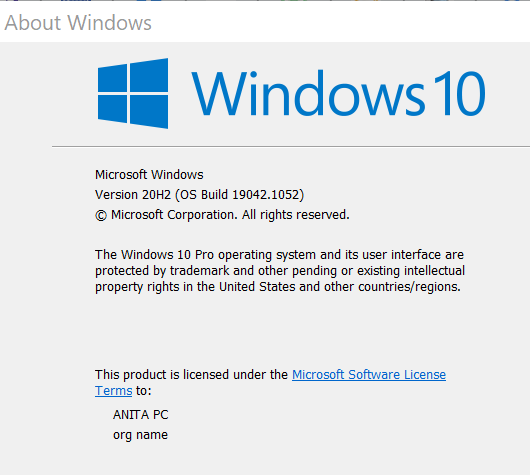
  1. Windows full version numbers. Please use Winver.exe to get to full Windows version numbers.
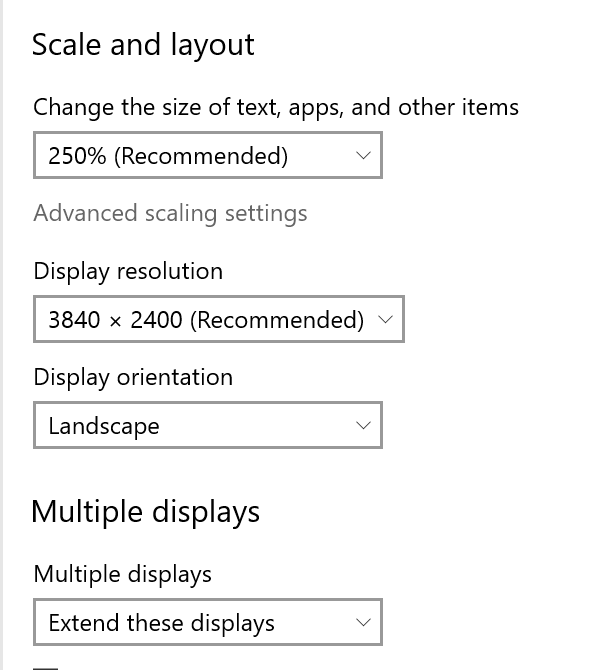
  2. Monitor/s Resolution and Scaling (100%, 125% etc)
  3. Any other application running in the background controlling icons size or and Reg mod done?

Thanks
Basj,
Stardock Community Assistant.

Reply #5 Top

OK, the issue just went away.   After having the scaling problem for two days with multiple shut downs and restarts, I started the machine again this morning and everything is how it should be.  I have no explanation for this. 

But I have to say your response time was great and you followed up well.  Much better than most support teams.  Thank you.

Reply #6 Top

Great, glad you resolved it.

Thank you,

Basj,
Stardock Community Assistant

Reply #7 Top

I am having the same problem (I hope this is the way to get an answer; I've not done forums before) 

I am using 3.0.9.11 – I just transferred all to a new computer.  For some reason all of my fence icons are very spread out (like 2+ inches apart) – I compared all of my Fence settings and they are the same (old computer and new computer).  How do I get them to be closer together?

Reply #8 Top

Quoting makadolf, reply 7

I am having the same problem (I hope this is the way to get an answer; I've not done forums before) 

I am using 3.0.9.11 – I just transferred all to a new computer.  For some reason all of my fence icons are very spread out (like 2+ inches apart) – I compared all of my Fence settings and they are the same (old computer and new computer).  How do I get them to be closer together?

End of makadolf's quote

Hello,
Sorry to hear you are having issues. Need to know more on your system.

  1. Windows full version numbers. Please use Winver.exe to get to full Windows version numbers.
  2. Monitor/s Resolution and Scaling (100%, 125% etc)
  3. Any other application running in the background controlling icons size or and Reg mod done?
  4. How do you did the transfer, copy over everything or just the layout snapshots?

Thanks
Basj,
Stardock Community Assistant.

Reply #9 Top

1.

2. Two monitors

3. Not aware of anything

4. My IT person did this (I am 99% sure he transferred/copied all over from old computer...as he has done prior from old-old computer); he was surprised to see the icons' distance (old computer compared to new computer).

Thank you~! Anita

Reply #10 Top

Hello,
Please try purge and reinstall steps as mentioned here: https://forums.stardock.com/486084/fences-support-faq#reinstalling. Just make sure to re-download the latest version from your account. Reboot after the purged. Reinstall, and Reboot again after the installation. Retest it. Report back here.

Note: The Purge should not delete your saved layout snapshot, but to be sure you should backup your snapshot using this guide : https://forums.stardock.com/486084/fences-support-faq#backupsnapshots

Thank you,

Basj,
Stardock Community Assistant

Reply #11 Top

Hi Basj,

I just went through all the steps you outlined; icons are still far apart :/ ... I hope there is an easy resolution.  Please advise.

Reply #12 Top

Hello,

Please try the following:

-For Win8/10 Users: Open the Start Screen, and type 'cmd'. Right-click on the search result and select 'Run as administrator' from below.

-Type: sfc /scannow

-Wait for the scan to complete (this can take several minutes)

Some help on how this looks should you need it:

https://support.microsoft.com/en-us/help/929833/use-the-system-file-checker-tool-to-repair-missing-or-corrupted-system

If the SFC finds errors, but cannot fix them, please also run the following command in the same command prompt window:

dism.exe /online /Cleanup-Image /RestoreHealth

Some help on how this looks should you need it:

https://www.windowscentral.com/how-use-dism-command-line-utility-repair-windows-10-image

The above command should assist with replacing any damaged or problematic system files. Please note, however, since it may require restoring certain files, this process can take some time and you will need to be patient until it has completed.

Please let me know whether this resolves your problem or if you have any additional questions.

Thank you,

Basj,
Stardock Community Assistant.