Icon layout

This is what my fences look like. The icon spacing creates an overlap that I cannot find a way to eliminate. Help would be appreciated. Thank you, John
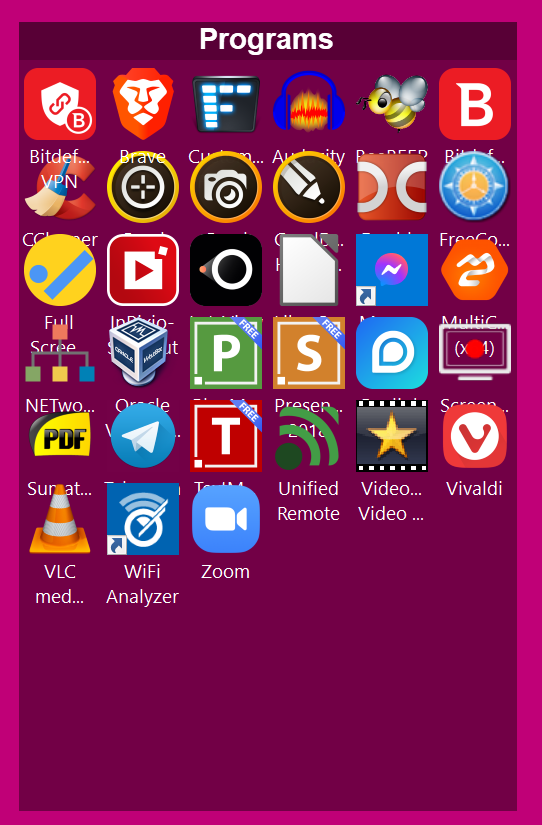
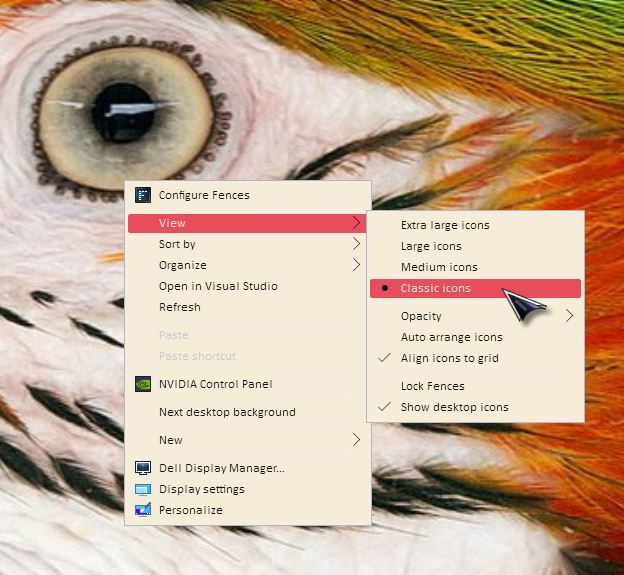
Image overlap

8,013 views 10 replies
Reply #1 Top

Hello,
Sorry to hear you are having issues. Need to know more on your system and issues.

  1. Windows version, please use Winver.exe for full Windows version numbers.
  2. Fences version.
  3. Monitor resolutions and scaling applied.
  4. Icons size. And do you have the same problem is you set those icons to "Classic Icons" size?


Basj,
Stardock Community Assistant.

Reply #2 Top

1. Windows version 21H1 (OS Build 19043.985

2. Fence version 3.0.9.11

3. Monitor resolution: 1920 x 1080 with 150% scaling (recommended). Changing scaling makes no difference.

4.Yes, changing icon size makes no difference.

Reply #3 Top

Hello,
Please try purge and reinstall steps as mentioned here: https://forums.stardock.com/486084/fences-support-faq#reinstalling 

Just make sure to re-download the latest version from your account. Reboot after the purged. Reinstall, and Reboot again after the installation. Retest it. Report back here.

Thank you,

Basj,
Stardock Community Assistant

Reply #5 Top

Hello,

Have you done the purge and reinstall as I mentioned above? And the result?

Thank you,

Basj,
Stardock Community Assistant

Reply #7 Top

Please try cleanboot steps as mentioned here : https://forums.stardock.com/486084/fences-support-faq#cleanboot. This is to check if you have corrupt user account or conflict between Fences with your other installed application running in the background. Try it and report back.

Thank you,

Basj,
Stardock Community Assistant

Reply #10 Top

So it show that, there is something wrong with your main admin account. Sometimes, the issue on your main admin account resolve itself when you create a new admin account. Not really sure why, but if you login your main account does the issue still there?

Thank you,

Basj,
Stardock Community Assistant