Fences moving to a secondary monitor when waking up from sleep

My laptop has a dual monitor. When I open the lid and the laptop wakes up, sometimes my fence in the desktop is drawn in the secondary monitor. I have to drag it to the main monitor manually, but then it loses its original width and height.


I think Stardock should fix this behavior, but does anybody have an idea how to prevent this?

24,384 views 18 replies
Reply #1 Top

Hello,
Sorry to hear you are having issues. Need to know more on your system

  1. Windows version, please use Winver.exe to get Windows full version numbers.
  2. Fences version.
  3. Specification on your two monitors. Resolutions, scalings and any other relevant information on it.
  4. Have you try Fences snapshot layout restore?

Thanks
Basj,
Stardock Community Assistant.

Reply #2 Top

My computer has the same issue.  Sometimes (not all the time) when my dual monitor computer comes out if hibernation all of the fences have moved to the primary monitor.  This in turn changes the positions of my other Desktop shortcuts.  At the same time some of the fences have automatically reorganized so some are placed on top of (overlap)other fences.

It would be nice if there were a Fences hot key sequence that could be used to restore a "Default" snapshot.

OS: Microsoft Windows 10 Version 20H2 (OS Build 19042.868)

Fences Version: 3.0.9.11

Monitor 1 Resolution: 1920 x 1080, scaling 100%

Monitor 2 Resolution:  1920 x 1080, scaling 100%

Thank you for your assistance with this frustrating problem.

Dave

Reply #3 Top

Hi,

I frequently have the same issue with the Fences ending up on the wrong display after login. Even though Windows shows the login dialog on the correct display and the main taskbar and start menu also appear on the right display, Fences still occasionally end up on the wrong display.

Could you please at least provide a button in the UI with action like "Move to primary display" until you find a more permanent solution. I don't mind clicking a button when required, but moving the Fences manually is too hard.

Thank you.

Tom


Reply #4 Top

Hello,
I have forward your problem/question to Stardock Support Team for their assistance. Please keep an eye on this thread for any updates. We appreciate your feedback and patience.

Basj,
Stardock Community Assistant

Reply #5 Top

This has to do with what monitors the PC has available at boot \ waking.  If any secondary lags behind (even for a moment), its not Fences that decides what Desktop (and its icons) to display and where, its Windows itself.

That said, a hotkey \ desktop right-click context menu for restoring a default snapshot is a good feature suggestion.  I will log it.

Sean Drohan
Stardock Support Manager

Reply #6 Top

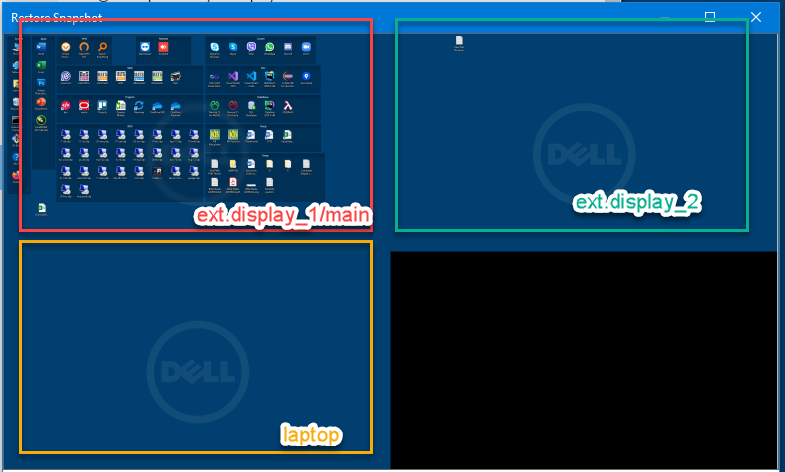
Does Fences start before logging in? Windows login screen is on the main/correct display (ext.display_1) at login time and a few seconds later Fences appear on the non-primary display (laptop). Even though the saved layout (screenshot below) shows where the fences should be, clicking the restore button doesn't move the Fences from the laptop screen to the ext_display_1/main.

Reply #7 Top

Quoting tkimovski, reply 6

Does Fences start before logging in?

Fences starts in the Windows Explorer process.

Sean Drohan
Stardock Support Manager

Reply #8 Top

The screenshot above with Fences on external display #1 is from the preferred layout I keep as backup. When the Fences after login end up on the wrong display i.e. the laptop display, clicking on Restore Snapshot does nothing, as if not clicked at all. Why is that?

Reply #9 Top

Hi,

Yes I have the same problem. Dual monitors. Whenever the machine goes to sleep, upon wakeup, everything is moved around - EVERY time.

At best, some shortcuts outside of Fences wander to the other screen.

At worst, the screens get swapped over, and icons outside of Fences get shuffled around. That's a PAINFUL manual repair sometimes.

Sometimes a restore snapshot fixes it but not always. So we are getting to the point where the PAIN and WASTED time of having to repair makes one wonder whether FENCES is worth it.

One partial solution is to have all icons in FENCES.... then only fences get shuffled around and that means fewer items to relocate. But thats not a solution to benefit that becomes and annoyance.


Reply #10 Top

The coming update for Fences has monitor fixes.  I cant say it will address yours but they are there.

Sean Drohan
Stardock Support Manager

Reply #11 Top

Same Problem since updating Windows

Windows 10 Home Single Language

Version 20H2

Installed on ‎3/‎16/‎2021

OS build 19042.867

Experience Windows Feature Experience Pack 120.2212.551.0


Reply #12 Top

Quoting ujmvjm1607, reply 11

Same Problem since updating Windows

Windows 10 Home Single Language

Version 20H2

Installed on ‎3/‎16/‎2021

OS build 19042.867

Experience Windows Feature Experience Pack 120.2212.551.0

Quoting sdRohan, reply 10

The coming update for Fences has monitor fixes.  I cant say it will address yours but they are there.

Sean Drohan
Stardock Support Manager

Reply #13 Top

I have the same problem, Win10 64bit dual monitor. I've made some hardware updates and reboot often. All fences move to the primary monitor when rebooting and I have to restore them. My PC normally stays on all the time so I don't know when this started. Looking forward to the next update!

Reply #14 Top

This is a big problem for me as well. Also, it would be great to be able to select multiple Fences to move them as a group. 

When will the next update roll out? 

Reply #15 Top

Quoting KaraHuett, reply 14

This is a big problem for me as well. Also, it would be great to be able to select multiple Fences to move them as a group. 

When will the next update roll out? 

Please review:

https://forums.stardock.com/504549/page/1/#3804200

Sean Drohan
Stardock Support Manager

Reply #16 Top

When I power up the laptop, which has an external monitor attached to it via USB-C in "Extend desktop to this display" mode and set as "Main display", after login, the taskbar correctly appears on the external/primary display. About 5-10 seconds later Fences appears on the laptop display instead of the external/main display. Log off/log on doesn't fix the issue. And neither does disconnecting/reconnecting the USB-C lead. Only restarting the laptop fixes the issue making Fences appear on the external/main display. The restart is a time consuming option. Perhaps introducing a button "Move Fences to main display now" can make it easier.  

Reply #17 Top

Even a Windows restart is no longer helping in having Fences appear on the primary display. I don't understand the stubbornness in not providing a button "Move Fences to Primary Monitor Now" or "Move Fences to Monitor 1/2/3 Now" - until they find a more permanent solution. This is annoying to the point that I'm considering uninstalling the product altogether. 

Reply #18 Top

Quoting tkimovski, reply 17

Even a Windows restart is no longer helping in having Fences appear on the primary display. I don't understand the stubbornness in not providing a button "Move Fences to Primary Monitor Now" or "Move Fences to Monitor 1/2/3 Now" - until they find a more permanent solution. This is annoying to the point that I'm considering uninstalling the product altogether. 

Again, please review:

https://forums.stardock.com/504549/page/1/#3804200

Sean Drohan
Stardock Support Manager