Update will not install

Dear sir or madam,

Via Humble bundle I bought Start 10. Best thing I did sinve long. But I  had to activat it via Steam, which worked fine. Yesterday my pc crashed and i have been reinstalling software all day, fun....not. But now the start 10 doesn't want to install.


Any ideas what I must do??


Thanks for any help probided


Kind regards
Peter


2,488 views 6 replies
Reply #1 Top

Hello,
Sorry to hear you are having issues. Would like to know what is the error massage came up when you try to install Start10? And are you installing the Steam version of Start10 since you said, you activated it via Steam.

Thanks
Basj,
Stardock Community Assistant.

Reply #2 Top

Hello,

Thanks for the fast reply. It seems that I didn’t have all the updates for windows 10. So I tried again after installing everything and it worked. Yes, I bought it via humble bundle and it worked perfectly with steam. Now I am customizing it a bit. But I have a question what’s the difference between windows blinds and start 10. ? 

have a nice day 

Kind regards 

peter

Reply #3 Top

Start10 is a program to change your Windows 10 Start menu to look like Windows 7 Start menu. Windowblinds is a program which change the look of some part of Windows. And Windowblinds also change how Start10 menu look like. You can get more information on each program here

  1. https://www.stardock.com/products/start10/
  2. https://www.stardock.com/products/windowblinds/

Each program can run without the other but it is best to run it both to complete change how Windows 10 look.

Thank you,

Basj,
Stardock Community Assistant

Reply #4 Top

Hello Basj,

Thanks for the response I tried Windowsblinds, but then I can't change the Startbutton  anymore using Start10.
Kind of annoying.
Any solution for that?

Kind regards,
Peter

Reply #5 Top

Hello,

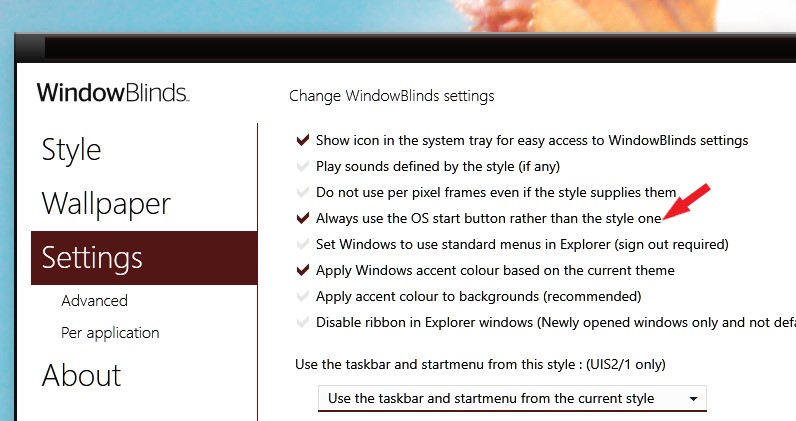
You need to disable Windowblinds from controlling Start button before you can change it in Start10. Try this setting.

Thank you,

Basj,
Stardock Community Assistant

Reply #6 Top

Thank you very much.

stay safe and have a wonderful Christmas and a happy new year