Windows 11 Explorer Corruption

Taskbar behavior

This is a VERY long-standing and chronic problem that I have experienced since Groupy v1, and on multiple Windows machines.  After a few days of routine activity on my PCs, the Explorer folder on the taskbar will stop functioning as a single icon for multiple windows and instead create new taskbar icons for each new Explorer window.  If I restart the Windows Explorer app in Windows Task Manager then it resets to the correct state.  After a few days the whole process repeats again.  I believe that my Groupy settings are correct and I am running the latest version.  

124 views 5 replies
Reply #1 Top

In File Explorer Options > General tab under Browse folders, do you have "Open each folder in the same window" selected?

In Groupy v2 Grouping settings, under Explorer enhancement settings, do you have "New Explorer tabs should open in the same folder" selected?

Are you running Start11 v2, because this sounds more like a Start11 taskbar issue?

Reply #2 Top

Yes, yes, and yes!  I assumed that the problem was Groupy related, but apparently wrongly so.  Are there settings in Start11 that I need to check?

Reply #3 Top

Are you using the Enhanced taskbar?

Are you running the latest version 2.7.3.0 Beta?

Reply #4 Top

I don't know what the Enhanced taskbar is, so I guess not.  My Start11 version is 2.72.  I try not to run beta versions because they're not as stable.  

Reply #5 Top

If you are not using the Start 11 Enhanced Taskbar, then Windows 11 is controlling the taskbar. 

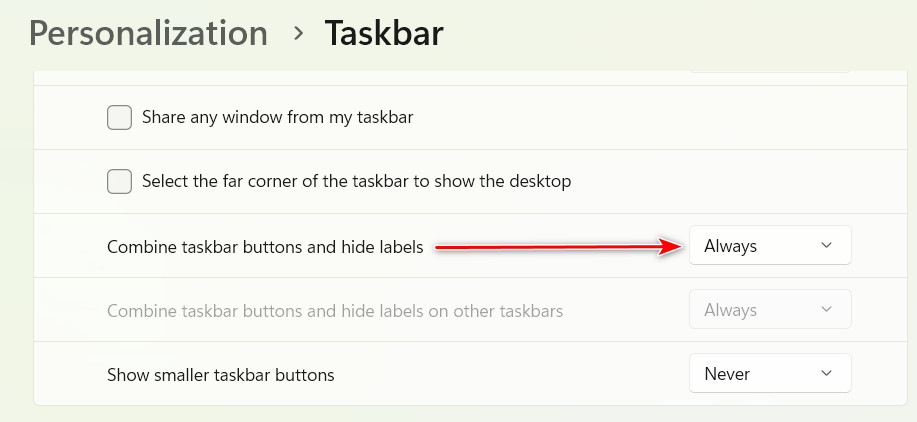
Make sure "Combine taskbar buttons and hide labels" is set to Always