Fences Black Background

Hi fellow Fences Users,


I formatted my system and have all latest graphics drivers installed but for some reason Fences makes the desktop background black around the Fences and I can't see the desktop picture I have set.

The fences themselves are fine but the area of the desktop around them become black and the only way to fix it is to go and set the background picture again(I actually have a background wallpaper changer so it loads a new picture automatically everyday).

Also, I noticed that the black background only happens when I press Windows + D, because i Multi-task when listening to music, browsing and opening games so I switch between the windows using Windows + D combination. However when simply using the Alt + Tab combo it seems alright but then supposing I want to open another application I simply have to press Windows + D to access the desktop but see this all black background.

I have tried purging and reinstalling Fences and Graphics Drivers to their newest versions and the issue still persists. Any help would be welcome, thanks.

11,816 views 18 replies
Reply #1 Top

Hello,

Sorry to hear you are having issues.

What Wallpaper Changer are you using ?

Try shutting it down and see if Fences is OK then .

Report back .


AzDude
Stardock Community Assistant

Reply #2 Top

I'm using the official Bing Desktop Wallpaper Changer application from Bing. Will try to shut it down and then check, but it's never happened before whenever I have run both side by side.

Reply #3 Top

I closed the desktop changer app, but the problem still persists.

Also if it helps, I disabled Fences and then did the Windows + D shortcut and it made entire desktop black except the program icons.

Reply #4 Top

Hello,

Sorry to hear you are having issues.

Some info please.

Version of Windows ( full numbered version - use winver.exe for that )

Version of Fences ?


AzDude
Stardock Community Assistant

Reply #5 Top

Hey, I found the solution but I have another smaller issue for another software if you wouldn't mind helping me.


The app that was interfering with Fences was Deskscapes 10. Once I uninstalled it, everything got fixed. But now I have one dilemma, in doing so I also uninstalled my IconPackager software and now some of my icons are not default Windows 10 icons.

So I resintalled IconPackager and tried to set it to Windows default but some icons like .DLL icons are for the customized icon package and not default Windows 10 icon package

Reply #6 Top

Hello,
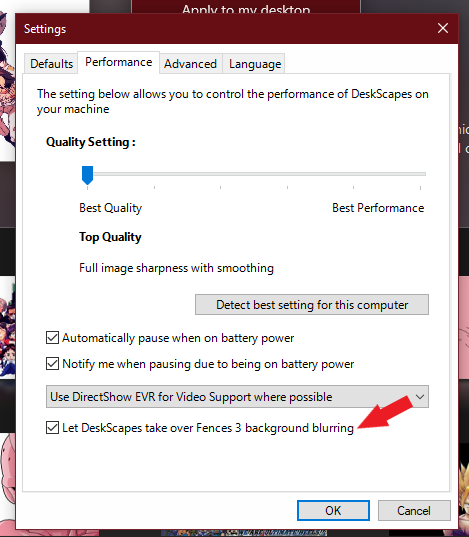
Sorry to hear you are having issues. But I wonder if you have this option turned on when you running Deskscapes with Fences.

Quoting alay_shukla, reply 5

So I resintalled IconPackager and tried to set it to Windows default but some icons like .DLL icons are for the customized icon package and not default Windows 10 icon package
End of alay_shukla's quote

Sometimes you will need to reboot to reset all those icons back to default. If that don't work. While you still have iconpackager still installed, do the purge using this guide : https://forums.stardock.com/485953/iconpackager-support-faq#reinstalling. Reboot and retest, report back.

Thanks
Basj,
Stardock Community Assistant.

Reply #7 Top

I disabled that setting in DeskScapes 10 and then tried to check but I still get a black background whenever I press Windows + D, with Fences also installed. I noticed that when I disabled Fences then pressing that combination didn't result in a black background but when I pressed F5(refresh desktop) then the black screen came back.

Regarding the fix for the IconPackager, yes the purge and reinstall worked and now my icons are default back to Windows 10 style.

Reply #8 Top

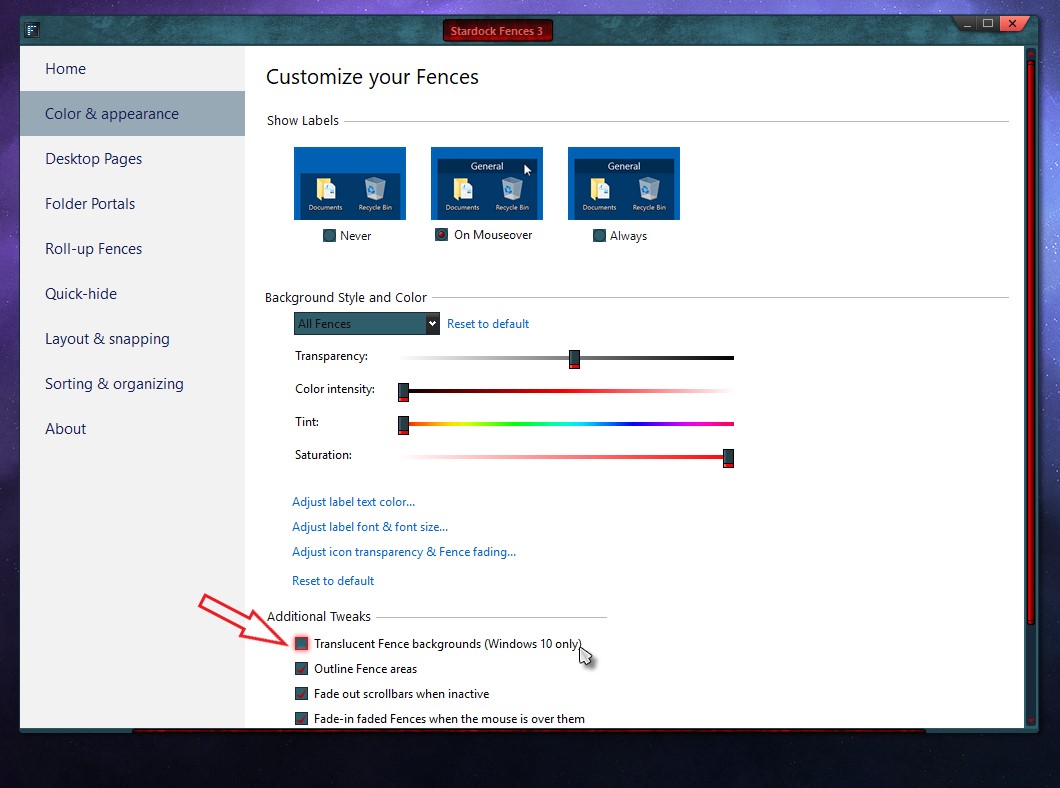
What happen if you disable this on your fence setting :


Thank you,

Basj,
Stardock Community Assistant

Reply #9 Top

I disabled that setting from Fences while keeping the setting off from Deskscapes you mentioned in the post above the last one but I still get the black screen background when I press Windows + D shortcut.

Again, when I disabled Fences, then if pressed Windows + D shortcut it was fine but if I refresh the desktop using the F5 key then the black background was there.

Reply #10 Top

Hello,
I have forward your problem/question to Stardock Support Team for their assistance. Please keep an eye on this thread for any updates. As a workaround, you can restart explorer which should restore your wallpaper from black. You can make a batch file and put it on your desktop or anywhere for easy access.

How to reset Explorer.exe using batch file (From: https://www.windowscentral.com/how-restart-explorerexe-fix-common-ui-problems-windows-10)

You can create a batch file that includes the commands to quickly terminate and restart the Windows Explorer process automatically using these steps:

  1. Open Start.
  2. Search for Notepad and click the top result to open the app.
  3. Copy and paste the following script to the text file:

    taskkill /f /im explorer.exe
    start explorer.exe
    
  4. Click the File menu, and select the Save As option.
  5. Type a descriptive name with a .bat file extension.

    Quick tip: It's recommended to save the batch file in the desktop, in case the experience freezes, and you need a quick way to restart the process.

  6. Click the Save button.

We appreciate your feedback and patience.

Basj,
Stardock Community Assistant

Reply #11 Top

Alright, shall do that and await assistance from Stardock Support Team and thanks for getting back to me.

Reply #12 Top

Hi, this post is from a year ago, but I am having this same issue, where the desktop periodically turns to black. To get back to normal, all I need to do is right-click settings or "personalize" and it instantly reverts. But it happens ALL THE TIME so it's a semi-constant annoyance. Has anyone figured this one out yet?? Note: I've used Fences without issues for years on both my desktop and laptops....just got a new laptop and desktop; laptop no issues, new desktop, this is happening all the time. 

Reply #13 Top

I just purchased Fences 4, hoping this problem would go away.

It's still there, I'm pretty sure stardock is aware of this problem, but it doesn't seem to be a priority  for them to fix it.

very annoying when it have been there for many builds and at least a couple of versions.

I've tried different video cards, different machines, same problem. always with Windows 10.

The only place I don't have the issue so far is with a Dell XPS 17 9700, same version and build of windows 10.

Reply #14 Top

Quoting Willie531, reply 13

I just purchased Fences 4, hoping this problem would go away.

It's still there, I'm pretty sure stardock is aware of this problem, but it doesn't seem to be a priority  for them to fix it.

very annoying when it have been there for many builds and at least a couple of versions.

I've tried different video cards, different machines, same problem. always with Windows 10.

The only place I don't have the issue so far is with a Dell XPS 17 9700, same version and build of windows 10.
End of Willie531's quote

Hello,
Sorry to hear you are having issues. I have no black wallpaper issue as mentioned here.

My main system is on Windows 10 V 21H2 (OS Build 19044.1526) and Fences V4. Dual display. Main monitor on 4K, 100% scaling and second monitor on 1920x1200, 100% scaling. I am also running Deskscape 11 (Picture wallpaper playlist only). My Windows wallpaper was always set to picture or slideshow mode when I am not running Deskscape. Nvidia 1050Ti Graphics card with only Nvidia Control panel use. Nvidia experience never install.

Would appreciate you share what on your system. And if possible, what software that you use on your other system that do not use in your Dell XPS 17 9700.

Thanks
Basj,
Stardock Community Assistant.

Reply #15 Top

Hi, 

Current system config, This machine is used mostly for software development.

Fences 4

Windows 10 Enterprise 21H2 64 bit - 19044.1526

Intel(R) Core(TM) i7-8700 CPU @ 3.20GHz 32 Gig Ram

Nvida GeForce GTX 1650 Super

3 Displays , Fences 4.0.0.3 on main monitor, not running any other of your products.

I like to use a solid color for background, since everything else is a distraction while programming.

Scaling at 100%, resolution at 2560x 1440

HDR is off,  bit depth is 8bit, color format RGB, color space SDR

If you need more info, please let me know.


Thank you

Reply #16 Top

Hello,

Just as a test, you can revert back after the test. Try setup all your monitors to use Picture wallpaper. Reboot. And test if the issue reappear and report back.

Thank you,

Basj,
Stardock Community Assistant

Reply #17 Top

Setting all my monitors as you stated, and I haven't had an issue in over an week, today I set it to solid color in all screens, i had the problem with 5 mins.

went back to picture, will make a solid color picture for now and use that.

Reply #18 Top

Hello,
I have forward your problem/question to Stardock Support Team for their assistance. Please keep an eye on this thread for any updates. We appreciate your feedback and patience.

Basj,
Stardock Community Assistant