Clipboard sharing

3.5 not working

I recently installed Multiplicity 3.5.. on all PC's, and all of sudden, today, with no other symptoms, I am unable to copy from my WIN10 PC to my WIN7PC directly using the clipboard sharing feature.  Never happened before.   I copied something off the web (Firefox), and tried to paste it into my accounting software ledger, but it wouldn't paste.  I could see that PASTE was activated when i right-clicked for the drop down menu.  So I decided to try pasting from Win10  into a blank word doc on the windows 7 PC  and it worked.. then I copied the same info from the word doc and paste it into my accounting software... so it took two steps to make the clipboard sharing to work.  Looks like a software glitch. Any advice?

9,456 views 19 replies
Reply #1 Top

Hello,

I have forwarded your report to the Stardock support team for their review and recommendations.

Please keep an eye on this thread for any updates.

We really do appreciate your feedback, thanks.


AzDude
Stardock Community Assistant

Reply #2 Top

Data on the clipboard can be stored in multiple formats.  If it pasted to word and from word, but not directly from Firefox it suggests Firefox incorrectly put a blank version of the data as text on the clipboard.  Word would read the rich text version but your accounting software probably does plain text only.

Have you been copying from firefox before?

Reply #3 Top

Quoting Neil, reply 2

Have you been copying from firefox before?
End of Neil's quote

And can any other text, copied from any other source from the Primary other than FF, be pasted to the Secondary \ accounting software successfully?

Sean Drohan
Stardock Support Manager

Reply #4 Top

I believe that I am experiencing this as well. Windows 10 PC and a Windows 10 Laptop but updated to the newest version. I can get Laptop>PC clipboard sharing fine, text images, files too. But from PC> Laptop nothing works. The mouse indicates it is "working" but nothing occurs on the Laptop when pasting "from" the PC.

Reply #5 Top

Quoting DocBennett, reply 4

I believe that I am experiencing this as well. Windows 10 PC and a Windows 10 Laptop but updated to the newest version. I can get Laptop>PC clipboard sharing fine, text images, files too. But from PC> Laptop nothing works. The mouse indicates it is "working" but nothing occurs on the Laptop when pasting "from" the PC.
End of DocBennett's quote

Do you have Multiplicity installed in its default C:\Program Files (x86) location (essential)?

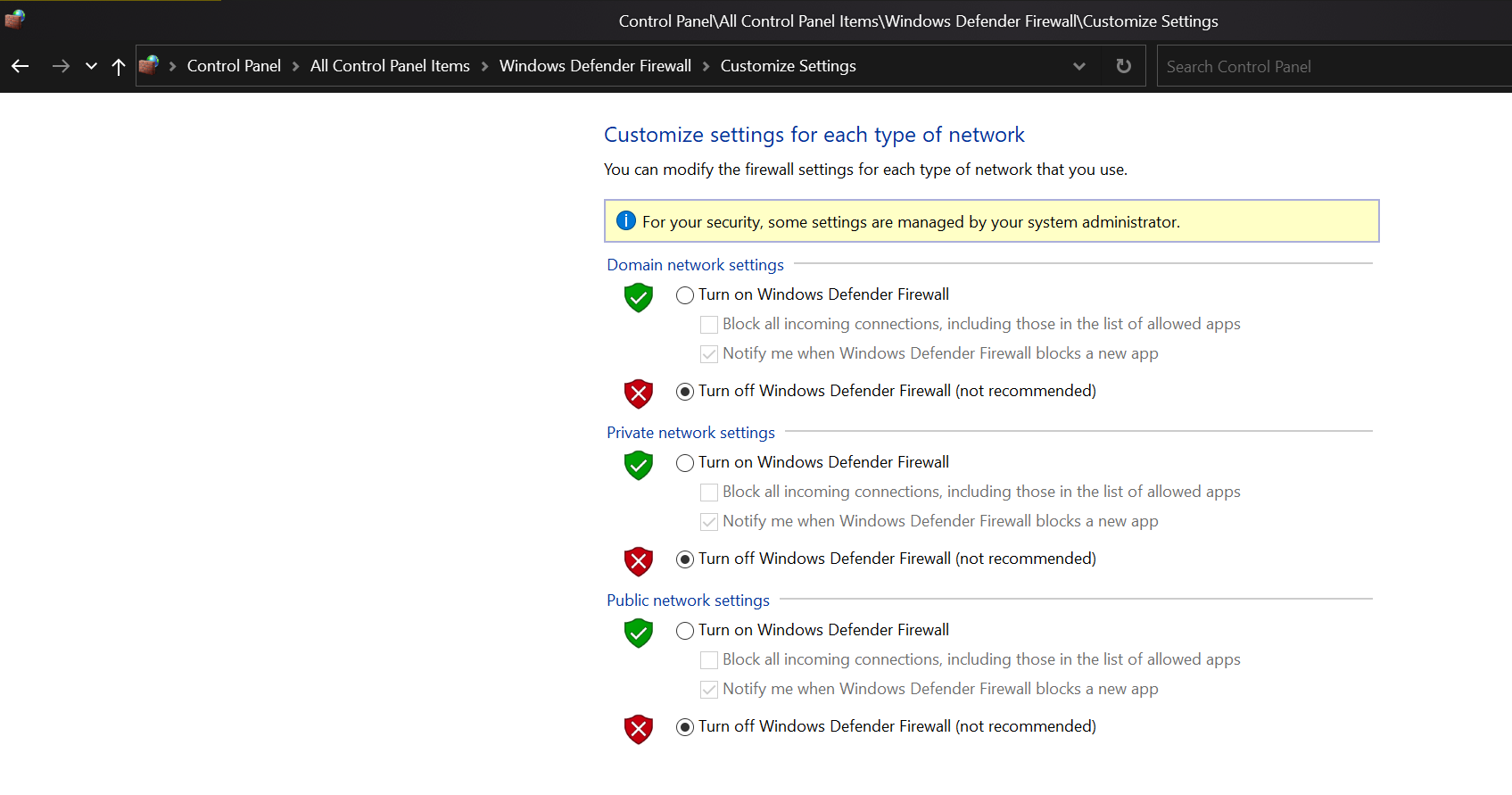
If you shut off your firewall on each PC:

Do you still see the issue?

Sean Drohan
Stardock Support Manager

Reply #6 Top

@sdRohan Yes - it most certainly works just fine if I disable the Private network Windows Defender Firewall on both machines. 


From my perspective, the issue didn't start until I updated both to version 3.5 Build 00096. Does that not automatically set rules for the firewall to allow things through?

Reply #7 Top

Quoting DocBennett, reply 6

From my perspective, the issue didn't start until I updated both to version 3.5 Build 00096. Does that not automatically set rules for the firewall to allow things through?
End of DocBennett's quote

Hard to say what had it fail... You can use the port fix here to see if that resolves it with it re-enabled:

https://cdn.stardock.us/support/uploads/MPPortFix.zip

Sean Drohan
Stardock Support Manager

Reply #9 Top

Quoting DocBennett, reply 8

I ran MPPortFix.bat on both machines and re-enabled the Private Network firewall. It resumed only working one way.
End of DocBennett's quote

Did you re-enable the firewall first - on each PC - before running the batch file on each PC?

Sean Drohan
Stardock Support Manager

Reply #10 Top

OOOOhhh K. Now I'm good. Ran the .bat WHILE the firewall was enabled and it seems to work great once more.


:thumbsup:

Reply #11 Top

For whatever reason, I am now able to cut/copy and paste into Quickbooks from content on the web.  I assume it was a one time glitch, until it shows up again.  This has only been an issue with MP3.5.. never seen it before.

Reply #12 Top

Whoops... spoke too soon.  Now the clipboard sharing, even on the same computer is not working.  I can see the Paste option on the right click menu is active, but won't paste the latest copied content .. .even to a wordpad doc.

Reply #13 Top

Quoting Richard, reply 12

Now the clipboard sharing, even on the same computer is not working.
End of Richard's quote

That it wont work on the same PC would seem to eliminate MP from the cause. 

Sean Drohan
Stardock Support Manager

Reply #14 Top

Clipboard feature is still not working consistently.   Copied some html code from online to paste into m y Wordpress site... and pastes and old link and not the code.   Using 3.5 in Windows 10

Reply #15 Top

Quoting Richard, reply 14

Clipboard feature is still not working consistently.   Copied some html code from online to paste into m y Wordpress site... and pastes and old link and not the code.   Using 3.5 in Windows 10
End of Richard's quote

Is this between two Windows 10 computers?

Also is this KVM or seamless mode?

Reply #18 Top

Quoting Richard, reply 16

I'm copying from a website to my Wordpress site on the same computer. 

Seamless
End of Richard's quote

If you are copying on the same computer to itself then Multiplicity shouldn't be involved at all unless you switch computers in between the copy and the paste.

Make sure you are not using the Windows feature to share your clipboard data via your Windows account as this could mess with things terribly.