Minimise button

I have a trial version of WindowBlinds and I have several issues with it - I shall post them (issues) separately. I will buy only if the issues are resolved - I can't really use it when there are issues.

I have an utility called RBTray (http://rbtray.sourceforge.net/) that minimises any window to system tray (instead of, to taskbar). It is quite important as I use 2 Plane Tracking software and two of them have running batch files and I need to minimise them to system tray.

For some reason, RBTray doesn't work with WindowBlinds loaded. 

Weird! :)


@Chris_Aerospace

6,443 views 5 replies
Reply #1 Top

Hello,
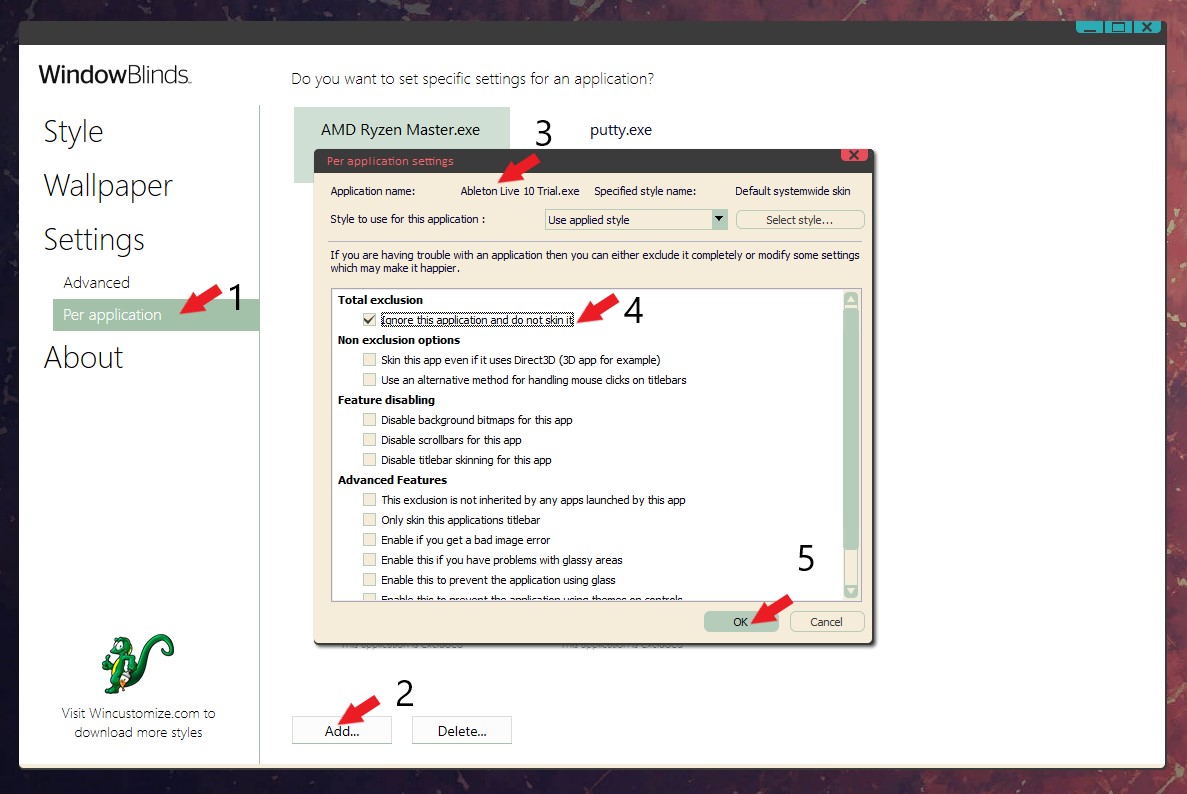
Sorry to hear you are having issues. Have you try exclude that application from Windowblinds


Basj,
Stardock Community Assistant.

Reply #2 Top

Hi Basj

You have fixed all my issues!

I have had to add to exclude C:\Windows\System32\cmd.exe for all command prompt windows (for running "dump1090" batch files that doesn't close until I close it) and I also have had to add to exclude Planeplotter.exe to the exclusion list and all works.

The Planeplotter drop-down menus didn't work unless I use ALT+F etc to open the drop-down menu but as you have instructed me to add it to the exclusion list! |-)  

For the truncation of the "secondary" taskbars - I don't know what happened but it is ok now.

:grin:

Thanks

@chris_aerospace

Reply #3 Top

Great, glad it worked out for you.

Thank you,

Basj,
Stardock Community Assistant

Reply #4 Top

Hi Basj, tut tut tut!

I just found out!

There *is* an option to minimise a window to system tray, it is in Settings "Action to take when right clicking on a titlebar:" > Send to tray!

And so I simply unloaded RBTray.dll (a hook) and I removed one of the exclusions that relates to batch files windows (cmd.exe) from "per application" and I applied the "Action to take when right clicking on a titlebar:" > Send to tray.

Presto! It works! Godsend! Simples!

Well done, Stardock for including that "hook" option; there is more things to explore in the settings :)

@chris_aerospace

Reply #5 Top

Great, yes there are lots of WB functions not so well known. Glad you figured it out and make it work for you better.

Thank you,

Basj,
Stardock Community Assistant