independent and connected sleep modes

secondary computer will not stay asleep nor go to sleep when I want it to

I have the KVM version.  It is unclear how to (a) get both machines to sleep at same time when I am done working and (b ) use only one machine (the primary) while keeping the secondary asleep until I need it. 

When I am working on only one machine without need for the secondary, the latter flashes on and off while I am not using it as though it is possessed. 

While using both machines (primary & secondary), Multiplicity seems to work just fine - great, actually.  However when I am then done working and want to put both active computers asleep, the secondary does not go to sleep.  I have unchecked the seemingly relevant setting "Prevent secondary computers auto sleeping whilst using this computer."  

Please advise.  Thank you. 
6,133 views 6 replies
Reply #1 Top

Hello,
I have forwarded your questions/problems to the Stardock Support team for their assistance. Please keep an eye on this thread for any updates. We appreciate your feedback and patience.

Thank You,
Basj
Stardock Community Assistant.

Reply #2 Top

Hello,

Sorry to hear you are having trouble.

I have the KVM version.  It is unclear how to (a) get both machines to sleep at same time when I am done working and (b ) use only one machine (the primary) while keeping the secondary asleep until I need it. 
End of quote

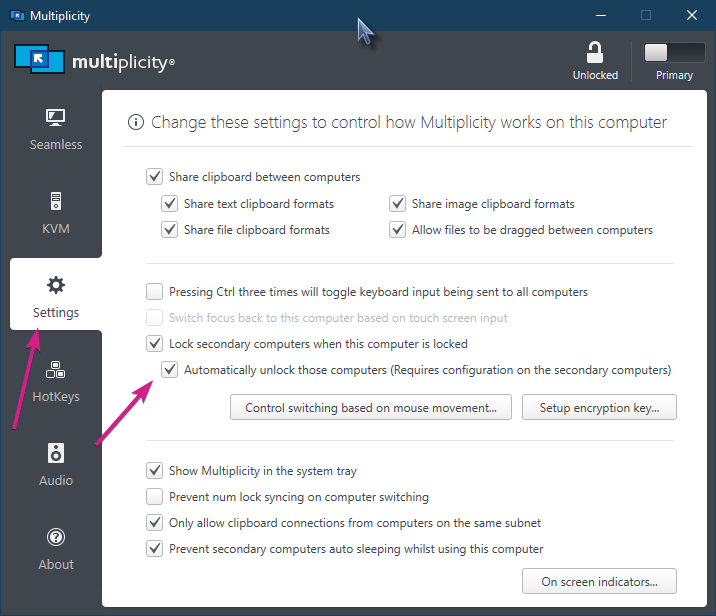
There is nothing in MP that will force a Secondary to 'sleep' - there is to 'lock' it:

There may indeed be an issue (and logged in the past) with the 'Prevent secondary computers auto sleep...' option.  It is being looked at.

Internal ref: Mantis: 0206824

Sean Drohan
Stardock Support Manager

Reply #3 Top

The flashing on and off may well be due to Connected standby which some tablets support.

What is the secondary machine hardware?

Reply #4 Top

Both machines are windows 10. Primary is an Asus laptop intel  i5/8gen. Secondary is a Dell Optiplex 7010 with similar processor. 

I'm not sure but maybe changing the lock function to be independent will allow the secondary to sleep if I don't use it for a while?  

I cannot claim my issue is huge, and in fairness, MP works really well - shockingly well for the price, really.  It would be nice to be able to put them to sleep as needed as I describe, though, so if you can figure it out and  let me know I'll appreciate it.

Thanks very much.  Using this forum isn't nearly horrible as I thought it was going to be, when I thought it represented abdication of tech support to customers (as I have seen elsewhere). 

/dar  


Reply #5 Top

I am going to ask for help again.  I want to be able to but the connected computer in sleep mode and not have to see it go on & off by itself constantly when I don't need it.  It SEEMS IMPOSSIBLE that such a sophisticated program as Multiplicity will not allow this.  It doesn't seem possible that my only recourse is to leave it on but turn the monitor off or else turn it off completely.

A little help here?  

Reply #6 Top

Quoting dar501, reply 5

I want to be able to but the connected computer in sleep mode and not have to see it go on & off by itself constantly when I don't need it. 
End of dar501's quote

Again, the former is not yet possible but your suggestion has been logged.  The latter, keeping a Secondary awake should work but may not be in all circumstances, that is being looked at.

Sean Drohan
Stardock Support Manager