Making shortcuts

I'm fairly new to Fences. I get how to make a 'fence' but how do I create the shortcut to put into a fence eg. to run a program? Each time I drag the mouse on my desktop I'm offered to create a fence or create a fence portal.  And what's a fence portal? Sounds like something out of Star Trek!

Thanks


5,302 views 5 replies
Reply #2 Top

thanks, some neat tips there, and answered my slightly tongue in cheek question about what is a Fences Portal, but my main question "how do I create the shortcut to put into a fence eg. to run a program" was not answered.  Let me give a specific example. I fire up my browser, go to the page with my local weather, copy the URL with my local weather. Before Fences, I'd be able to right click on my desktop, create a shortcut, enter the URL as the location and finish, leaving a shortcut that when I click it, would start the browser if not already open, and display the weather. Having Fences running seems to block me creating the shortcut, as instead of creating a shortcut icon, it creates a Fence - so my question is how do I create an icon which I can put into a fence?

Can you help me with that?

Thanks

Reply #3 Top

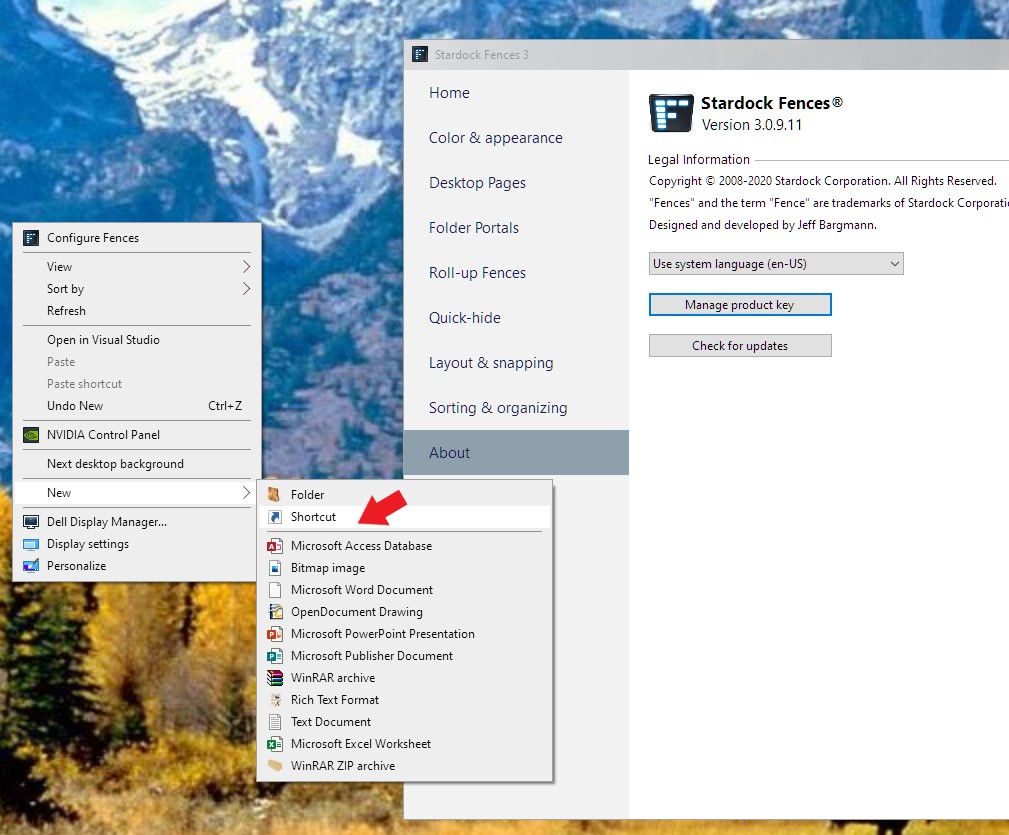
1) You can create a desktop shortcut as you normally do. It will be on you desktop until you move it into any fence of your choice. For Programs, you can right click on it inside Window Explorer and select create shortcut. If it create inside that Folder. You can drag and drop it into your desktop. For Web Shortcut, just right click on empty desktop-> New-> shortcut-> copy&paste the url-> Next, Give it a name -> Finish.

That Icon should be on your desktop, you can than move it to any Fences you wish.


Thank you,

Basj
Stardock Community Assistant.


Reply #4 Top

Basj, thanks for your prompt reply. I see where I was going wrong with making shortcuts as I had mistakenly been swiping with my right mouse on the desktop, perhaps as I used to do before I installed Fences, but your post reminded me to do that in a simple right click with no swiping. I can create program icons in a similar way but your post reminded me that I can also do this a right click on the program name from File Explorer. Great support !

Reply #5 Top

Great, glad you figure it out.

Thank you,

Basj
Stardock Community Assistant.