Re-activation after Windows 10 updates

I'm having a hard time with an issue concerning three of my favorite Stardock applications [Start 10, Fences  and Groupy]. They all require me to re-activate the applications after every minor or major Windows 10 update. In the past it was only a problem with Fences but now I'm required to reactivate all Stardock products on my computer. It is not very convenient. Am I the only horse in the stable?  

1,816 views 5 replies
Reply #2 Top

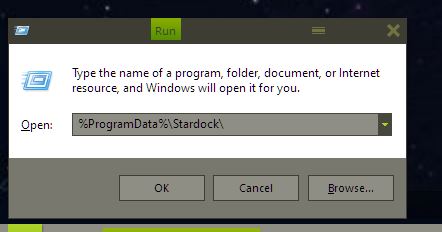
After following your instructions and pasting in "%ProgramData%\Stardock\ the response I received in the command prompt was: "programdata\stardock\ was not recognized as an internal or external operable program or batch file".

Reply #3 Top

Hello,

I have forwarded your report to the Stardock support team for their review and recommendations.

Please keep an eye on this thread for any updates.

We really do appreciate your feedback, thanks.


AzDude
Stardock Community Assistant

Reply #4 Top

Quoting davidoren, reply 2

After following your instructions and pasting in "%ProgramData%\Stardock\ the response I received in the command prompt was: "programdata\stardock\ was not recognized as an internal or external operable program or batch file".
End of davidoren's quote

Not really sure, how you did it. There not suppose to be in the command prompt. Put it in the "Run" dialog box. Refer below.

The folder named "PRODUCTNAME", meant product that you have issue with ie. Fences3, Start10 and Groupy

Thank you,

Basj
Stardock Community Assistant.