Passcode on secondary shows as Extended ASCII

Need help connecting

I cannot get the secondary PC to show a reasonable passcode, nor does it work when I type it in.  I get a passcode like:

`)ã^3¥ûà7É:

which is a pain to type out, but I have used a web page that shows extended ASCII codes to copy and paste.  Even then, I cannot connect.

If I type in an easy to understand passcode and try to connect using that it displays the gibberish on the screen. Is there a connection between the "Change Passcode" button on the Security tab and "Computer passcode:" on the Control screen of the secondary computer? If I type in a new passcode, then it is not displayed the same. Is the encryption key used to make a new passcode?

The secondary computer says that the primary computer needs the same encryption key, yet there is nowhere on the primary computer to enter it.

What am I missing?  This should not be rocket science.

9,013 views 17 replies
Reply #1 Top

Hello,

I have forwarded your report to the Stardock support team for their review and recommendations.

Please keep an eye on this thread for any updates.

We really do appreciate your feedback, thanks.


AzDude
Stardock Community Assistant

Reply #2 Top

Hello,

Sorry to hear you are having trouble.

If you create a new Windows Admin (<--important) account, log into it, does MP connect then - does the password show correct?

If you then log back into your main account, does it to then work?

Sean Drohan
Stardock Support Manager

Reply #3 Top

Logging in as admin and running the install did the trick.  I had initially installed as a user with UAC privilege elevation.

Thanks for the help.

Reply #5 Top

Obviously, this has happened before, since you have asked me about the exact scenario that is failing now.  Is there no easy fix for this?

Reply #6 Top

Are you saying it looks correct for the admin user but not for the other user?

Reply #7 Top

When I log into the new (admin) account it works fine.  If I log back into the original account where I installed the app (regular user) I get gibberish and it fails to authenticate, and it changes every time I click the button.  I uninstalled and reinstalled, but it has not fixed the issue. The affected machine is the primary.

Reply #10 Top

Hello,

I have forwarded your report to the Stardock support team for their review and recommendations.

Please keep an eye on this thread for any updates.

We really do appreciate your feedback, thanks.


AzDude
Stardock Community Assistant

Reply #11 Top

Quoting PoolDweller, reply 7

When I log into the new (admin) account it works fine.  If I log back into the original account where I installed the app (regular user) I get gibberish and it fails to authenticate, and it changes every time I click the button.  I uninstalled and reinstalled, but it has not fixed the issue. The affected machine is the primary.
End of PoolDweller's quote

If you purge MP, and re-install under the Admin user, does it then work for all Win accounts?

Sean Drohan
Stardock Support Manager

Reply #12 Top

I made the domain user account an admin (temporarily).  Then I uninstalled again and reinstalled, and it's working for now.  I will leave myself as admin for a day or two and then remove that permission.  On this company laptop I cannot leave myself running as admin for very long.

Even though the mouse is still on the slave screen when I start typing the input is directed to the master. That is quite annoying.  I have to touch the mouse and then immediately start typing.  Either something needs to be updated in the configuration, or I will need to adjust my typing habits.

Reply #13 Top

Quoting PoolDweller, reply 12

Even though the mouse is still on the slave screen when I start typing the input is directed to the master.
End of PoolDweller's quote

That is always or sometimes - meaning, you click a text box/place you can type on the Secondary, wait a few seconds, start typing and it only shows on the Primary and you can reproduce that at will, yes?

Sean Drohan
Stardock Support Manager

Reply #14 Top

If the mouse is on the slave, then I would expect the keyboard should be directed to the slave as well.  Yes, the problem is consistent. 

Reply #15 Top

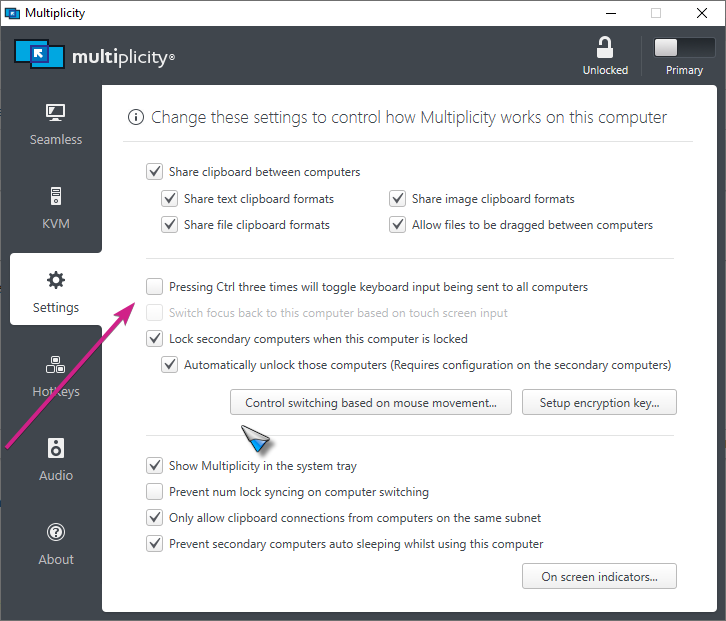
If on, turn it off...

Sean Drohan
Stardock Support Manager

Reply #17 Top

Quoting PoolDweller, reply 16

Thanks
End of PoolDweller's quote

You are most welcome...

Sean Drohan
Stardock Support Manager