Object Desctop keep launcheing randomly

Hello.

Object Desktop manager keeps launching itself minimum once a day randomly.

i'm not sure if it is installing an update to itself.


However this is annoying when working or a game loses focus or from fullscreen being minimized.


Any ideas how to stop this?

50,229 views 16 replies
Reply #1 Top

Hello,
Sorry to hear you are having issues. Try disable "Launch Object Desktop Manager on Windows Startup"

Thank You,
Basj,
Stardock Community Assistant.

Reply #2 Top

Hello

I have the same problem in that Object Desktop launches at startup even though  "Launch Object Desktop Manager on Windows Startup" is disabled on my system.

Alan


Reply #3 Top

Quoting ajlovel, reply 2

Hello

I have the same problem in that Object Desktop launches at startup even though  "Launch Object Desktop Manager on Windows Startup" is disabled on my system.

Alan

 
End of ajlovel's quote

Hello,
I have forwarded your questions/problems to the Stardock Support team for their assistance. Please keep an eye on this thread for any updates. We appreciate your feedback and patience.

Thank You,
Basj
Stardock Community Assistant.

Reply #4 Top

Please make sure you are running the version of ODM which you can find in your account. If you still have that issue after using the latest version please report back.

https://store.stardock.com/myaccount/products/


Reply #5 Top

It is possible that you are running on an old Beta which may be causing the problem.  You can verify your version by clicking on the Settings (gear icon) and then choosing "About".

If you are still running a beta please download and install https://cdn.stardock.us/downloads/public/software/objectdesktop/ObjectDesktop_setup_sd.exe

Reply #6 Top

Hi.  I've been having the same problem as the OP with object desktop popping up all the time.  I reinstalled it but it is still doing it.  It is not set to launch with windows.

+1 Loading…
Reply #7 Top

ok. had 3.93 now 4.0...

will have to wait what will happen or won't happen

Reply #8 Top

Quoting Soran, reply 7

ok. had 3.93 now 4.0...

will have to wait what will happen or won't happen
End of Soran's quote

Thank you. Please update us when you can. We appreciate it. :)

Reply #9 Top

I have V4.0, launch on startup is off. It still randomly pops up in the middle of my work.

Reply #10 Top

Hello,

Sorry to hear you are having trouble.

Quoting Haigster, reply 9

I have V4.0, launch on startup is off. It still randomly pops up in the middle of my work.
End of Haigster's quote

What pops up the Object Desktop Program, or just a SysTray Message/Notification saying there are updates?  If it is the SysTray updates message, then you need to use the "Exit" command from the SysTray icon because the Close button just minimizes it to the tray.  Also, the latest version is 4.01.
 
Sean Drohan
Stardock Support Manager
Reply #12 Top

I'm having the same problem. See my other post in the other thread here.

@sdRohan, it is this window that keeps opening. Even after I uninstall Object Desktop:
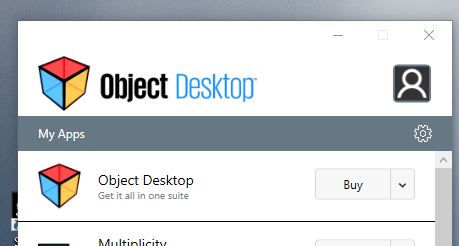
 

@T-Man, I think I just confirmed that it is my earlier installation of Stardock Central that is reinstalling Object Desktop.  I started it and saw "Updating Stardock Central" for a second or so and then the Object Desktop window appeared with all the products listed (but did not uninstall SDC). So it does indeed seem like SDC was renamed to "Object Desktop", not to be confused with the actual Object Desktop product which it shows as uninstalled.  (Marketing gone awry in my opinion.) This is probably adding to the confusion of users.

It does not appear to be a beta though:
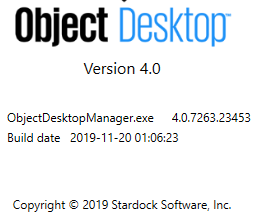
So the workaround is probably to uninstall Stardock Central (if you have it installed) and then just uninstall Object Desktop.  Then rely solely on the upgrade checks present in individual products, rather than the Object Desktop (or Central) wrappers.

Reply #13 Top

I'm seeing a similar behavior, and have just downloaded the latest version (equal, btw, to the one that was running). I can definitely state that what it's doing is popping up when it does the update check - regardless of whether or not it's an update (although I'm assuming the "regardless ..." part; I'm seeing the list of installs with a "configure" option next to them, and not-installed with an "install" option; there's no notice of an update).


Rich

Reply #14 Top

in my case, the problem was solved after 


Quoting Soran, reply 7

ok. had 3.93 now 4.0...

will have to wait what will happen or won't happen
End of Soran's quote

Reply #15 Top

My Object Desktop Manager is doing the same thing, current version is 4.01.  Once a day at least without fail it'll open itself up as if it's doing and update whilst actually not doing any update at all.

Reply #16 Top

Hello,

I believe Support mentioned that the issue will be resolved on next ODM update as mentioned here : https://forums.stardock.com/499142/get;3773773


Thank you,

Basj
Stardock Community Assistant.