How do I change the submenu pointer arrow for the desktop context menu

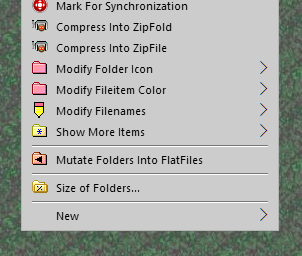
I'd like to change the symbol used to point to submenus in the desktop explorer context menu.  (This symbol also appears in Windows Explorer pane context menus.)  In the context menus of programs, and in the context menus that drop down from menu bars, I can change the symbol, but I've found no way to change it for the desktop context menu, and I've looked at most of the skins that come with WindowBlinds without success.  The left picture below shows the desktop context menu; the right picture shows the normal program context menu.  I'd like to get the triangle symbol to appear in the desktop context menu.  Any idea how? {This post may be a duplicate.  I wrote about this two days ago, but now I do not see the post in the forum and have not had any replies to it if it is somewhere in the forum.  If it is a duplicate I apologize.}
 

9,288 views 5 replies
Reply #1 Top

Hello,
Sorry to hear you are having issues. if you referring to Windows 10's desktop right click menu, I don't think you can change it with Windowblinds. Windows 10 remove most of the ability to skin desktop right click menu except colors. You can see the difference from the same skin on Windows 8 and 10 from screenshot below.

Basj,
Stardock Community Assistant.

Reply #2 Top

Thanks for the quick info.  Definitive answers are worth a lot.  I guess I'll stop looking, then. 

Reply #3 Top

'Top Level' menus are immersive, there seems nothing can be done about that!

However, if you carefully follow the method described here, you'll be able to restore classic menus, by dll injection, on the Taskbar...

... as opposed to this...

And,

if you utilize QTTabBar, it will hook the shell using the classic dll...


Reply #4 Top

I don't know where that post about the alternative dll went, but, it's working...

Reply #5 Top

Fictitiousfellow, thanks for the pointer.  I did try the method, and the taskbar context menus do change, but I really want to get the desktop right-mouse-button context menu to change, and that did not.  So I guess I will continue to fume quietly to myself every time I am forced to use the desktop context menu.  Thanks again -- this is a great forum.