Multiplicity on networked X-Plane 11 - Pilot2ATC

Problem with "Triple Click" Ctrl

Hello.

I have Multiplicity (basic version) installed as Primary on my desktop running X-Plane 11 (fullscreen mode) and as Secondary on networked laptop running Pilot2ATC. Everything appears to be working EXCEPT that Multiplicity option to "triple click" Ctrl key on Primary to have focus on both screens (when PTT key is pressed on desktop) is greyed out in Multiplicity Settings. Result is that mouse cursor must be on X-P 11 screen only when PTT key is pressed.

Any suggestions to get full functionality from Multiplicity?

8,584 views 8 replies
Reply #1 Top

Hello,
I have forwarded your questions/problems to the Stardock Support team for their assistance. Please keep an eye on this thread for any updates. We appreciate you feedback and patience.

Thank You,
Basj
Stardock Community Assistant.

Reply #2 Top

Hello,

Sorry to hear you are having trouble.

Any suggestions to get full functionality from Multiplicity?
End of quote

I have Multiplicity (basic version)
End of quote

You need KVM for that option, not just KM:

https://www.stardock.com/products/multiplicity/

Sean Drohan
Stardock Support Manager

Reply #3 Top

It's a shame to have to upgrade the basic version to the KVM version for a 2 PC setup. I'm in the same situation: X-Plane 11 on a server PC and Pilot2ATC on a client. $56 Canadian for a 2 PC setup, thanks but no thanks.

JJ

Reply #4 Top

Hello. One year later I have purchased an upgrade license for Multiplicity KVM, still hopeful of getting the "triple click" functionality working to have focus on both screens simultaneously.

I downloaded and ran the Multiplicity Installer but there is no option to setup KVM on the exiting setup - only Seamless. Should I have uninstalled KM version before installing KVM?

Thanks and regards

Rob D


Reply #5 Top

Quoting robdowdeswell, reply 4

Hello. One year later I have purchased an upgrade license for Multiplicity KVM, still hopeful of getting the "triple click" functionality working to have focus on both screens simultaneously.

I downloaded and ran the Multiplicity Installer but there is no option to setup KVM on the exiting setup - only Seamless. Should I have uninstalled KM version before installing KVM?

Thanks and regards

Rob D

 
End of robdowdeswell's quote

Please refer to this : https://forums.stardock.com/486104/multiplicity-support-faq

and let us know if you still need our assistance.

Thank you,

Basj,
Stardock Community Assistant

Reply #6 Top

Quoting robdowdeswell, reply 4

I downloaded and ran the Multiplicity Installer but there is no option to setup KVM on the exiting setup - only Seamless. Should I have uninstalled KM version before installing KVM?
End of robdowdeswell's quote

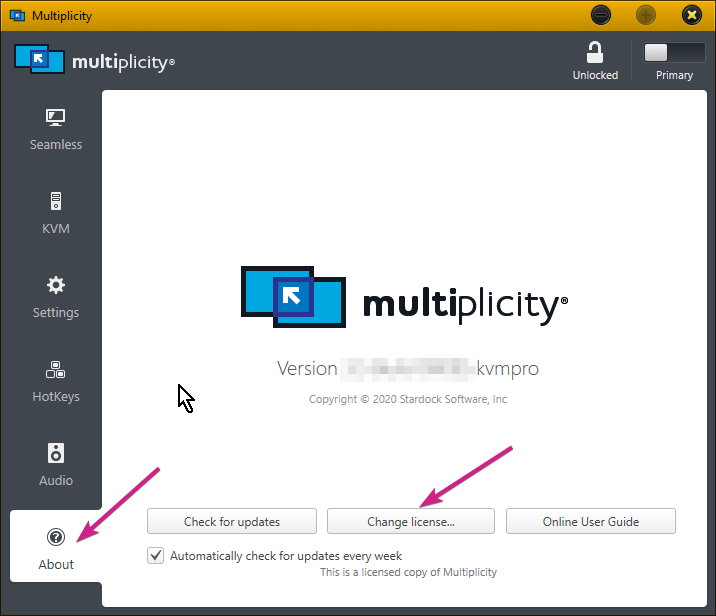
You need to 'change the license' with the new key:

Sean Drohan
Stardock Support Manager

Reply #7 Top

Thank you. I followed your instructions and I can drag and drop files between computers.

I have a follow-on question: I cannot get Multiplicity "triple click" Ctrl to make both screens 'hot' on my networked X-Plane 11 and Pilot2ATC.

Multiplicity is set up as Secondary on laptop with Pilot2ATC running and Primary on desktop running X-Plane 11.

Does it make a difference as to which is s Primary and which Secondary??

Thanks and regards

Rob Dowdeswell

Reply #8 Top

Quoting robdowdeswell, reply 7

I have a follow-on question: I cannot get Multiplicity "triple click" Ctrl to make both screens 'hot' on my networked X-Plane 11 and Pilot2ATC.
End of robdowdeswell's quote

It depends on what 'hot' means here and what the expectation is when invoked. 

When triggered, it will send all Primary keyboard input (not mouse) done on any PCs to all other PCs.  For example, if I had notepad up on each PC, whatever I type in it on one PC, test sent to all other PCs.

What will not happen is if there is a keyboard plugged into any Secondary, and it is used, it will not broadcast keys to all others - its only the input from the Primary keyboard. 

Sean Drohan
Stardock Support Manager