Dead space when moving mouse to 1 of 3 computers

I have 6 computer in my setup that I use Multiplicity to control with single keyboard and mouse.  The other day for reasons unknown 1 of 6 computers has this 'dead space' or 'buffer' in between the two monitors when I move the mouse from host computer to the client.  All of my 5 other computer transfer the mouse seamlessly as it has for years.

I have to pick up the mouse to move the mouse all the way to the troubled computer.  I have looked through host and client settings but I see nothing that would cause this 'buffer or dead space'.

Anyone seen this and have a suggestion to resolve?  Thank you in advance.  Sorry for poor grammar, I don't talk good!  :P

10,328 views 15 replies
Reply #2 Top

Hello thank you for the quick reply.  I had already went through the FAQ searching for a resolution to my issue.  No luck.

Hopefully I did a good job explain the behavior I am observing with my Multiplicity.

It is just one of the computers in my 6 computer setup that is misbehaving.  I recently did reformat the machine and installed a fresh Win10.  And it was working for the last month as intended, the other day I noticed the delay before the mouse actually switches.

If no one else has experienced the issue I might try a reinstall of host and client.  Not sure what other direction to head honestly.

Reply #3 Top

Quoting kopuzlabasu, reply 2

Hopefully I did a good job explain the behavior I am observing with my Multiplicity.
End of kopuzlabasu's quote

Just not sure what this actually means:

'dead space' or 'buffer'
End of quote

Does the cursor disappear but still eventually transition, or no, it wont transition at all?

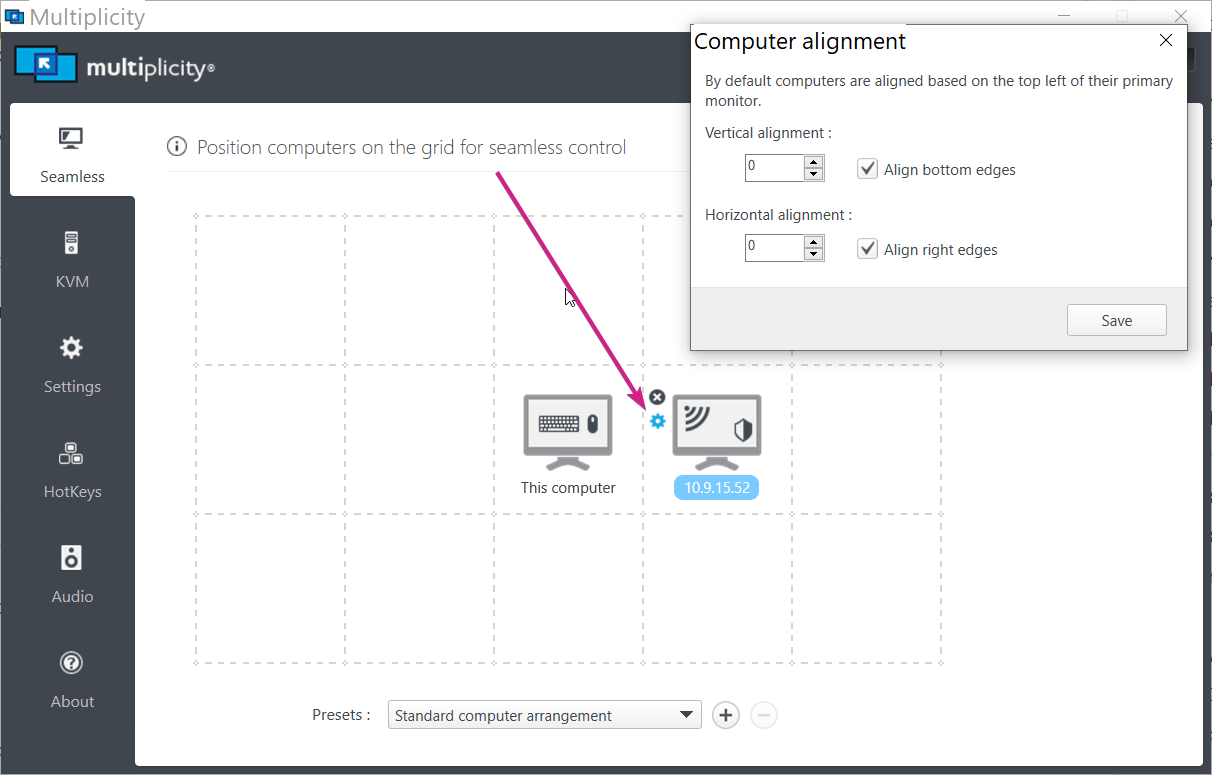
If it is the latter, you might want to experiment with alignment:

Sean Drohan
Stardock Support Manager

Reply #4 Top

It does transition eventually but it is not a seamless smooth transfer like normal.  I have to pick up the mouse multiple times and keep dragging that direction before the cursor starts to move on the troubled machine.  Its the same behavior moving back to the main rig from the trouble machine as well.  both monitors are 2k but ill dabble with alignment.


Reply #5 Top

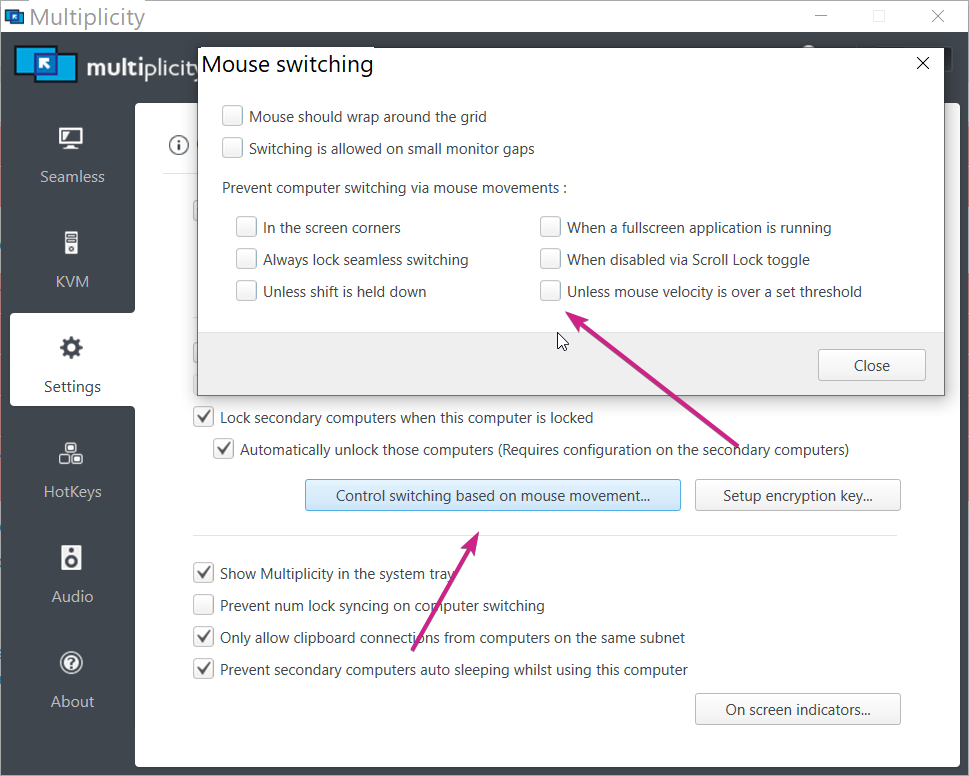
What is sounds like is this but that would be global:

You might try the 'switching is allowed on small monitor gaps.'

If not, let us know how alignment works.

Sean Drohan
Stardock Support Manager

Reply #6 Top

Alignment Switching on small monitor gaps didn't work.  Such a strange issue.

For science I loaded up a vastly inferior similar application and I get the same behavior.  So it is not Multiplicity issue it in OS configuration.

I started experimenting with refresh rate on the monitor.  2k 144Hz rigs and the troubled machine GPU just can only 100Hz but that also didn't work.  Time to brain storm on what else could be causing this.. or maybe just a reformat in the near future.

I really appreciate ya'lls support the quick replies were greatly appreciated!

Reply #7 Top

Quoting kopuzlabasu, reply 6

I really appreciate ya'lls support the quick replies were greatly appreciated!
End of kopuzlabasu's quote

You are most welcome.  Please report back if you find out what the cause was.

Sean Drohan
Stardock Support Manager

Reply #9 Top

Quoting Mikaller, reply 8

I have this same exact issue, did you ever find a resolution?
End of Mikaller's quote

My solution was reformatting the host and the problem client.  I spent hours trying things and no luck.  Good luck sir!

Reply #10 Top

I have this same problem and the switching option above did not make a difference. The gap or dead-space is very annoying. I am using the same monitors that were working flawlessly before and the former primary is now secondary and a new laptop primary.

Reply #11 Top

Quoting mheffler, reply 10

I have this same problem and the switching option above did not make a difference. The gap or dead-space is very annoying. I am using the same monitors that were working flawlessly before and the former primary is now secondary and a new laptop primary.
End of mheffler's quote

Duplicate post from another thread - answered there.

Sean Drohan
Stardock Support Manager

Reply #12 Top

I have not seen an answer. Nothing is the other thread works

Reply #13 Top

Please send a link or subject for the thread that is supposed to fix this. Nothing I have yet found has worked. Still a phantom

Reply #14 Top

Quoting mheffler, reply 13

Please send a link or subject for the thread that is supposed to fix this. Nothing I have yet found has worked. Still a phantom
End of mheffler's quote

Quoting mheffler, reply 12

I have not seen an answer. Nothing is the other thread works
End of mheffler's quote

Keep posting in the other thread you had already...

https://forums.stardock.com/511954/page/1/#3849352

Sean Drohan
Stardock Product Lifecycle Manager