
Fence rollup not working properly/consistently

I position my fences at the bottom of the display and have them set so that just the title bar is visible. Some of the fences expand when I put the mouse over the title bar (which is what I want), others require me to move the fence on screen in order to see the content. All the fences have the "Roll-up Fence" view setting enabled, but it seems to work for some fences and not others.

12,976 views 15 replies
Reply #1 Top

Hello,
Sorry to hear you are having issues. Could you post a video grab of the issue so we can understand it.

Thanks

Basj,
Stardock Community Assistant.

Reply #2 Top

How do I send you a video? There doesn't seem to be an option to insert a file here

Reply #3 Top

You can upload it to any video sharing site. Such as Youtube. And paste the link here.

Thank you,

Basj
Stardock Community Assistant.

Reply #4 Top

https://www.dropbox.com/s/12p8c43drqpk76x/SCreen-capture.m4v?dl=0

The video shows three fences at the bottom of the right-hand side of the screen labelled "Vacation Plans", "Files", and "Tax Stuff". All are configured identically, and the first two work as expected, i.e. I hold the mouse over the title bar and the fence appears, the third one "Tax Stuff" doesn't respond to mouse-over, I have to click-n-drag to make the fence visible.

Reply #5 Top

I think there is something wrong on your method. Please follow the instruction below and see if you can do it.

Need to make sure to drag the fence so that the bottom part of the fence touch the top part of the taskbar. Than release the mouse. If the fences not roll-down might need to double click on that fence title bar to activate the roll-up/roll down function.

In your video the bottom of your fence did not touch the top of the taskbar to activate the roll up functions.

Thank you,

Basj
Stardock Community Assistant.

Reply #6 Top

First, my taskbar is at the top, so the position of the fences relative to the taskbar makes no sense. Second, all the fences are positioned the exact same distance from the bottom of the screen, and all have the "View-Rollup Fence" option set, yet some work and some don't.

Reply #7 Top

I am sorry, I made a mistake assuming the taskbar at the bottom and I miss that part where your hidden taskbar show up for a split second at the end of that video.

Now at on your video. You show that you grab you fence at move the titlebar and the fences to the bottom of the screen. That will not work. Instead you should just move the fences and stop as the bottom of the fence touches your bottom screen border and release that fences. It the same methos applies. Please refer to my video below. Sometimes as you can see you will over shoot the fences bottom and that will not work. Need a bit of adjustment and alignment. But normally it can be done with a few try.

Thank you,

Basj
Stardock Community Assistant.

Reply #8 Top

That video makes no sense,  it appears to show the entire fence onscreen but rolling up/down with the mouse, so the title bar is some distance from the bottom of the screen. I have all my title bars right at the bottom of the screen, i.e. only the title bar is visible, when I mouse-over the title bar, the fence expands upward from the bottom to display the contents. Like I said, this works perfectly with some fences and not at all with others

Reply #9 Top

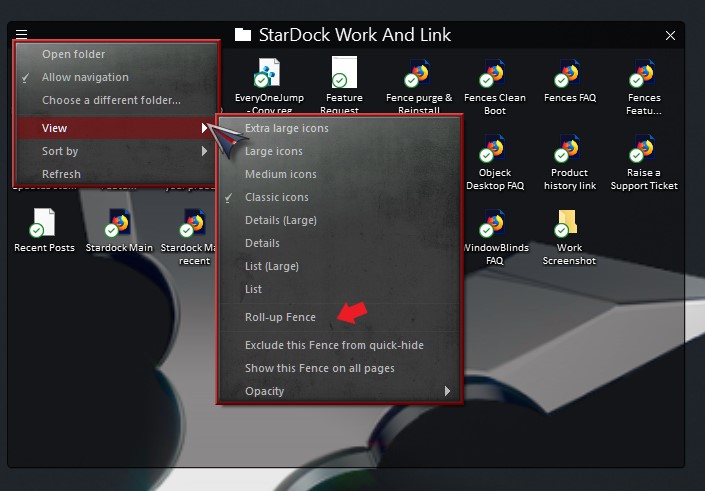
Initially, yes if you already turn on the roll-up/down function the fence will roll up and down even if it in the middle of the screen, when you mouse over your fences. You can do that just by double click on the Fences titlebar. or you click on the 3 bar line on the titlebar-> view-> Roll-up Fences as shown below.

When you docked it the bottom or top of the screen the roll up / down a little different.

Thank you,

Basj
Stardock Community Assistant.

Reply #10 Top

All have the Rollup/roll down option selected (like I said)

Reply #11 Top

From your video, the way you do it is wrong, as I have mentioned. You just need to drag the title bar until the bottom of the fences touch the bottom screen edge. In your video you drag the whole "The Stuff" fence over the edge, just the title bar left not over the edge. That is wrong. You just need to drag the fence bottom not the Fence title bar to touch the edge.


Reply #12 Top

What you describe simply doesn't work, I can only assume that you don't understand what I'm describing.

Reply #13 Top

Hello,
I have forwarded your questions/problems to the Stardock Support team for their assistance. Please keep an eye on this thread for any updates. We appreciate you feedback and patience.

Thank You,
Basj
Stardock Community Assistant.

Reply #14 Top

niksimpson,

What basj is telling you is correct -as shown in this video, you need to have the bottom of any Fence touch a border for a Fence to attach to it:

https://cdn.stardock.us/support/uploads/2019-08-05_12-19-41.mp4

Sean Drohan
Stardock Support Manager

Reply #15 Top

I've tried moving the fence around and it makes no difference for that fence, it simply will not display without being dragged back on to the desktop.