Huge lag on desktop

Hello,

I'm using fences since a month and I like it very much but there's a problem that is very annyoing.

The desktop is lagging, when I move the cursor too fast on icons the animation doesn't move, same when I select something too fast, it lags.


Also is it possible to disable the fences animation when I move an icon?


Thank you.

25,682 views 16 replies
Reply #1 Top

Hello,

Sorry to hear you are having issues.

We need more info please.

Version of Windows ( use winver.exe )

Version of Fences .


AzDude
Stardock Community Assistant

Reply #2 Top

Windows version: Windows 10 1809

Fences version: 3.0.9.11

Reply #3 Top

Hello,

Not sure what you mean by "huge lag" but have you tried the purge and reinstall step to see if solve your problem.https://forums.stardock.com/486084/fences-support-faq#reinstalling

Just make sure to re-download the latest version again from your account. Reboot after the purge. Install the new downloaded file and reboot again. Report back here.

Thank you,


Basj,

Stardock Community Assistant


Reply #4 Top

I'll try that but also is there a way to disable fences on my secondary monitor?

Reply #5 Top

Quoting Shade991, reply 4

I'll try that but also is there a way to disable fences on my secondary monitor?
End of Shade991's quote

I don't think there is an option to do so. 

Thank you,


Basj,

Stardock Community Assistant

Reply #7 Top

Hello,

From the video you provided. At that speed even the un-fences icons will take some time to capture that movement. But anyway, I have forwarded your problem to Stardock Support team for their assistance. Please keep an eye on this thread for any updates. We appreciate your feedback and patience.


Basj

Stardock Community Assistant.

Reply #8 Top

When I hadn't yet installed fences the desktop was fast as always, since when I have fences installed I'm experiencing that issue.

Reply #9 Top

Here a video I made comparing it between Fences on and off. I can not see huge difference.

https://youtu.be/h9a00AW3OiM

Thank you,


Basj,

Stardock Community Assistant

Reply #11 Top

Do you know why with fences enabled when I save a file on the desktop it goes automatically on the second monitor?

How can I fix this?

Reply #12 Top

Create a Fence and put it on the main monitor. Make a rule to that new fence so that all new files on the desktop goes to that Fence. Now all your new files should be inside that Fence on your main monitor.

Thank you,

Basj
Stardock Community Assistant.

Reply #14 Top

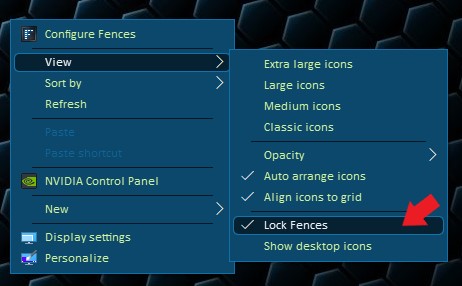
Try this : Right click on the desktop and.

Thank you,

Basj
Stardock Community Assistant.


Reply #15 Top

Quoting Shade991, reply 11

Do you know why with fences enabled when I save a file on the desktop it goes automatically on the second monitor?

How can I fix this?
End of Shade991's quote

Quoting basj, reply 12

Create a Fence and put it on the main monitor. Make a rule to that new fence so that all new files on the desktop goes to that Fence. Now all your new files should be inside that Fence on your main monitor.

Thank you,
Basj
Stardock Community Assistant.
End of basj's quote

Here is something else to try as well

https://forums.stardock.com/486084/fences-support-faq#shortcutswrongmonitor

Sean Drohan
Stardock Support Manager


Reply #16 Top


Hello,

I'm using fences since a month and I like it very much but there's a problem that is very annyoing.

The desktop is lagging, when I move the cursor too fast on icons the animation doesn't move, same when I select something too fast, it lags. mcdvoice 

Also is it possible to disable the fences animation when I move an icon?

Thank you.
End of quote

Did you have a fix on this issue? I have the same problem with.