Start 10 update
from  Stardock Forums
Stardock Forums
Have tried numerous times to update but installation stalls at the same point every time - please advise


 Stardock Forums
Have tried numerous times to update but installation stalls at the same point every time - please advise
Stardock Forums
Top
Please try to download the latest version through your account. https://store.stardock.com/myaccount/products
Thank you,
Basj,
Stardock Community Assistant
Stardock Forums
Top
I have done this numerous times but the installation still freezes at the same point
 Stardock Forums
Top
Stardock Forums
Top
When it stall did it gave any error massage? And if possible please include a screen capture on that error or at that specific point where it stall.
Thank you,
Basj,
Stardock Community Assistant
Stardock Forums
Top
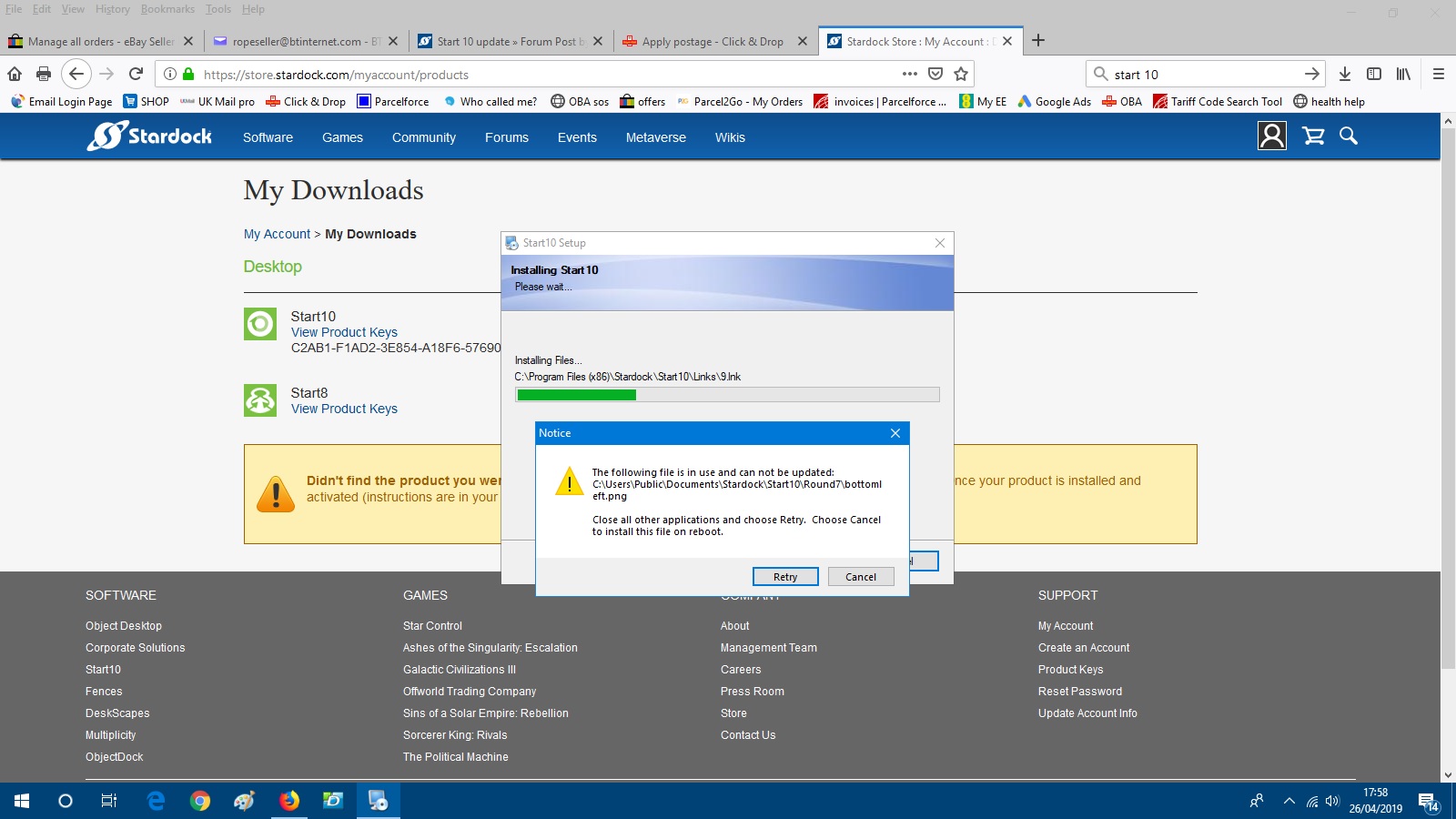
Stardock Forums
Top
I have the same problem. Will not install start10 and yes I first used Purge. It worked just fine until I did the update to a newer version. Very disheartening. Feel like I am going in circles with no real hope it will be fixed.
Stardock Forums
Top
I am having exactly the same problem as 'ropeseller' and with the same error notification. I cannot uninstall either through the program uninstaller or with Revo. Strangely, it has updated perfectly on my other Windows 10 machine, with similar hardware. Please advise what possible actions to take.
Stardock Forums
Top
Hello,
If you have not tried the purge and reinstall steps, please try it : https://forums.stardock.com/486022/start10-support-faq#reinstalling
Just make sure to re-download the latest version again from your account. Reboot after the purge. Reinstall using the one you just download. Reboot and retest. Report back here.
Thank you,
Basj,
Stardock Community Assistant
Stardock Forums
Top
Hi Basj,
Thanks for the instructions. However, when I checked my Start 10 properties again - low and behold it has somehow installed itself correctly.
Don't ask me how!!
Stardock Forums
Top
Hey.. as long as it work for you. I am happy.
Thank you for reporting back, 
Basj,
Stardock Community Assistant
Stardock Forums
Top
Hi Basj,
It seems I spoke too soon!! After a reboot I have now lost Start 10 and it has reverted to Windows Start. It is very odd as it stated that it was Vsn 1.7 when it was working. Seems it is now not loading correctly.
Will keep trying to sort it out.
Stardock Forums
Top
Still need to know, have you tried the purge and reinstall step mentioned above?
Thank you,
Basj,
Stardock Community Assistant
Stardock Forums
Top
Tried the purge and reboot and seems to ahve done the job
Stardock Forums
Top
Hi Basj,
Sorry for the late reply but I have been away for a couple of days.
I have run the purge file. PLUS as it was still showing up in Revo Uninstaller I also ran this prog and it found some leftover entries which I also deleted.
Reinstalled Start 10 okay - so far.
Fingers crossed and thanks for the help.
Stardock Forums
Top
Glad, you solved it. Thanks to both of you for reporting back.
Thank you,
Basj,
Stardock Community Assistant
Welcome Guest! Please take the time to register with us.