ivanmartin2 ivanmartin2

Start 10 Version 1.7

Start 10 Version 1.7

Update

Like some others I had Start 1.61 installed when had an email to update to 1.7.


When I downloaded, the install failed due to other software running and to install on next restore.  I now have the typical Windows Start menu with tiles - thinking I should have deleted 1.61 first I tried but that fails so I am unable to delete to re-install and have the standard Windows Start menu which was the reason I purchased Start in the first place.

Also - if I make any change in Start 1.7 setup these are not applied

How to do I get Start to work?

22,411 views 53 replies
Reply #26 Top

Ah, bugger. Same thing happened to me. :( Not a great rollout. Usually, you all are great.

Installed 1.7 because you notified me there was an update -> I restarted -> Start10 is non-functional. Even opening Start10 1.7 doesn't do anything to the Start menu.

I'm trying the "updated installer" now. Why couldn't...this bugfix have been pushed as a 1.7.1 update? I checked for updates: nothing. Users have to go to your forums, find this post, click the installer link, retrieve their key, go to their email, and the finally they get the bug fix. :(

EDIT: the new installer (called Start10_1.70b_setup_sd.exe) immediately fixed the issue! No errors during the install. This was on Windows 10 Pro x64 1803 17134.706 & Avira Free AV 15.0.45.1184. Thanks for fixing this immediately: I'd definitely consider a bug update next time. Cheers, mates.

Reply #27 Top

To Basj -- yes with Stardoc10 1.6  I got the Windows 7 menu, but guess what, with Stardoc 1.7  I don't, instead I get tiles. That is why I am trying to get some sort of fix, if there is any, I notice other people have had the same issue.

To sd Rohan -- I have a lenovo G570, there is no tablet mode.  I will try the purge and reinstall as you suggest, I will let you know if that works.

Reply #28 Top

Quoting Bob2468, reply 27

To Basj -- yes with Stardoc10 1.6  I got the Windows 7 menu, but guess what, with Stardoc 1.7  I don't, instead I get tiles. That is why I am trying to get some sort of fix, if there is any, I notice other people have had the same issue.
End of Bob2468's quote

Hello,

Have you tried the purge and reinstall steps : https://forums.stardock.com/486022/start10-support-faq#reinstalling

Just make sure to re-download the latest version again from your account. Reboot after the purge. Reinstall using the one you just download. Reboot and retest. Report back here.

Thank you,


Basj,

Stardock Community Assistant

Reply #29 Top

Finally got around to the reinstall ("product key retrieval), that worked... happy to have the start interface I want.


Reply #30 Top

I also have this issue when trying to install version 1.7.

I get the error message that indicates "C:\Users\...\Round7\bottomleft.png A decompression error has occurred (#2026) Unknown decompression error"

My options then are:

Abort - Closes installer

Retry - Does nothing

Ignore - Skips to the next error of the same type


PLEASE FIX!

Reply #31 Top

Quoting WSChelpdesk, reply 30

I also have this issue when trying to install version 1.7.

I get the error message that indicates "C:\Users\...\Round7\bottomleft.png A decompression error has occurred (#2026) Unknown decompression error"

My options then are:

Abort - Closes installer

Retry - Does nothing

Ignore - Skips to the next error of the same type 

PLEASE FIX!
End of WSChelpdesk's quote

Sorry to hear you are having trouble, however, there are many suggested fixes in this thread - can you confirm you have tried any of them?

----------------
Sean Drohan
Stardock Customer Service Manager


Reply #32 Top

Sean,

Yes with the exception of making a new admin account I have tried all of the relevant fixes. I have re-downloaded the "new" version from both links that were suggested, and rebooted my PC an ungodly amount of times. I continue to get decompression errors when trying to run the installer. However I still have an older version of the 1.6 installer so I ran it and have just been suggesting to skip the update. I'm not sure what is wrong with 1.7, but this thread should be evidence to the fact that it isn't working right.

Reply #33 Top

Quoting WSChelpdesk, reply 32

Sean,

Yes with the exception of making a new admin account I have tried all of the relevant fixes. I have re-downloaded the "new" version from both links that were suggested, and rebooted my PC an ungodly amount of times. I continue to get decompression errors when trying to run the installer. However I still have an older version of the 1.6 installer so I ran it and have just been suggesting to skip the update. I'm not sure what is wrong with 1.7, but this thread should be evidence to the fact that it isn't working right.
End of WSChelpdesk's quote

What AV product are you using? If you temporarily disable it, does it work then?

----------------
Sean Drohan
Stardock Customer Service Manager

Reply #34 Top

Quoting Bob2468, reply 29

Finally got around to the reinstall ("product key retrieval), that worked... happy to have the start interface I want.

 
End of Bob2468's quote

Reply #35 Top

Quoting sdRohan, reply 33


What AV product are you using? If you temporarily disable it, does it work then?


End of sdRohan's quote


The only antivirus that is currently running on my device is the builtin Windows Defender that comes with Win10. Other than that, there is nothing that would prevent the decompression that it is referring to. Also, I was able to reinstall version 1.6 without any issues. So right now I am just running 1.6 and skipping the update to 1.7.

Reply #36 Top

Quoting WSChelpdesk, reply 35

The only antivirus that is currently running on my device is the builtin Windows Defender that comes with Win10.
End of WSChelpdesk's quote

Did you try what I mentioned in reply #20:

https://forums.stardock.com/494558/get;3747554

Regarding Controlled Folder Access?

----------------
Sean Drohan
Stardock Customer Service Manager

Reply #37 Top

Quoting sdRohan, reply 36


Did you try what I mentioned in reply #20:


https://forums.stardock.com/494558/get;3747554

Regarding Controlled Folder Access?

----------------
Sean Drohan
Stardock Customer Service Manager

End of sdRohan's quote

I will honestly admit that I must've over looked that step previously, but I just tried it today and the installation still failed in the exact same manner.

Reply #38 Top

Quoting WSChelpdesk, reply 32

Yes with the exception of making a new admin account I have tried all of the relevant fixes.
End of WSChelpdesk's quote

Is the above a possibility for you?

----------------
Sean Drohan
Stardock Customer Service Manager

Reply #39 Top

Quoting sdRohan, reply 38


Quoting WSChelpdesk,

Yes with the exception of making a new admin account I have tried all of the relevant fixes.


Is the above a possibility for you?

----------------
Sean Drohan
Stardock Customer Service Manager

End of sdRohan's quote

I feel like it is an unnecessary step to take. Why would version 1.6 install just fine, but 1.7 doesn't work and the problem is my own admin level profile? There is a separate local admin account that I can log in on my device and try, but if that doesn't work what would be the next suggestion?

Reply #40 Top

I am still getting the same error since ver: 1.7 last week, exact same file crashing my install.  None of the above fixes have been able to overcome this error.  Any chance I can get my Ver: 1.61 back? 

Reply #41 Top

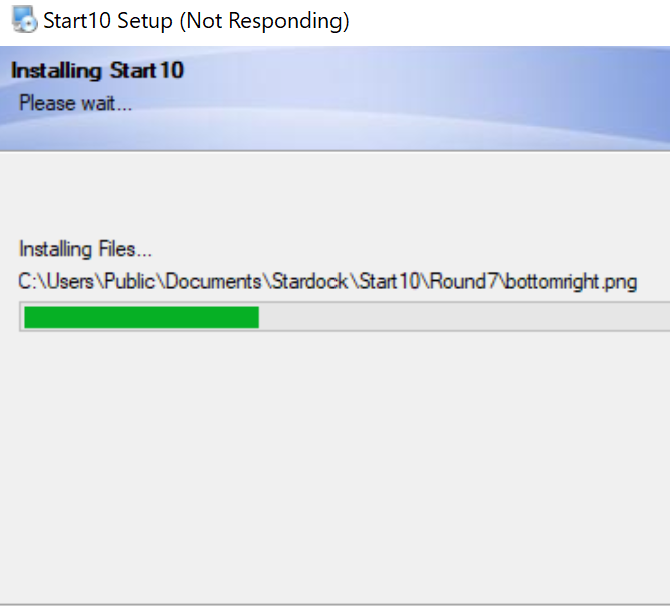
Quoting pzdvlehr, reply 40

I am still getting the same error since ver: 1.7 last week, exact same file crashing my install.  None of the above fixes have been able to overcome this error.  Any chance I can get my Ver: 1.61 back? 

Reduced 43%
 
Original 670 x 606


End of pzdvlehr's quote

If you right click on the installer and pick properties and then digital signature tab, does it show it signed using sha1 or sha256?

Also are you using bit defender?

Oh and are you using the rounded theme in Start10?

Reply #42 Top

Both versions are sha256, I don't use bitdefenderand I was not using rounded theme I don't believe. The last version I had that I could find among my backups was ver: 1.02. That's my fault for downloading directly from email.  I never saved any other version after I installed, just let software update. 

Reply #43 Top

All,

If my count is correct, it is just pzdvlehr and WSChelpdesk left with this issue.

Both are failing when trying to install a file here:

C:\Users\Public\Documents\Stardock\Start10\Round7

What I would like you to try:

  • Uninstall any Start10 version you may have now, reboot.
  • If you go to the above directory location, does it still exist?  If so, delete the problem file in the install error (bottomright.png or the other we have seen, bottomleft.png). 
  • Try the 1.7 install again.
  • If it fails on any file, please let me know what one (the path and file).

Thanks for your help here and sorry for the frustration and delay.

----------------
Sean Drohan
Stardock Customer Service Manager

Reply #44 Top

I appreciate all of your assistance with this Sean. I will work through the new process and let you know how it fares. However I did try to uninstall it already and ran into this message:

Failed to load plugin: C:\Program Files (x86)\Stardock\Start10\Uninstall\Encoding.lmd (#1)


Now running "Purge_StartALL"

Reply #45 Top

Quoting WSChelpdesk, reply 44

I appreciate all of your assistance with this Sean. I will work through the new process and let you know how it fares. However I did try to uninstall it already and ran into this message:

Failed to load plugin: C:\Program Files (x86)\Stardock\Start10\Uninstall\Encoding.lmd (#1)


Now running "Purge_StartALL"
End of WSChelpdesk's quote


Sean,

Here is what I have done so far today:

1) Attempted to uninstall Start10, which required running the Purge_StartALL (downloaded from your site)

2) Checked the location C:\Users\Public\Documents\Stardock\Start10\Round7 for the remaining files, and they were still there.

3) deleted all files in this folder

4) rebooted device again, then logged back in and made sure all remnants were removed.

5) attempted to reinstall version 1.7 (ran into same decompression errors)

6) nothing appeared to be installed, but i ran Purge_StartALL again, then deleted the Round7 folder also.

7) rebooted device and attempted to reinstall, received the following error message: Setup can not create the following folder: C:\Users\Public\Documents\Stardock\Start10\Round7 (I am a global admin, so permissions are not an issue)

8) Cancelled the error, rebooted the device

9) Logged in as local admin (not my account) and attempted running the 1.7 installer again just for testing sakes, got same error

10) completely uninstalled and purged again, logged back in as myself, redownloaded the Start10 installer from the https://store.stardock.com/download/139/10618437 and ran it again only to receive the same errors.

11) I manually recreated the "Round 7" folder at the correct location and now I'm back to receiving the decompression errors.

12) Purged_StartAll, rebooted, ran the 1.61 installer and Start10 is working again...


Not sure what more I can do at this point...

If it helps at all, my OS is currently Win10 1809, build 17763.437

Reply #46 Top

Finally got it to install correctly.  Uninstalled via Control Panel, searched for and deleted any file/folder with Stardock as part of its name, did a final PurgeAll.bat run and then installed.  It worked.  

Reply #47 Top

Sorry I was not able to participate in forum since earlier problems with install.  Was able to download 1.7 today using product key and had no issues.

Thank you for fixing the problem.


Beth

Reply #48 Top

Quoting WSChelpdesk, reply 45

Not sure what more I can do at this point...
End of WSChelpdesk's quote

With the others detailing that it is now working for them, your report is the only one left outstanding. 

Is it at all possible for you to try a cleanboot and attempt the install after?  My reasoning is that I would like to try with only MS essential services running to exclude any 3rd party app (likely AV) from interfering with the install.

https://support.microsoft.com/en-us/help/929135/how-to-perform-a-clean-boot-in-windows

Let me know please and thank you for your patience.

------------
Sean Drohan
Stardock Support Manager

Reply #49 Top

Quoting sdRohan, reply 48


Is it at all possible for you to try a cleanboot and attempt the install after?  My reasoning is that I would like to try with only MS essential services running to exclude any 3rd party app (likely AV) from interfering with the install.

End of sdRohan's quote


But I already said I don't have any AV installed. :(

A clean boot is definitely not worth the time and effort at this point for a simple cosmetic change. I will just work with 1.6 that seems to install/uninstall just fine. Not sure what the update does to make it any different, but working vs non-working isn't much of an update to me at all. Thank you for all your help.

Reply #50 Top

Quoting WSChelpdesk, reply 49

Thank you for all your help.
End of WSChelpdesk's quote

You are most welcome but please know it is alway our aim to resolve any, and every, client issue - this is frustratingly vexing for us as well.  Should you ever return to wanting to resolve this, we will assist.

Thank you for your feedback and we look forward to ultimately resolving it.

------------
Sean Drohan
Stardock Support Manager