Start 10 Version 1.7

Update

Like some others I had Start 1.61 installed when had an email to update to 1.7.


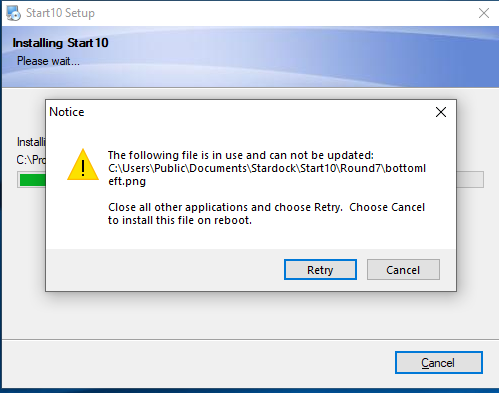
When I downloaded, the install failed due to other software running and to install on next restore.  I now have the typical Windows Start menu with tiles - thinking I should have deleted 1.61 first I tried but that fails so I am unable to delete to re-install and have the standard Windows Start menu which was the reason I purchased Start in the first place.

Also - if I make any change in Start 1.7 setup these are not applied

How to do I get Start to work?
22,423 views 53 replies
Reply #1 Top

Hello,

Sorry to hear you are having issues. Please try the purge and reinstall step : 

https://forums.stardock.com/486022/start10-support-faq#reinstalling

Reboot than redownload Start1.7 from your account. Install it. Reboot again. And test it. Report back here.

Thanks

Basj,

Stardock Community Assistant.

Reply #2 Top

Basj

The purge has removed Start 10 from my pc - I use Bitdefender Total Security which initially blocked this software but it did remove Start 10.


However when I tried to re-install I still get a number of error messages that stop the installation


The upshot being I still cannot install Start10

Reply #3 Top

Hello,

I have forwarded your problem to Stardock Support team for their assistance. Please keep an eye on this thread for any updates. We appreciate your feedback and patience.


Basj

Stardock Community Assistant.

Reply #4 Top

Basj,

I am having the same install issues as ivanmartin2.  I was initially trying to update Start10 to 1.7 and got the same errors.   I uninstalled Start10 1.61 from computer using Revo Uninstaller and then tried to install the most recent version of Start10.  I still get the same errors as ivanmartin2 shows on his screen shots and cannot install Start10 1/7.  So right now I have the regular Windows Start menu with tiles.  Hope you find a solution soon.  

+1 Loading…
Reply #5 Top

Hello,

If you both create new Windows Admin accounts (admin is important):

https://support.microsoft.com/en-us/help/4026923/windows-10-create-a-local-user-or-administrator-account

Install Start10 1.7, does it install?  If so, and you go back to your normal accounts, does it too have a working 1.70 version?

Sean Drohan
Stardock Support Manager

Reply #6 Top

Sean


Can you clarify why we need to create a new Windows admin account? 


Ivan 


Reply #7 Top

Quoting ivanmartin2, reply 6

Sean

Can you clarify why we need to create a new Windows admin account? 

Ivan 
End of ivanmartin2's quote

While it could be something else, I wanted to eliminate account issues and / or a possible permissions one.

Sean Drohan
Stardock Support Manager

Reply #8 Top

Also, we just now replaced the installer after making one adjustment to it.  Get the new installer with either:

https://www.stardock.com/support/product-key-retrieval

https://store.stardock.com/myaccount/products

That may be a first option to try before the new admin account.

Reply #9 Top

Install of Start 10 1.71 is a failture and I wish I had never tried it. I wondered when I tried to update the normal way, It could not find any update. I'm guessing you made a huge mistake and now you don't know what to do. I also see I'm not the only one having an Issue and Now I'm wondering how long before you fix the problem.

Reply #10 Top

Hello RJGoodHouse, sorry to hear you are having trouble.

Quoting RJGoodhouse, reply 9

nstall of Start 10 1.71 is a failture and I wish I had never tried it.
End of RJGoodhouse's quote

We are glad you did but do need more information to fix whatever issue you are having.

Quoting RJGoodhouse, reply 9

I'm guessing you made a huge mistake and now you don't know what to do.
End of RJGoodhouse's quote

There was an issue, yes, but it was not 'huge' and we knew exactly what do do when it was discovered.

Quoting RJGoodhouse, reply 9

I also see I'm not the only one having an Issue and Now I'm wondering how long before you fix the problem.
End of RJGoodhouse's quote

I still dont know what your exact problem is, RJ...  If you need any examples of how dedicated we are to solving client issues, we are all actually off today for Good Friday.  Many of us were made aware of an issue and acted. 

That said, and if you have not already, I want you to ty getting the latest from either link below:

https://www.stardock.com/support/product-key-retrieval

https://store.stardock.com/myaccount/products

Again, let me know if that solves whatever issue you are having.  If not, please give me more details on your exact issue.

Regards,
Sean Drohan
Stardock Support Manager


Reply #11 Top

Sean

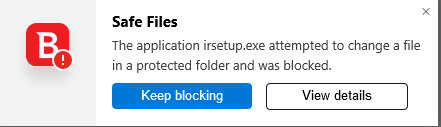
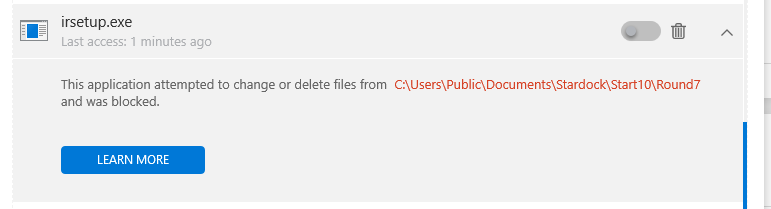
Have created a second user (which I didn't want) and despite downloading from the Stardock site I am getting the same error message.  One thing I have notice is that Bitdefender is blocking the irsetup.exe 


Bitdefender is not however allowing me to allow the file


Still not Start 10?


Reply #12 Top

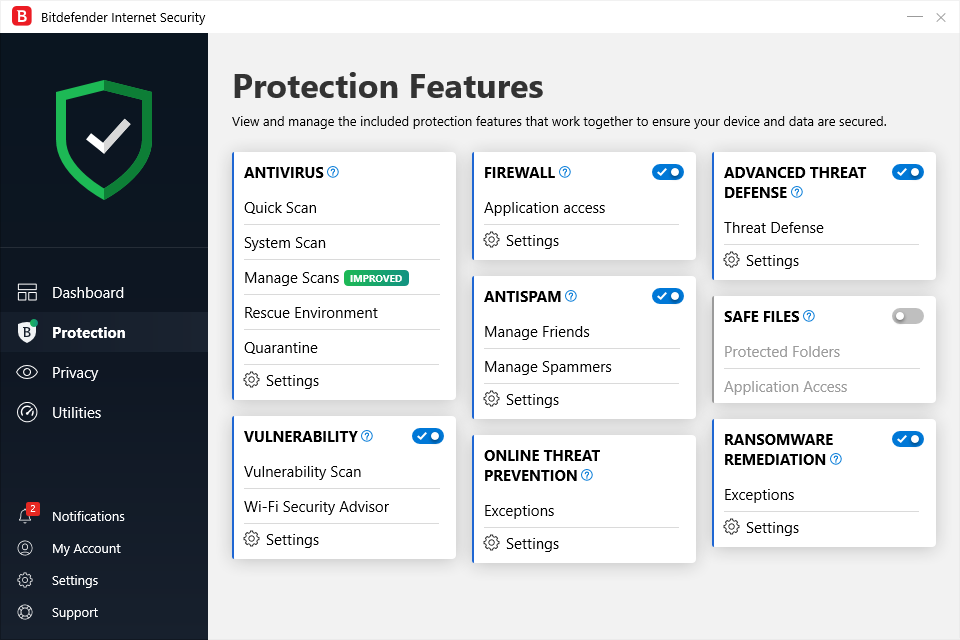
Hi there, I had the exact same issue. Bitdefender is terrible for recognising actual threats versus programs that access secure files. What I did was uninstall Start10 then disable "Safe Files" in Bitdefender "Protection" settings. Then I installed from the Start10 update page.


I hope this helps :)  

Reply #13 Top

Finally managed to sort the User issue and tried to install Start 1.7.  I hadn't seen Jo55y's comment but this time was able to get Bitdefender to allow the update so that I now have Start 1.7 installed and working.

Between Stardock and Bitdefender - not an great install but now resolved. 

Reply #14 Top

It sounds like a very poor implementation of anti ransomeware where anything that touches your docs or shared docs is considered suspicious.

I will see if we can go yell at anyone about this.

Reply #15 Top

Neil

By way of update - I have a second instance of Start on my laptop.  I was debating whether the likely problems made it worth updating but went ahead.  Started well in that Start identified an upgrade was available - so I selected to update.


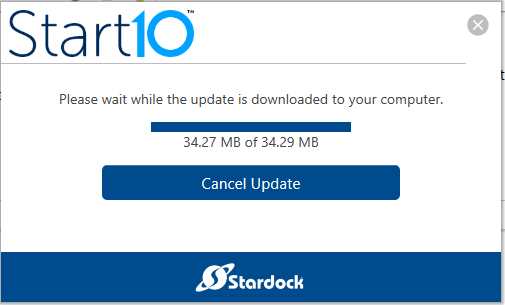
Stuck - it always the last 0.02mb that gets you!

I had disabled the Safe Files option on Bitdefender in advance but ...


Reply #16 Top

As an update - I was able to download and install direct from the web site.  However - as in my previous update the auto download failed to complete.

Reply #17 Top

Sean,

I tried installing your fixed download and the install still had the same errors as before.  I, then, created a new Windows Administrator account and logged into it and tried the download install again.  The same problems still exist.  It did not make any difference.

Beth 

Reply #18 Top

Quoting pettisbe, reply 17

I tried installing your fixed download and the install still had the same errors as before. 
End of pettisbe's quote

Are you using Bitdefender as well?

----------------
Sean Drohan
Stardock Customer Service Manager

Reply #20 Top

Quoting pettisbe, reply 17

Sean,

I tried installing your fixed download and the install still had the same errors as before.  I, then, created a new Windows Administrator account and logged into it and tried the download install again.  The same problems still exist.  It did not make any difference.

Beth 
End of pettisbe's quote

I want to make sure you have the updated installer and have tried it:

https://www.stardock.com/support/productkeyretrieval

If that still fails, I want you to try turning off Controlled Folder Access in Windows Defender and trying again:

https://support.microsoft.com/en-us/help/4046851/windows-10-allow-blocked-app-windows-security

----------------
Sean Drohan
Stardock Customer Service Manager

Reply #21 Top

Hello,

Just to add to the chorus... I too took the bait and downloaded Stardock 1.7 over 1.6 and now I have the windows start menu with tiles, which is exactly what I don't want and I cannot get Stardock 1.7 to change to anything else.

The download process of Stardock 1.7 seemed a bit lumpy (I could not tell that it actually downloaded so I had to do it twice) and I successfully installed it (to my surprise since I did not see an "install complete" msg) but now it is installed and "working" but I cannot get the start menu I want.

I've read all the above responses and replies, and I will wait to see what happens in the way of fixes in the next week or two, then I'll decide whether to keep Stardock or delete it.  I can't be bothered fixing software, nor am I a QA department. Get something that works without making buyers go through a lot of acrobatics.

Sorry for the frustrated note, but I would prefer going back to 1.6, if that is a possible option, that did exactly what I wanted it to do, I don't need anything else.

Regards,

Bob

Reply #22 Top

Hello,

Sorry to hear you are having trouble.

Quoting Bob2468, reply 21

installed and "working" but I cannot get the start menu I want.
End of Bob2468's quote

What one are you getting, Bob? What happens when you use the Start10 config to set a different style?

If nothing else, you can try the purge and reinstall detailed here:

https://forums.stardock.com/486022/start10-support-faq

----------------
Sean Drohan
Stardock Customer Service Manager

Reply #23 Top

The interface that I get is the Windows 10 with tiles.... (the "I'm so childish I need big tiles" interface).

As for the Start10 config, it is not something I use (in the past I took default values), but at your suggestion I tried, and as far as I can tell it does nothing.

Reply #24 Top

Quoting Bob2468, reply 23

The interface that I get is the Windows 10 with tiles.... (the "I'm so childish I need big tiles" interface).
End of Bob2468's quote

I believe, Start10 was designed to replace Windows 10 Start menu with something that look like Windows 7 Startmenu. And I don't think you can have big tiles with Start10. 

Thank you,


Basj,

Stardock Community Assistant

Reply #25 Top

Quoting Bob2468, reply 23

The interface that I get is the Windows 10 with tiles.... (the "I'm so childish I need big tiles" interface).
End of Bob2468's quote

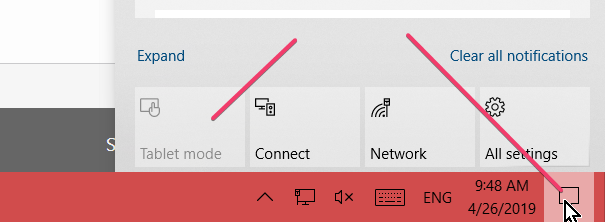
Is this a laptop that has accidentally been placed in tablet mode by chance?

----------------
Sean Drohan
Stardock Customer Service Manager