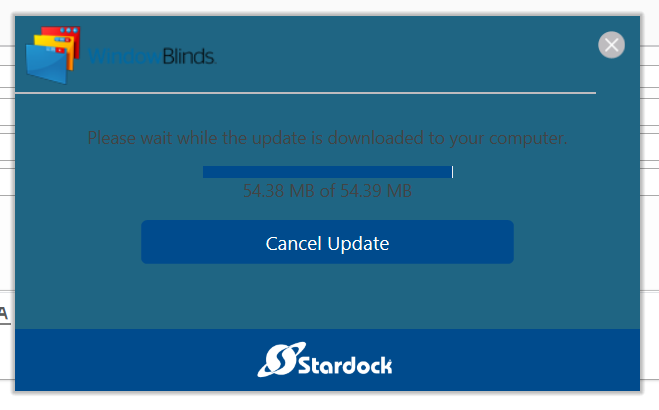
Can´t update windowblinds
it gets stuck on 54.38 mb and nothing changes even after an hour.

my windowblinds version

here it gets stuck, I hope I don“t need to reinstall the programm, because I will loose my theme downloaded from the internet
it gets stuck on 54.38 mb and nothing changes even after an hour.

my windowblinds version

here it gets stuck, I hope I don“t need to reinstall the programm, because I will loose my theme downloaded from the internet
Hello,
Sorry to hear you are having issues. Can you try to download direct from your account : https://store.stardock.com/myaccount/products
Basj,
Stardock Community Assistant.
FWIW: Win 10 version 1804 is buggy. I had similar problems until I upgraded to version 1809 which is the latest version of Win 10. Programs would get stuck or not open at all and some even closed after a few seconds. As for losing the theme you downloaded, that shouldn't happen if you have that theme saved in your download folder. Go to your account at Stardock and download the latest version of WindowBlinds. Uninstall the old one, reboot and install the new one then reboot again and reinstall your theme.
The same thing happened to me, it gets stuck on 54.38 mb...
In the end, I went to Stardock store and did the job...
I wonder why this happens...
I am sorry for your issue, but, I am not sure, are you the same person as the thread starter? If you are not please start a new one.
Thank you,
Basj,
Stardock Community Assistant
I have had this same issue. I get an update notice [outside of the time I selected for updates] and the results are as posted above. Thing is, I already have version 10.74.
Hello,
I have forwarded your report to the Stardock support team for their review and recommendations.
Please keep an eye on this thread for any updates.
We really do appreciate your feedback, thanks.
AzDude
Stardock Community Assistant
All the themes you download are in .wba format. You should save the download and you won't ever lose it unless you lose what you saved it on.
what he said^^^^^^
Welcome Guest! Please take the time to register with us.