"Save to desktop" going to secondary monitor

Team,

I followed the steps in the Faq which states "If you're comfortable with editing your registry, open regedit.exe, to see if Fences has your "PrimaryMonitorLast" set to your actual primary".  As I undock and re-dock, the monitor number in that field seems to change in increments of 1 but seems to reference the correct display. I'm using a Dell  Latitude 5490 with Win10, 2 24" Dell monitors and a Dell D6000 dock with no 3rd party multi-screen software. When I save anything to the desktop it goes to the secondary monitor. If I temporarily disable Fences it will save to the primary monitor / desktop but the problem returns once I re-enable Fences. 

Suggestions?

8,332 views 4 replies
Reply #1 Top

That’s been happening to me for about a year. I got tired of trying to figure it out, so I just save things to a folder on my main screen. 

Reply #2 Top

I have reported your issue to Stardock Support .

Keep an eye on this thread , please.


AzDude

Stardock Community Assistant 


Reply #3 Top

Hello,

Sorry to hear you are having trouble.

Other than the additional help here dealing with docking stations specifically:

https://forums.stardock.com/486084/fences-support-faq#multimonitor

Docking stations can make things a bit tricky as what is the main monitor, and then what is not, can change with each docking.

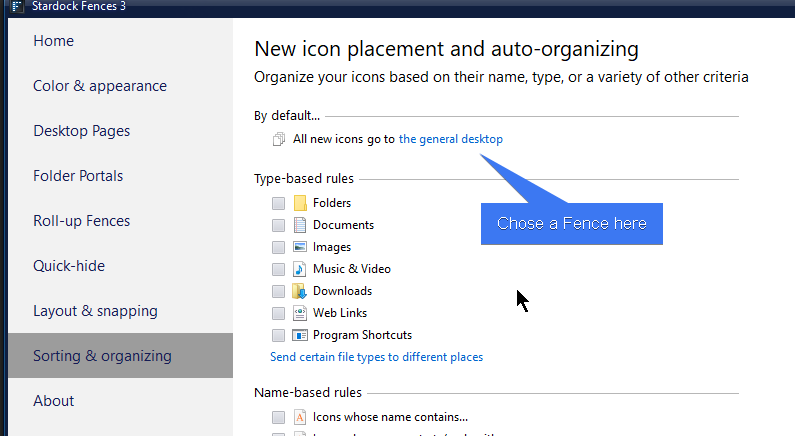
What I would suggest is creating a Fence that has a rule to have all new things go to it:

You can then place that Fence on whatever desktop / monitor you like depending on the conditions.

----------------
Sean Drohan
Stardock Customer Service Manager

Reply #4 Top

Hello, has there been any development about this issue? 

I don't want to use the workaround suggested in other threads. I want my primary desktop to function as a primary desktop. All files should save here as intended. 

Please let us know when this will be fixed. Thanks!