Fences 3.0.9.11
Startup problem.
After I boot up Windows 10 my Fences won't show up unless I right click on the desktop first. Any suggestions?
Startup problem.
After I boot up Windows 10 my Fences won't show up unless I right click on the desktop first. Any suggestions?
Hello,
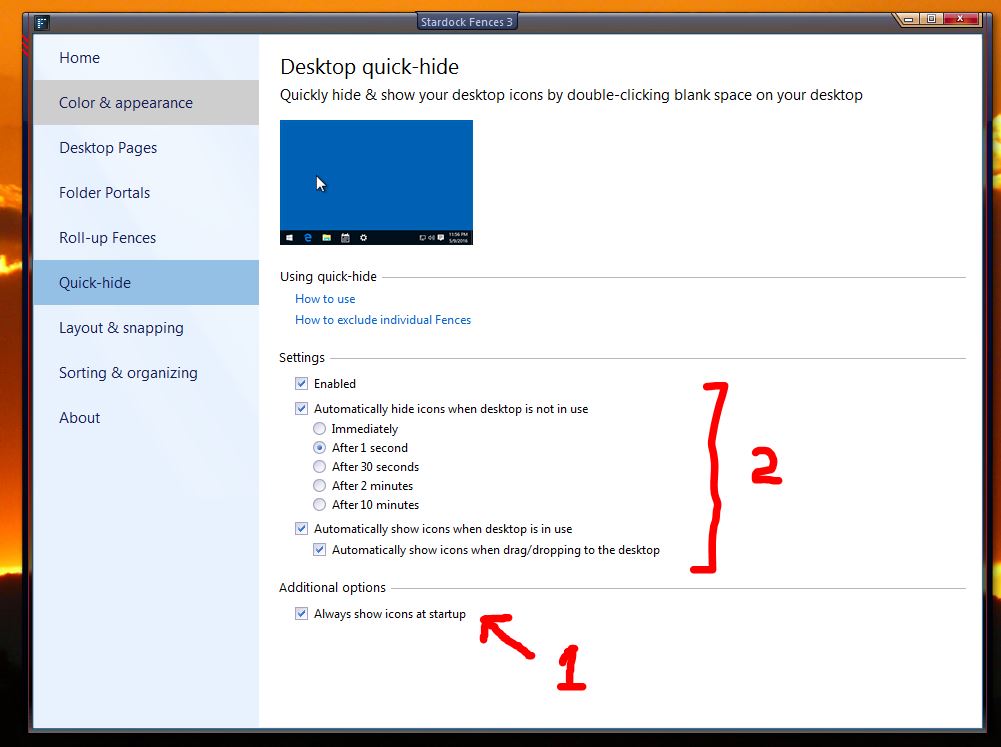
Sorry to hear you are having issues. Try to play around with the setting on Quick-hide see if it helps. No .1 and 2.

Let us know if you still need our assistance.
Thank you.
Basj,
Stardock Community Assistant.
Thanks... but what should affect this? I don't see anything related to start-up at boot, except 'Always show icons at startup' which I have enabled.
Its the first step of troubleshooting your problem. Some people have solved their problem just by setting that part. If its not for you, we can proceed further. Please be patience.
Next please try the purge and reinstall steps : https://forums.stardock.com/486084/fences-support-faq#reinstalling
Please use the latest installer from your account. Reinstall that and reboot. Report back.
Thank you,
Basj,
Stardock Community Assistant
I'm the one that posted about this problem so it looks like I'm not the only one experiencing this problem.
Hi, do you still having the problem? And if you do, have you try these solution I've suggested above? May we know the outcome?
Thank you,
Basj,
Stardock Community Assistant
Everything except the purging. I have a lot of housekeeping to do before that or I will have hundreds of icons all over the desktop if the fences go away.
Seems to me if others have the problem then there a glitch that shouldn't require drastic measures.
Didn't work here. Run the purge script, reinstalled, restarted, but the same thing. I have to right-click the mouse to have my icons & Fences show/start up.
Trust me if it a small bug we would have more report on this problem. Said that, we are not ignoring your problem. We are trying to help you solve it. And a large percent of problems are solve by doing the purge and reinstall steps.
on the second note : I realize that you mentioned you have hundreds of icons on your desktops. Is there any portal fence that link to network or cloud drive?
Thank you,
Basj,
Stardock Community Assistant
Same question to you too : Is there any portal fence that link to network or cloud drive?
Thank you,
Basj,
Stardock Community Assistant
Same question to you too : Is there any portal fence that link to network or cloud drive?
Thank you,
Basj,
Stardock Community Assistant
Nope, all icon shortcuts.
FWIW, tried observing not right-clicking on mouse after a reboot. It's past 30 minutes and the icons still didn't appear. Just right-clicked the mouse now and icons/fences appear/start on my desktop.
Well, from what I can tell, there is something hiding your desktop icons, just to make sure, please do the cleanboot steps : https://forums.stardock.com/486084/fences-support-faq#cleanboot
and report back.
Thank you,
Basj,
Sardock Community Assistant
I have a shortcut to a cloud website, but that's it. I see there is another person here with the same problem. Doing an Internet search tells me there are others with the problem too and with an older version of Fences, so it must have been reported.
I solved the problem I was having. In Task Manager I selected startup tab then I started disabling things and after reboot, I noticed a Fences settings on the list. I just enabled it and the problem went away after another boot. Easy fix without the drastic measures.
Thanks. This worked in my case as well.
You are welcome. Glad you got it fixed.
Welcome Guest! Please take the time to register with us.