Fences appears to be unstable on Windows 10

Odd behaviour such as temp desktop freeze, temp desktop clutter of icons, etc.....

Is anyone else experiencing odd behaviour with Fences running on Windows 10?

e.g. temp desktop freeze, temp desktop clutter of icons (until double click twice to hide and unhide entire desktop), Fence Freeze for up to 20 seconds, etc.....

regards

Paul

30,434 views 21 replies +2 Loading…
Reply #1 Top

Hello,

Sorry to hear you are having issues. I am using Fences on Windows 10, but I have not experienced what you mentioned. Maybe a purge and reinstall could help you. : https://forums.stardock.com/486084/fences-support-faq#reinstalling.

BTW, I have notice some users having problem with portal fences linking to network drive or folders. Which could be resolved with this solution https://forums.stardock.com/486084/fences-support-faq#folderportalsempty

Basj,

Stardock Community Assistant.

Reply #3 Top

Yes, I am experiencing the same symptoms.  I am using Windows 10 and for a while, all was okay, but in the last month, I am experiencing freezes, the screen goes blank and has to re-render itself.  All icons disappear.  Tonight, Fences produced a message saying it became unstable and it had to close and to Enable it again, so I did and within seconds it happened again.

I do have network drives and do understand the above possible solution, but since we don't back things up that are saved locally, I have folders saved on my network drive.

I LOVE LOVE LOVE Fences and am hoping there is a solution that doesn't require shortcut folders to be saved on C:. 

Again, this only started happening recently.

Thanks in advance for any assistance you can provide.

Francine

+1 Loading…
Reply #4 Top

Quoting fmillman, reply 3

Yes, I am experiencing the same symptoms.  I am using Windows 10 and for a while, all was okay, but in the last month, I am experiencing freezes, the screen goes blank and has to re-render itself.  All icons disappear.  Tonight, Fences produced a message saying it became unstable and it had to close and to Enable it again, so I did and within seconds it happened again.

I do have network drives and do understand the above possible solution, but since we don't back things up that are saved locally, I have folders saved on my network drive.

I LOVE LOVE LOVE Fences and am hoping there is a solution that doesn't require shortcut folders to be saved on C:. 

Again, this only started happening recently.

Thanks in advance for any assistance you can provide.

Francine
End of fmillman's quote

Hello,

Sorry to hear you are having issues. Need more information.

1) Windows 10 version : Please use Winver.exe to check it.

2) Fences installed version.

3) Does the PC have Websence /Forcepoint or something similar?

4) Have you tried the Purge and reinstall steps suggested above? https://forums.stardock.com/486084/fences-support-faq#reinstalling

Make sure to redownload Fences installer file from your account. Reinstall it and reboot after the installation. Test it and report back.

Thank you.

Basj,

Stardock Community Assistant.

Reply #5 Top

Hi Basj,


I've been experiencing the same issues as above. My Fences causes my internet explorer to crash. It freezes the start menu toolbar in windows and does not allow me to continue working on the PC. I know it is the Fences app because I've wiped my entire PC and slowly put apps back on and waited. The day after I installed Fences and nothing else, it started doing the crashing again.

I like what Fences does for my desktop when it works, however, I just recently paid to upgrade Fences and cannot use it because of the crashing constantly so I'm very unsatisfied with the product.

1. Windows Version: 10.0.17134 Build 17134

2. Fences Version 3.0.9.11

3. No Websence or Forcepoint

4. Yes I've purged and reinstalled Fences. Also have reformatted my entire PC. The crashing was non existent without Fences and begun right after I installed it. Fences was the last program I installed as I methodically installed each program I needed one at a time.

Reply #6 Top

Quoting gbjordan06, reply 5

Hi Basj,


I've been experiencing the same issues as above. My Fences causes my internet explorer to crash. It freezes the start menu toolbar in windows and does not allow me to continue working on the PC. I know it is the Fences app because I've wiped my entire PC and slowly put apps back on and waited. The day after I installed Fences and nothing else, it started doing the crashing again.

I like what Fences does for my desktop when it works, however, I just recently paid to upgrade Fences and cannot use it because of the crashing constantly so I'm very unsatisfied with the product.

1. Windows Version: 10.0.17134 Build 17134

2. Fences Version 3.0.9.11

3. No Websence or Forcepoint

4. Yes I've purged and reinstalled Fences. Also have reformatted my entire PC. The crashing was non existent without Fences and begun right after I installed it. Fences was the last program I installed as I methodically installed each program I needed one at a time.
End of gbjordan06's quote

Hello,

I don't think your issue and fmillman the same. But, can you try the cleanboot to see if there is a conflicting application with Fences. : https://forums.stardock.com/486084/fences-support-faq#cleanboot

Try it and let us know.

Thank you,


Basj,

Stardock Community Assistant

Reply #7 Top

Sorry Guys I am having the same issues! This is getting annoying since I teach from this computer. This just started a couple of days ago. I have reinstalled it. When I disable fences the system works fine, when re enabled, problems start back up with the freezing screen.

Reply #8 Top

Quoting ml8766, reply 7

Sorry Guys I am having the same issues! This is getting annoying since I teach from this computer. This just started a couple of days ago. I have reinstalled it. When I disable fences the system works fine, when re enabled, problems start back up with the freezing screen.
End of ml8766's quote

Hello,
Sorry to hear you are having issues. But, what change a couple days ago? Is there a Windows upgrade, Antivirus/security software update etc. More details would help.

Need to know:

1) Windows version, please use Winver.exe for full Windows version numbers.

2) Fences version.

3) More details on the issue.

Thanks.

Basj,
Stardock Community Assistant.

Reply #9 Top

Hi All,


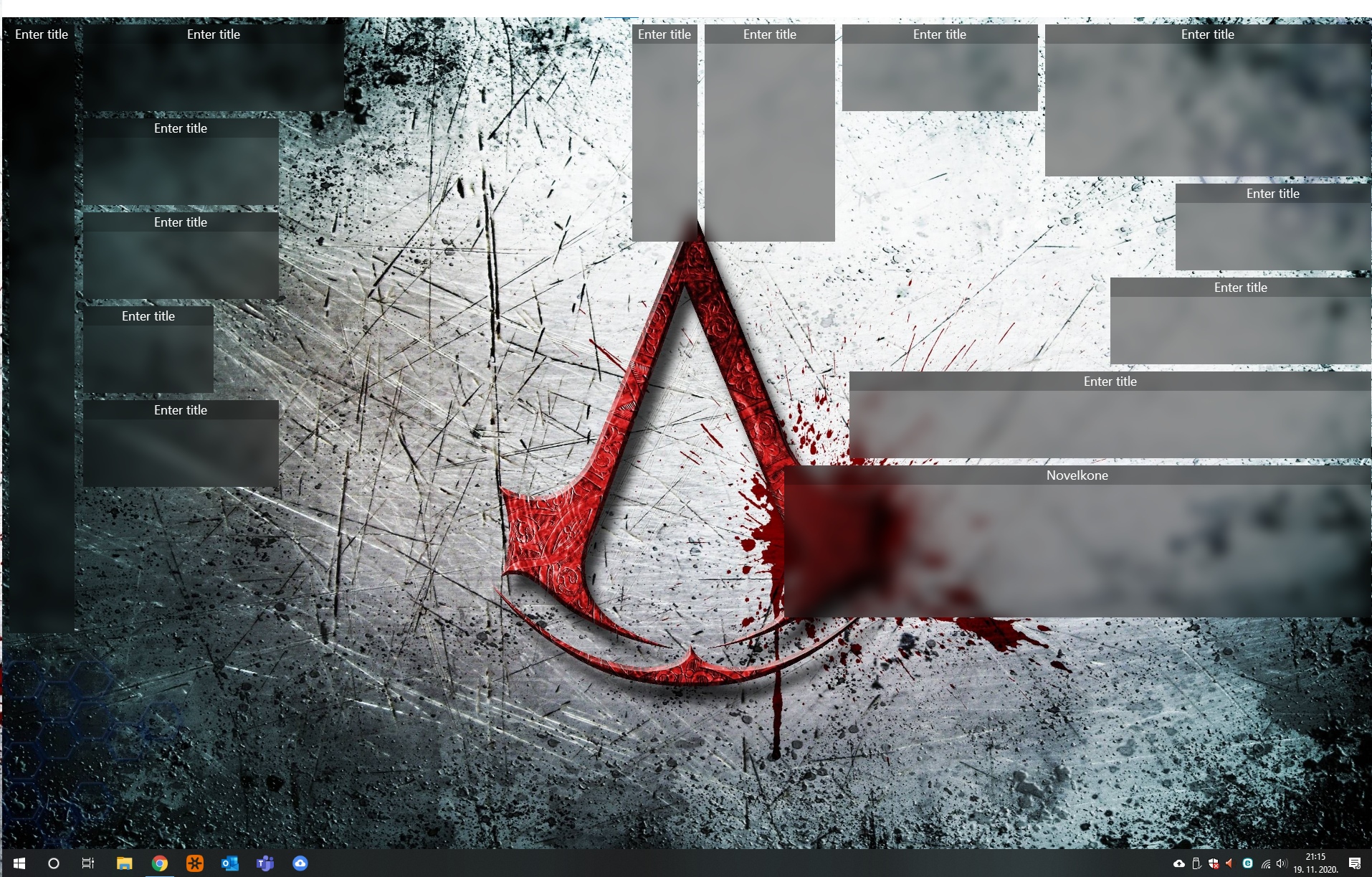
I have same symptoms, for crashing and other, I also notice when you click right button on Desktop and refresh it needs more than minute to desktop and explorer come to normal work. All icons are gone for more than a minute. After this explorer crashes and evertning is back to normal. This I get every time when I refresh Desktop. It is quite annoying. 


Already try all solution from this post its still same?!


Reply #10 Top

Quoting jasminmizic, reply 9

Hi All,


I have same symptoms, for crashing and other, I also notice when you click right button on Desktop and refresh it needs more than minute to desktop and explorer come to normal work. All icons are gone for more than a minute. After this explorer crashes and evertning is back to normal. This I get every time when I refresh Desktop. It is quite annoying. 


Already try all solution from this post its still same?!


Reduced 34%
Original 1914 x 1223


End of jasminmizic's quote

Did you try all the fixes mentioned  in the above comments by basj ?  

Reply #11 Top

Did you see my last sentence in post :D yes i try all but still is the same. It was working before but last few months it started to make issues.

Reply #12 Top

Quoting jasminmizic, reply 11

Did you see my last sentence in post :D yes i try all but still is the same. It was working before but last few months it started to make issues.
End of jasminmizic's quote

Hello,
Sorry to hear you are having issues. But, have the installation ever work before? If it yes, what has change? Is there a Windows upgrade, Antivirus/security software update etc. More details would help.

Need to know:

1) Windows version, please use Winver.exe for full Windows version numbers.

2) Fences version.

3) Installed Antivirus & Security software installed. Is this a corporate system PC?

3) More details on the issue.

Thanks.

Basj,
Stardock Community Assistant.

Reply #13 Top

Hi,

I have no idea what has change, maybe updates of windows or something, I try to uninstall antivirus but it has no difference. 

Windows:19041.630

Fences:3.0.9.11

Details on issue: when PC is starting it take usually 1 minute or more to fences show, if i do refresh on desktop explorer and fences are blocked for one 1 minute or more. 

I try to uninstall ESET antivirus but I have same issues with or without antivirus.

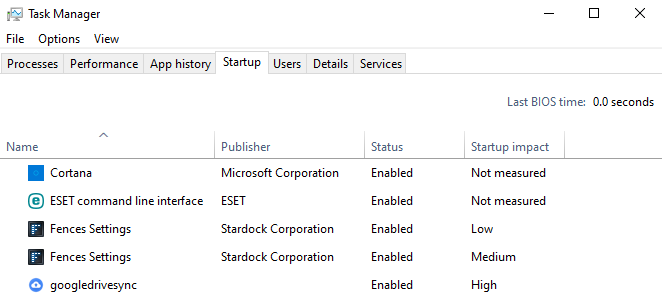
Not sure is it ok to have 2 startup processes for fences, picture attached.

Reply #14 Top

Quoting jasminmizic, reply 13

Not sure is it ok to have 2 startup processes for fences, picture attached.
End of jasminmizic's quote

Yes Fences need to have 2 startup processes. Need to know if you have Stardock's Deskscape installed? And does the icons return if you do explorer.exe restart. https://www.windowscentral.com/how-restart-explorerexe-fix-common-ui-problems-windows-10

Thank you,

Basj,
Stardock Community Assistant

Reply #15 Top

Hi,

I have only Fences. Strange thing is that I have same set up on my laptop and on laptop everything is ok. On laptop when I click refresh everything is refreshed in second.

On my pc, when I click refresh everything is blocked for 1:30 min but then fences and explorer.exe are back automatically, I don't need to run explorer manually.

Reply #16 Top

Please try the following:

-For Win8/10 Users: Open the Start Screen, and type 'cmd'. Right-click on the search result and select 'Run as administrator' from below.

-Type: sfc /scannow

-Wait for the scan to complete (this can take several minutes)

Some help on how this looks should you need it:

https://support.microsoft.com/en-us/help/929833/use-the-system-file-checker-tool-to-repair-missing-or-corrupted-system

If the SFC finds errors, but cannot fix them, please also run the following command in the same command prompt window:

dism.exe /online /Cleanup-Image /RestoreHealth

Some help on how this looks should you need it:

https://www.windowscentral.com/how-use-dism-command-line-utility-repair-windows-10-image

The above command should assist with replacing any damaged or problematic system files. Please note, however, since it may require restoring certain files, this process can take some time and you will need to be patient until it has completed.

Please let me know whether this resolves your problem or if you have any additional questions.

Thank you,

Basj,
Stardock Community Assistant


Reply #18 Top

Hello,
I have forward your problem/question to Stardock Support Team for their assistance. Please keep an eye on this thread for any updates. We appreciate your feedback and patience.

Basj,
Stardock Community Assistant

Reply #19 Top

Quoting jasminmizic, reply 15

I have only Fences. Strange thing is that I have same set up on my laptop and on laptop everything is ok. On laptop when I click refresh everything is refreshed in second.
End of jasminmizic's quote

What the different between the laptop and your main pc? Does it share the same software setup? ie. Does Eset also run there? Have you tried totally uninstall Eset from your main pc, reboot and retest it? I am looking at Eset since it has issue with Stardock's Windowblinds where something need to be change to its setting to make it work with Windowblinds.

Thank you,

Basj,
Stardock Community Assistant

Reply #20 Top

Hello,

Sorry to hear you are having trouble.

In addition to what basj asked, is this actually a corporate computer or run under policies from where you work?

Also, does this still happen if you do a clean boot:

Fences Support FAQ » Forum Post by Island Dog (stardock.com)

Sean Drohan
Stardock Support Manager

Reply #21 Top

Hi,

with Administrator account works perfectly, but i had just few icons. I didn't need to run clean boot it worked normally.

This point me to my icons. When I delete old network shortcuts from Desktop it start to work. Its not fast as on clean Administrator account but is quite ok. Now refresh is just few seconds which is bearable.