Fences

Really weird problem with PDF's.

If I leave on it my"normal" desktop I can open, move and delete as normal. However if I drop it in a folder within a Fence it indicates that:  "There was an error opening this document" so I can't read it and I can't delete it either ("You do not have permission.....").

I think that the document is protected (and I don't have access to edit etc.) but as it changes regularly they are building up and eating space and I can't get rid of the little bu**ers. It also means that I can't reference the changes to get my part of the process correct. (Not that I really care as England just beat Sweden!!!!!!)
2,325 views 6 replies
Reply #1 Top

Hello,

Sorry to hear you are having issues.

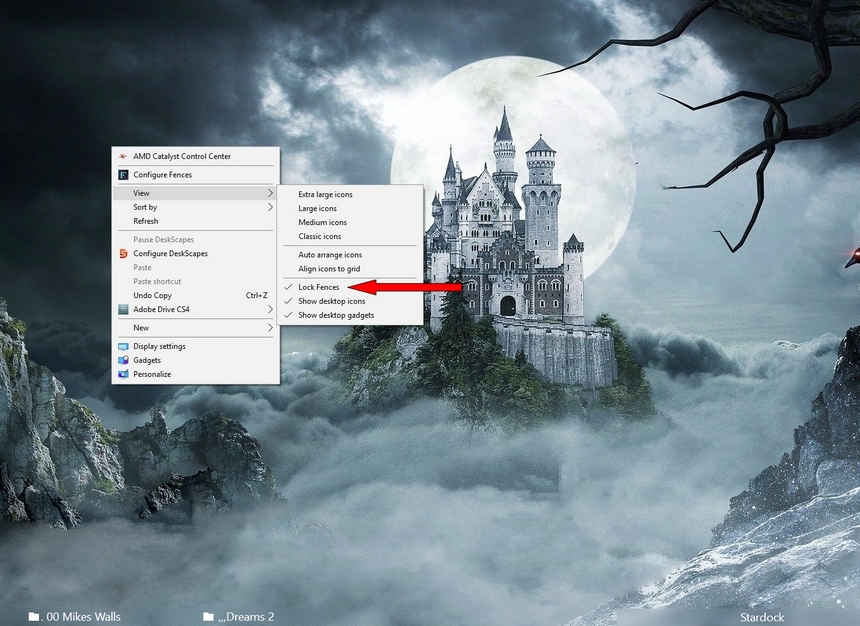
Make sure your fences are NOT locked if so unlock should allow you to make changes and delete items.

Right Click on desktop to check 


AzDude
Stardock Community Assistant

Reply #3 Top

Hi!

The fences were unlocked anyway.

I've tried purge and re-install and it's the same as before.

Just in case it's something to do with the PDF reader I've opened both Adobe Reader and Foxit as administrator - both open the desktop version but neither will open the version in the Fence.

Nick


Reply #4 Top

Hello,

Sorry to hear you are having issues. I can't reproduce your problem on my system. Would like to know more. When you said you moved your pdf files into a folder within a fence. Do you mean that the fence is a portal fence? If yes where is the portal actual location? Is it a share folder? etc etc. Could you provide us with more information on that.

Thanks

Basj,

Stardock Community Assistant.

Reply #5 Top

One of the things you mentioned has cracked it!

I have a number of PDF's of lender guidelines which I access all the time and it was easier to drop them into a folder on the desktop and, when I got Fences (which I love BTW,) I just dropped the folder into a fence and continued in the same way, saving the new ones and archiving the old. I have put through dozens of these documents but I suspect that these particular ones wre protected in some way I was not aware of.

So I checked the folder sharing properties and there was a read/write limitation which I have now checked and all seems to be well now. I can now read, move and delete them.

Sorry to have wasted your time - I should have thought of it earlier.

Enjoy what's left of the week-end and once agan, many thanks

Nick

Reply #6 Top

Hey, Great to know it get solved. Thanks for reporting back.

Thank you,


Basj,

Stardock Community Assistant