Workaround for exactly setting color values for fences
 Stardock Forums
Just tried Fences and missed, like others, a way to set colors of multiple fences to an exact value. I figured out a workaround, using the Windows Registry:
Color values of the Fences Groups are stored here:
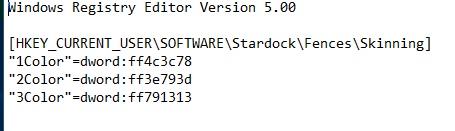
HKEY_CURRENT_USER\Software\Stardock\Fences\Skinning
listet with names like "4Color", "5Color" and so on. This entries only exist if you had choosed an individual color to one or more groups before.
The value of the key is the hex value of the color transparency followed by the RGB values. E.g. ff00ff00 for a solid green. You can edit, copy and paste this values to any other group(s).
Note that the numbers of the groups (in my case) are individual numbers, not matching the group numbers you can find here:
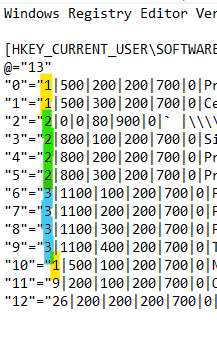
HKEY_CURRENT_USER\Software\Stardock\Fences\Groups
But in the last key you can find the group names and the matching numbers:
e.g. a key has the name "2" and the value
4|316|136|540|613|0|System` |\\.\DISPLAY2` |0|0|2560|1440|1|0|255|0|` |-1|0|1|0|0|{7AAA5C05-79AA-422E-8CDE-6F3FA4749BF1} |
You see that this are the parametres of the group "System". The first number (4) is the internal number of this group. For color editing look in the .../Skinning key for the name "4Color".
Hope this can help.
Please be carefull with registry editing, is it at our own risk.