ObjectDock conflicting with unnecessary things
from  Stardock Forums
Stardock Forums
I just want to play my game..................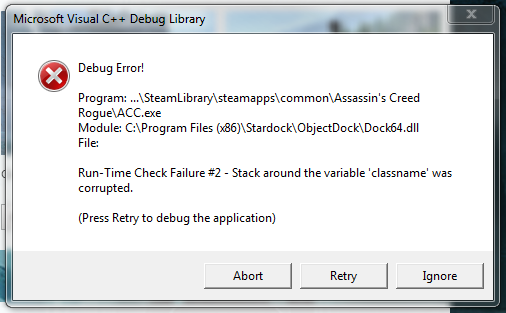
 Stardock Forums
I just want to play my game..................
I was just about to post the same error myself but I was unable to take a screenshot.
Assassin's Creed: Unity and Black Flag both work fine with ObjectDock so it is strange that Rogue doesn't, especially as it seems to be using the same engine, for the most part, as Black Flag.
Would be nice to have the option to add exclusions to ObjectDock to work around this issue.
In the meantime, you CAN play the game fine by unloading ObjectDock. Not an ideal solution but at least it is a workaround for now.
Have you tried a SFC scan for any possible issues? It sounds like something is corrupted, RE: the error message. Have you re-installed ObjectDock recently?

Well I haven't reinstalled ObjectDock recently but the point is that stbarrett and myself are having a problem ONLY with ObjectDock and Assassin's Creed: Rogue. For all we know, we may be only the two people so far using those two pieces of software together. Besides which, all the other Assassin's Creed games run perfectly fine, including Unity and Black Flag, as do all 500+ of my other games. AC: Rogue is the ONLY game that conflicts with ObjectDock. If ObjectDock was corrupted then it either would not run at all (it is working fine for me) or it would causes issues with every game and application I run (which it doesn't, only AC: Rogue).
A workaround posted by mansonfamily on the Guru3D.com forum: http://forums.guru3d.com/showpost.php?p=5030264&postcount=99
Quote: "Found a temporary fix for conflict with ObjectDock : start the game with a shortcut key ( ex. Ctrl+Alt+R) added to your desktop game shortcut. No need to unload ObjectDock."
your not the only one! ive got the same issue!
the shortcut fix didn't work 
ive posted a ticket to Ubi in hopes of a resolution but nothing so far.
Welcome Guest! Please take the time to register with us.
Select a reason for giving karma:
You're about to visit an external site:
Sign up here to get the latest news, updates, and special offers delivered directly to your inbox.