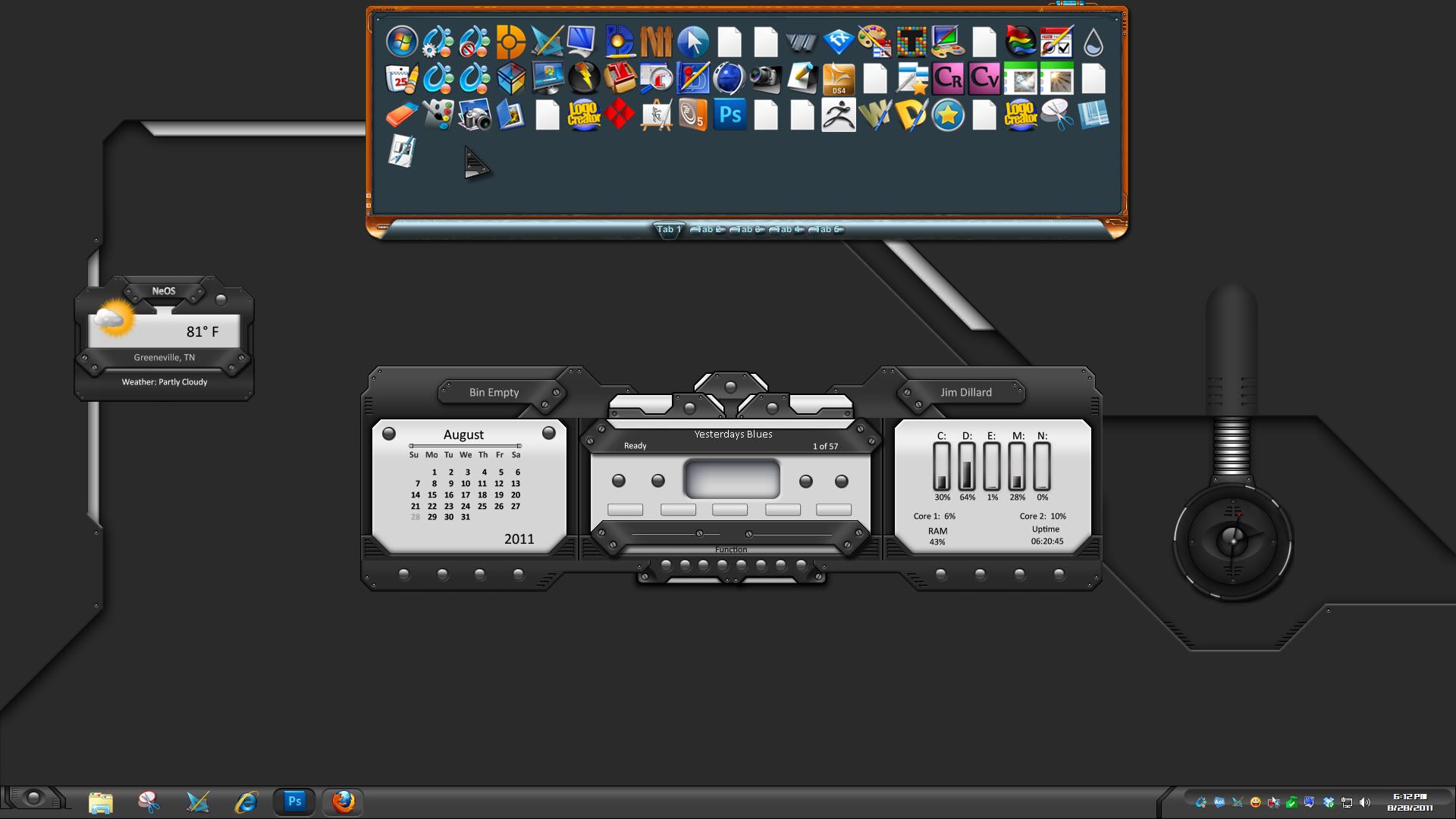
Multiple rows (shelves).. Possible? If not, I'm requesting it.

I love ObjectDock. I have it set to autohide and drop down from the top of my screen. It looks like a shelf of icons when it drops down. Very neat, organized, and convenient.

I'm starting to accumulate many icons. I'm almost at a point where the shelf full of icons is as wide as the screen. I thought it would be a great thing to have multiple shelves drop down instead of just the one. I could organize the icons even further, sorting icons to designated shelves.

I use an add-on for Firefox called Multirow Bookmarks Toolbar. I always thought it was a silly design to have extra bookmarks scrolled off the screen where you couldn't see them. Seemed to defeat its own purpose of having a bookmarks toolbar in the first place. Someone designed an app that allowed for multiple rows of bookmarks on the bookmarks toolbar. That kind of feature seems to me like a natural thing for ObjectDock.

I hope such a feature can be added in future additions of ObjectDock. I would just love to have multiple rows (shelves) of icons drop down from one dock.

5,655 views 9 replies
Reply #1 Top

I believe if you are running the paid version of ObjectDock you can have as many docks as you need.  :sun:

Reply #2 Top

I'm starting to accumulate many icons. I'm almost at a point where the shelf full of icons is as wide as the screen. I thought it would be a great thing to have multiple shelves drop down instead of just the one
End of quote

You can do this by using a tabbed dock and dragging it to make it several rows of icons.


Reply #3 Top

Check da box, Philly.

Reply #4 Top

Jeez, I feel like such a n00b.. I never new there were tabs. Why didn't I ever just click on "create a new dock"?

And why is your desktop so *#@$% COOL!!


ObjectDock is just great.

Thanks much, RedneckDude!


-Howard

Reply #5 Top

OK, I tried "tabbed docks"... that's almost the functionality I am looking for, but not quite. I can still see the tabs when it autohides. Is there any way to make the whole thing, tabs and all, hide away?

I use a "quicklaunch dock" which autohides at the top of my screen. I like a clean desktop -- no icons at all, no menu bars, no taskbars, no nothing. Everything hides away so that there is nothing to see but my wallpaper.

I would love to be able to make my "quicklaunch dock" create a new row of icons when it reaches a number of icons I prescribe. I'd love to have all the functionality of the "quicklaunch dock" as I have right now with the way it autohides and zooms -PLUS- giving me multiple rows of icons in the one dock.

Here's a photoshopped screenshot of my vision for the quicklaunch dock... multiple autohiding layers of "shelves" in one quicklaunch dock. In this image you will see one quicklaunch dock with three shelves -

http://www.imagebam.com/image/ac6718147681995

Of course I imagine having more than just three icons on each shelf. I currently have 25 icons on my shelf. I would have many, many more than that if ObjectDock would allow for multiple shelves in its quicklaunch dock.

So can this be done?

Reply #6 Top

You mean like this?  http://screencast.com/t/CROpS1Txyez

Three docks.  Each one a bit further away from the edge,  http://screencast.com/t/uGYwma9i8Tx


Reply #7 Top

That's cool Zub!  :beer:

Reply #8 Top

I mean EXACTLY like that, Zubaz! Thank you so much!

Now I ran into a new problem.. I use the "Acrylic" style on the quicklaunch dock. The reflection does not stay aligned to the dock if the dock is positioned away from the edge of the top of the screen. I positioned one dock to appear just below the dock aligned to the top edge of the screen. That lower dock is giving me a reflection problem. The lower dock hides away just perfectly but the reflection does not hide completely away. I changed the distance from the edge for the lower dock. It seems that the further away I set the distance for the dock the further away the reflection gets from the dock. The reflection stays aligned to the dock only if the dock is aligned to the top edge of the screen.

I suppose I'll have to find a new style but I think I might like to bring this issue to the Acrylic developers attention. Its my favorite style. I hate to have to lose the appearance (reflections, zooming, etc) because its one of the reasons I love ObjectDock so much, but the need for the functionality of multiple shelves will take precedent unfortunately.

Reply #9 Top

Happy to hepl.