Two problems with a skin

I have two problems with the skin I'm using, it's called Radiate.  I don't know if I can get help here or not.  I don't know if the problem lies with WindowBlinds as a whole or just the skin itself.  But I though I'd ask here first.

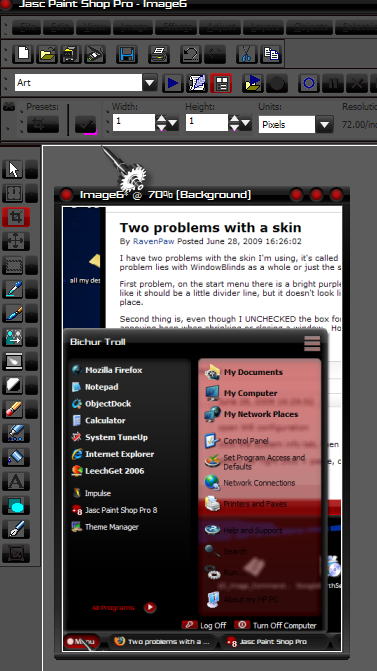
First problem, on the start menu there is a bright purple line that I know should not be there.  It's right under my programs.  Looks like it should be a little divider line, but it doesn't look like it should.  A couple pixels tall, bright purple line that looks very out of place.

Second thing is, even though I UNCHECKED the box for "play sounds defined by the skin (if any)" there is still sound.  A very annoying beep when shrinking or closing a window.  How can I get rid of that sound?

4,491 views 17 replies
Reply #1 Top

open WB configuration

click the system info tab, then the copy text button

ctrl+v (or right click > paste, depending on browser) here and post the info


Reply #2 Top

I tried searching the WC WB gallery library for the skin and didn't find it.  Where did you get the skin from?

Usually the best thing to do, no matter where you download the skin from is to contact the skinner directly when you feel you are having problems.

Reply #3 Top

WindowBlinds version : WindowBlinds 6.3 (build 67 x86) - Shareware

WindowBlinds is installed correctly on this PC
Your machine does not support per pixel borders on WindowBlinds skins.

This is because :

Your computer graphics hardware does not support acceleration of per pixel alpha.  WindowBlinds requires this for per pixel alphablended borders as without it performance would be poor.  Please see if you can obtain new drivers for your graphics hardware.  Recent ATI & NVIDIA boards should support this feature.  Onboard graphics tend not to.

It appears you have enabled limited per pixel mode, so WindowBlinds will support per pixel, but with no hardware support.

(Plug and Play Monitor) 1 is attached to RADEON 9200  

Wblind.dll         2008/09/17 08:05:10
Wbsrv.dll         2008/09/17 08:05:10
Wbconfig.exe         2008/09/17 08:05:57
Wbload.exe         2008/04/26 16:14:14
Wbhelp.dll         2008/04/26 16:14:07
Wbui.dll         2008/04/26 16:14:24
Tray.dll              2008/04/26 16:14:21
Screen.exe         2008/07/22 16:42:31

Reply #4 Top

I tried searching the WC WB gallery library for the skin and didn't find it. Where did you get the skin from?
End of quote

I found it at Customize.org.  http://customize.org/windowblinds/themes/41820
Although if I remember right I actually downloaded it from deviantart because the download at Customize.org wouldn't work.

I'm going to try to find a way to contact the creator of the skin.

Reply #5 Top
This one?


Saturday, September 10, 2005


That was made for WB 4.6...


I'm not seeing the line you mention, but I do see pink in PSP on the button... since it's WB4.6, I'm guessing it's a 'magic pink' effect gone awry - magic pink can be used for tranparent, but if it's slightly off it will show

Reply #7 Top

This one?

End of quote


oops, guess not... sort of - should be the same skin though - he mentions alpha blending in the description at customize but...

Reply #8 Top

Its a pretty old skin, probably broken after WB updates, If you can't get Josephs to update it I'd suggest trying some diff. skins.

Reply #9 Top

Your machine does not support per pixel borders on WindowBlinds skins.

This is because :

Your computer graphics hardware does not support acceleration of per pixel alpha.  WindowBlinds requires this for per pixel alphablended borders as without it performance would be poor.  Please see if you can obtain new drivers for your graphics hardware.  Recent ATI & NVIDIA boards should support this feature.  Onboard graphics tend not to.

End of quote

http://support.amd.com/us/gpudownload/Pages/index.aspx


where did you download that version from? and how long ago?

6.4 has been out since February and download.com doesn't stock older versions - and all the shareware versions are 30 day trials


Reply #10 Top

Yes, that's the one.  You can see what the menu should look like on those previews, here is what my menu looks like:


And what about the sound, can anything be done about that?


Its a pretty old skin, probably broken after WB updates, If you can't get Josephs to update it I'd suggest trying some diff. skins.
End of quote

Well, I have searched and searched and never found a skin I like as much as this one.  :(  As annoying as the purple line is, if it can't be fixed, I may just live with it so I can keep this skin.

Reply #11 Top

where did you download that version from? and how long ago?

6.4 has been out since February and download.com doesn't stock older versions - and all the shareware versions are 30 day trials
End of quote

I downloaded it from stardock just a few weeks ago.  I wanted to try it out before deciding if I wanted to buy it.  I will be perchasing the full version soon.

Reply #12 Top

Downloaded and applied Radiate here on XP, no problems at all with the current release of Windowblinds 7 beta.  |-)

Reply #13 Top

And what about the sound, can anything be done about that?
End of quote


Delete the .wav from the skin folder. ^_^

Reply #14 Top

OMG guys I fixed it!  I just re-downloaded it from the link you posted, and the evil pink line of doom is gone!  It just must have been an old version I first downloaded.  Now don't I feel foolish!XD


But the problem of the sound is still there.  Why can't I disable the beeps when shrinking and closing windows?

Reply #15 Top

Delete the .wav from the skin folder.
End of quote

But of course!  Ya know I looked for the sound file before and couldn't find it, I don't know why.  But now I've found it, and deleted the annoying thing.

I still am curios as to why unchecking play sounds defined by the skin didn't disable the sound in the first place.  But I guess it doesn't matter now.


All problems solved.  Thank you very much guys!  Although I feel silly, I should have been able to figure this all out on my own.  But it's all good now!  :D

Reply #16 Top

1. download latest drivers for your graphics card here http://support.amd.com/us/gpudownload/Pages/radeon-prer300-xp.aspx

2. open C:\Documents and Settings\All Users\Documents\Stardock\WindowBlinds\Radiate and delete button.wav to remove the sounds. After you delete the file reapply the skin via wbconfig.

As for the purple line you are seeing I beleieve it is

It appears you have enabled limited per pixel mode, so WindowBlinds will support per pixel, but with no hardware support.
End of quote
this is where it will cause you problems. Maybe the driver update will solve this.

I believe you are using XP and hope this helps with your problems. Would be nice if you updated your WB program to the latest.I'm using WindowBlinds version : WindowBlinds 6.4 (build 73 x86) here and have no problems with this skin whatsoever.

As seen here which I like the compact version of this skin...

Good to hear that! :grin:

Reply #17 Top

why unchecking play sounds defined by the skin didn't disable the sound
End of quote


Thats been asked a few...or more times...it just dosnt work.;)