Unable to install/setup Impulse

Hello,

I have been having trouble installing Impluse, I uninstalled Sins of a Solar Empire, and Impulse to see if that fixes it, re-downloaded Impulse, but right when I start the set-up, it shows me this:
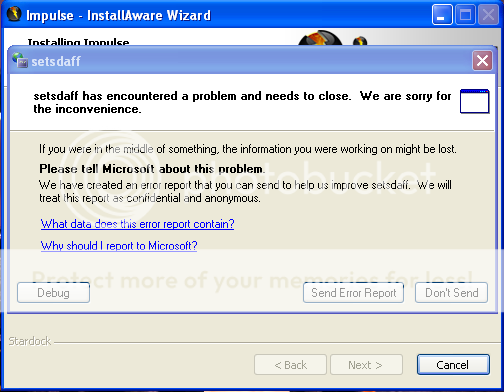


It shows me that report every time I try to install it, I clicked "Don't Send" and it finishes the set-up saying it was "successful" yet when I start up Impulse it gives me another Error Report, similiar to the one above. SINS gets installed perfectly fine, yet I cannot update it, due to Impulse not being able to start.


Any help on this will be greatly appreciated.


Regards

2,838 views 3 replies
Reply #1 Top

Problem solved, I had to go back to IE 7 by going to Start-Control Panel-Add or Remove Programs-Scroll down to IE 8 and remove it. Then  I restarted my computer. Next I cleaned Microsoft .net and reinstalled the Microsoft .net 2.0. I re-downloaded Impulse, and now it works 100%.


I got this information from: https://forums.joeuser.com/323495 and https://forums.joeuser.com/341573


Thank you Kend0,

Regards

Reply #2 Top

seriously thank you.  I couldnt figure out why impulse all of a sudden stopped working.  I havent been on it until now to download the updates.  For me i just went to windows update and downloaded the newest .net 3.5..... didnt need to change back to internet explore 7 or anything else.  thanks again.

Reply #3 Top

The "setsdaff" error typically indicates .NET problems. In XP, removing and re-installing .NET 2.0 usually does the trick. In Vista, sometimes updating to the latest .NET components takes care of it.