Mysterious Black box behind Startpanel

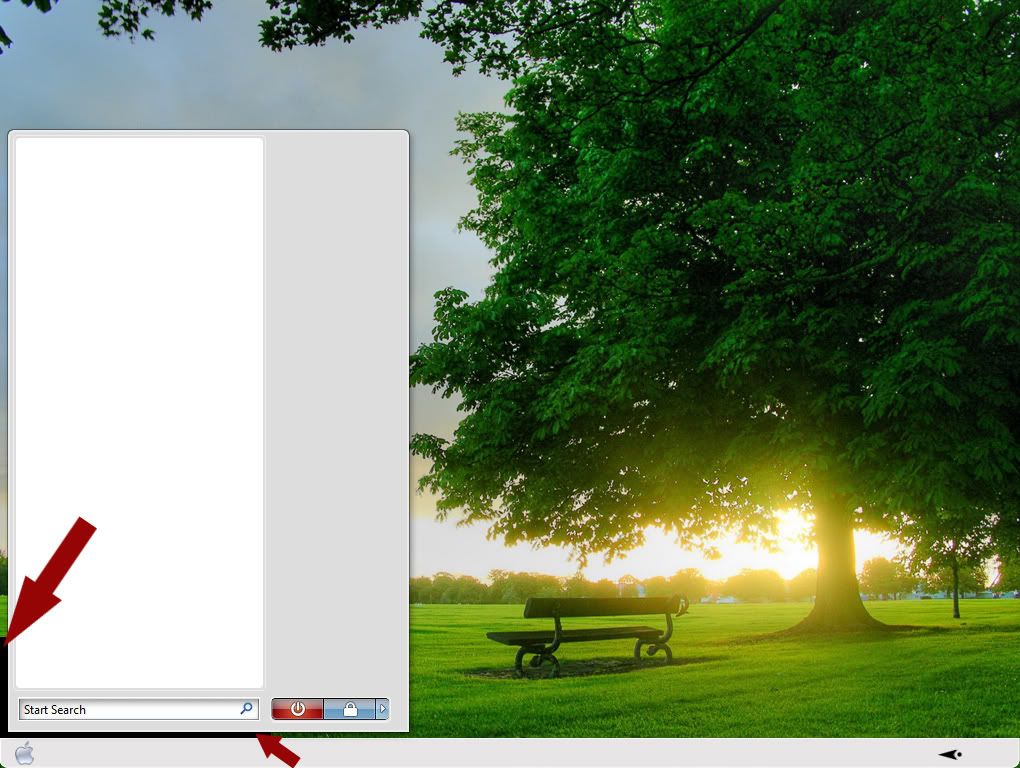
As soon as I install Vista Ultimate, the taskbar transparency issued SHOULD be resolved. But I would like to have the issue of the black box behind the start panel resolved.

When I initially applied the SL style on my laptop (currently running Vista Home Basic) there was NO black box behind the startpanel. But the original SL start panel was too narrow and did'nt display the Right List side items. So created my own wider startpanel and adjusted the margins so that it fit perfectly. But now I have this black box behind the startpanel. Therfore, since there was no black box behind the startpanel with the SL style's original images, I think its safe to assume that this black box IS'NT due to the lack of Aero support of my home basic version of Vista(as is the case with the taskbar). Perhaps I adjusted the margin setting improperly when I applied my startpanel images. Can you please assist? I drew the image below to illustrate my issue. 
6,857 views 10 replies
Reply #1 Top

as far as i know., the vertion of Vista doesn't really matter..., i would like to know the setup of your margins at SKS(skin studio)., that would give us a better idea of how you are doing it ;)

Reply #2 Top

Quoting TYCUS, reply 1
as far as i know., the vertion of Vista doesn't really matter..., i would like to know the setup of your margins at SKS(skin studio)., that would give us a better idea of how you are doing it
End of TYCUS's quote

I'm at work right now, so I'll have to wait til I get home in about 5 hours to post the settings for you. Is there an easy way to post all of the margins info for each of the 5 startpanel parts? or do I just have to type it all out? Also, should I post the settings under the other tabs such as "glyph", and I cant remember the others -- but you know what I mean?

Reply #3 Top

Your wb or vista not allow to use perpixel skin.

What your Windows Experience Index base score?

Per-pixel skinning requires your hardware has WDDM drivers and a graphics experience score of at least 2.

Open windowblinds,click on system info copy and paste your windowblids system information here.


Reply #4 Top

What your Windows Experience Index base score?

Per-pixel skinning requires your hardware has WDDM drivers and a graphics experience score of at least 2.

Open windowblinds,click on system info copy and paste your windowblids system information here.
End of quote
That can be found in his other post. LINK

 So you think Home Basic is the culprit then? (limited Aero) Maybe you should install your Upgrade then see what it looks like then ortizlgnd.It may fix your problem.

Reply #5 Top

Quoting Wizard1956, reply 4

What your Windows Experience Index base score?

Per-pixel skinning requires your hardware has WDDM drivers and a graphics experience score of at least 2.

Open windowblinds,click on system info copy and paste your windowblids system information here.That can be found in his other post. LINK


 So you think Home Basic is the culprit then? (limited Aero) Maybe you should install your Upgrade then see what it looks like then ortizlgnd.It may fix your problem.

End of Wizard1956's quote

Here's the info: (Actually, This info is old. I've already upgraded to WB 6.4. And I installed the latest updates for my graphic card)

Your computer has a Windows Experience Index base score of 2
Your Windows Graphics Experience score is 2.4

WindowBlinds version : WindowBlinds 6.3 (build 112 x86 - Vista Edition)

WindowBlinds is installed correctly on this PC
WindowBlinds appears to be activated on this PC
(Generic PnP Monitor) 1 is attached to ATI Radeon Xpress Series

Wblind.dll      2008/11/06 12:22:20
Wbsrv.dll      2008/09/16 07:44:22
Wbconfig.exe      2008/11/18 17:15:54
Wbload.exe      2008/04/26 15:14:14
Wbhelp.dll      2008/04/26 15:14:07
Tray.dll           2008/04/26 15:14:21
Wbload.dll           2008/04/26 15:14:28
Screen.exe      2008/07/15 10:31:09


Also, please see the thread below for more info.

https://forums.stardock.com/345741

Reply #6 Top

Here's my system info:

Your computer has a Windows Experience Index base score of 2
Your Windows Graphics Experience score is 2.4

WindowBlinds version : WindowBlinds 6.4 (build 129 x86 - Vista Edition)

WindowBlinds is installed correctly on this PC
WindowBlinds appears to be activated on this PC
(Generic PnP Monitor) 1 is attached to ATI Radeon Xpress Series

Wblind.dll      2009/03/24 13:59:20
Wbsrv.dll      2009/03/24 17:03:02
Wbconfig.exe      2009/03/24 17:04:20
Wbload.exe      2008/04/26 15:14:14
Wbhelp.dll      2008/04/26 15:14:07
Tray.dll           2008/04/26 15:14:21
Wbload.dll           2008/04/28 12:34:28
Screen.exe      2008/07/15 10:31:09


Reply #7 Top

I was told that inorder to get this black box away, DWM needs to be set to "Run". Anyone know where I can find DWM and how to set it to Run?

Reply #9 Top

You might want to try running your windows experience score (again) Some drivers arent recognized by vista until the test is done.