I've never found the recycle bin on the desktop very useful, so I almost always disable it as one of the first things that I do. Windows Vista has an even simpler way to hide the icon than XP does, but why couldn't they have disabled it by default?
Just right-click on the icon and select delete from the menu. It's as simple as that.
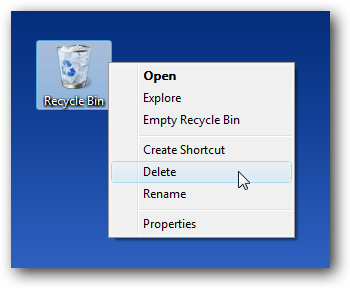
Note that you can also configure this from the Desktop Icon Settings in Personalization.
If you've removed or lost system icons on your desktop, you can restore them easily.
OR For XP...
Download TweakUI like Bebi Bulma said
OR
If you are trying to delete all the icons on your desktop then you would notice that only Recycle Bin icon is not getting deleted where as all the icons like My Computer can easily be removed. This icon can easily removed & retained after deleting by following these steps :--
Deleting Recycle Bin icon :
- Open registry Editor(regedit.exe) in Run Under start menu.
- Navigate to HKEY_LOCAL_MACHINE\SOFTWARE\Microsoft\Windows\CurrentVersion\Explorer\
Desktop\NameSpace\{645FF040-5081-101B-9F08-00AA002F954E}
- Delete the Key {645FF040-5081-101B-9F08-00AA002F954E} by right clicking on it & selecting Delete
- Then close the editor.
- Reboot or Restart your PC
after this your Recycle Bin icon will be removed from the desktop...
Bringing Back Recycle Bin Icon on Desktop again :
- Open registry Editor(regedit.exe) in Run Under start menu.
- Navigate to HKEY_LOCAL_MACHINE\SOFTWARE\Microsoft\Windows\CurrentVersion\Explorer\ Desktop\NameSpace
- Then right click on NameSpace,select New & then select Key & name it as
{645FF040-5081-101B-9F08-00AA002F954E}
- Your Recycle Bin icon will again be restored....


 Stardock Forums
 WinCustomize Forums