How do you remove transparency from taskbar

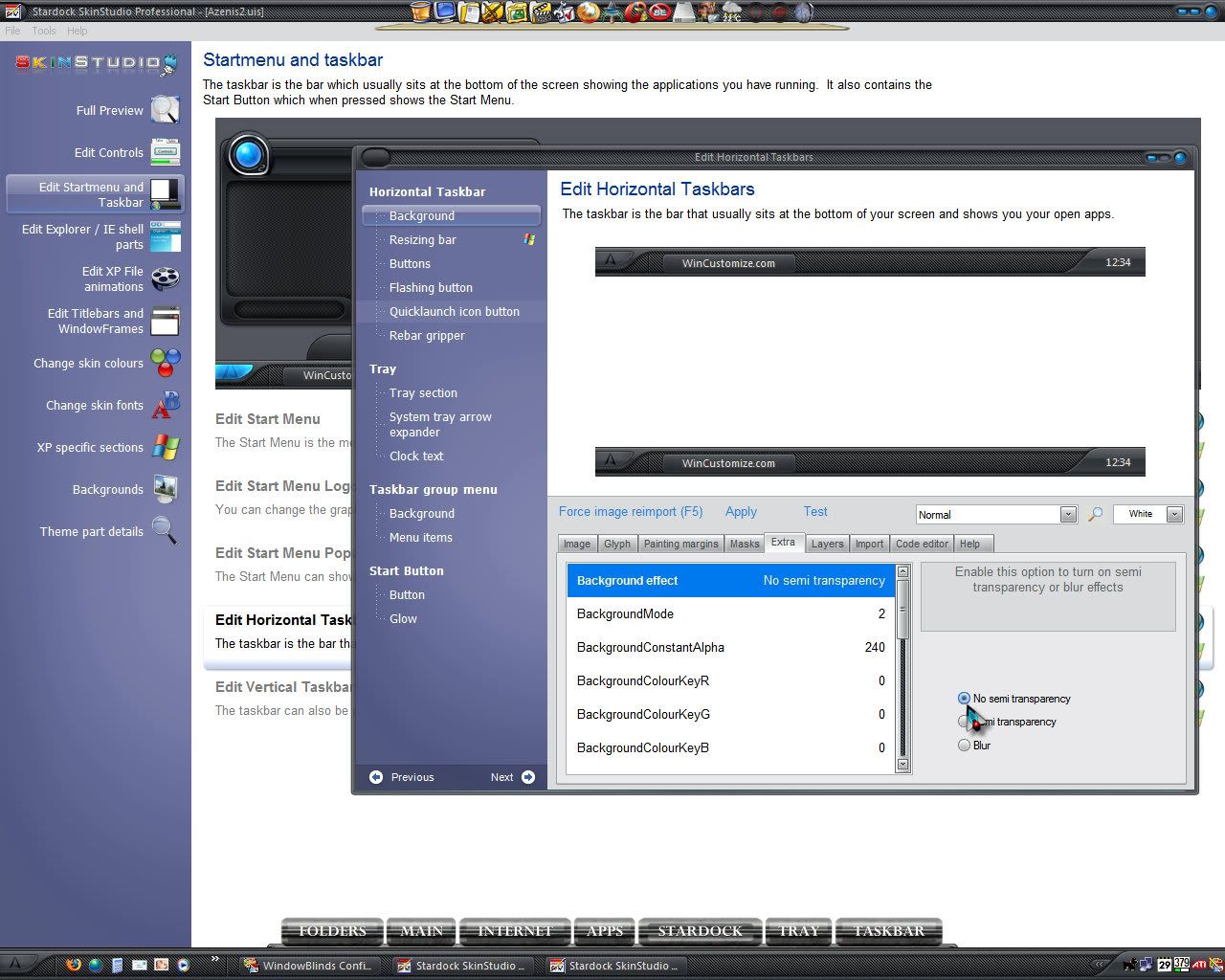
Hi, I am using the skin Azenis 2 and I want to remove the transparency from the taskbar using Skin Studio... how do I go about it?
4,260 views 13 replies
Reply #1 Top
You should be able to adjust the taskbar transprency in the Transparency and Blur menu in the WB config. Just move the slider to the right.
Reply #2 Top
I tried that, and after applying the setting it didn't change
Reply #3 Top
If the author of the skin used transparency for the taskbar (ie, the taskbar image itself is transparent), there is nothing you can really do to get rid of the transparency, other than making a new image for the taskbar that is not transparent...
Reply #4 Top
You can open the skin in SKS 5....then on the left in the tree view.....click on taskbar....then the plus to open it then choose horizontal. The at the top where you see "Analyze"..."code"..."Template"..."Preview"....choose code and you'll see "BackgroundEffect = ?...if it's set at 1 change it to 10 and it should get rid of the tranparency.
Reply #5 Top
You can open the skin in SKS 5....then on the left in the tree view.....click on taskbar....then the plus to open it then choose horizontal. The at the top where you see "Analyze"..."code"..."Template"..."Preview"....choose code and you'll see "BackgroundEffect = ?...if it's set at 1 change it to 10 and it should get rid of the tranparency
End of quote


Hey...I never knew that! Learn something new everyday!  :CONGRAT: 
Reply #6 Top
Please note though that if the skin was initially created or finalized using SKS 6 and a New Programs highlight image on the All Programs menu was created, saving it back in SKS 5 will lose the image as SKS 5 does not support it. This does not apply to Windows Vista though.
Reply #7 Top
anyone have a download link for SKS 5?
Reply #8 Top
Hey...I never knew that! Learn something new everyday!
End of quote


Jazzy! Shame on you!

anyone have a download link for SKS 5?
End of quote


If ya do a google search you can probably find a copy out there somewhere.
Reply #9 Top


Hey...I never knew that! Learn something new everyday!
End of quote


Jazzy! Shame on you!
End of quote


Hate to tell WebGizmos... nowadays women are encouraged to learn. ;)
Reply #10 Top
"BackgroundEffect = ?...if it's set at 1 change it to 10 and it should get rid of the tranparency
End of quote


Needs to be set to = 0


Can also be fixed with SKS6, the taskbar is not trans but the resize bar is, setting task to no trans will also make resize bar not trans.

For SKS6

Reply #11 Top
Hate to tell WebGizmos... nowadays women are encouraged to learn.
End of quote


I was just surprised she didn't know that with all the skins she's done!
Reply #12 Top
I was just surprised she didn't know that with all the skins she's done!
End of quote


LOL! I have never had a desire to remove transparency from an image....so, how to remove transparency was a non-issue for me!  :d 
Reply #13 Top
Personal taste, I think Azenis 2 looks great with trans and blur; this is my own edit of skin.