Left part background of Vista explorer

Though I´ve posted that aleady somewhere else https://forums.wincustomize.com/171742, here it is again (I can´t beleive there is no solution):

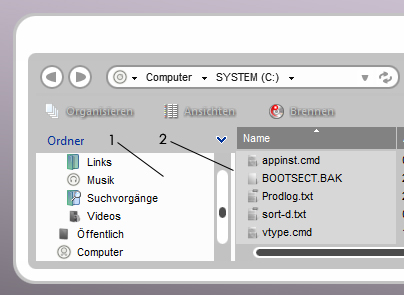
does anybody know how to get the left side of vista explorer to use a certain backgroud (color)??

please help!!!!!!!
6,113 views 10 replies
Reply #1 Top
can you possibly show a screenshot of where you mean? that would help greatly......
Reply #2 Top
here it is:


I meant the background labelled "1". If someone also knows how to change the color of the vertical bar (2) that would be perfect!
Reply #3 Top
number 1 is explorer_folder_bar_vst.bmp which can be found here:

Explorer and IE/ Folders bar

number 2 is obviously yr vertical bar which can be found here:

Vertical Scrollbars/background.

hope this helps!!!
Reply #4 Top
oh, i forgot to add, as for changing the colour, you can do that in yr art program.....ps, or whatever is yr choice of art program.....

my mistake on number 1, i looked at the wrong thing.......could be windowbackground colour?
just a wild guess.......i will have to look into it.....sorry about the error i need to open my eyes.
Reply #5 Top
hmm, the window backgroud color acts only on the right part of explorer (in Vista). For XP both sides are skinned by it. And that´s why I´m asking here. For you guys from stardock, are you planning to fix this for Vista or am I totally wrong, and there is already a way to change that color (or background image)?

For Number2: it´s actually the resizing bar for the folders area. To my opinion it´s a little huge in Vista, but anyway, again, are there any plans to make it skinnable?

This all sounds like I´m unhappy with WB-SkS-Vista, so at this point I have to mention, that up to here the people from Stardock have done a great job on Skinstudio adapting it to Vista within a rather short time - there are really so many new features in Vista - and many of them can now be skinned by skinstudio, that´s great.

But also, there are several things left to do :-)


P.S.: due to the things mentioned above I´ve only made bright WB skins for Vista so far, dark skins really can´t be made perfectly and all dark skins out there are somehow just a compromise (to my opinion)...
Reply #8 Top
Neither can be skinned or fixed until it is added to SKS.
Reply #10 Top
yup i made a post about this awhile ago. also you cant change the font in the details pane. so you cant make that background a dark color either. also,jekylll #2 is not the scrollbar background
