


Can't start the game
from  Sins Forums
Sins Forums
Right, got Sins last tuesday and was playing it (with 1.03 installed) without any problems yesteday, but now when I try to start it the screen goes black and I get this message:
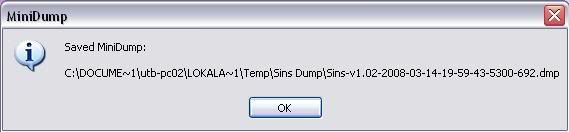
Right, so this minidump-thingy should be in documents and settings -> user utb-pc02 -> Local applications -> Temp -> Sins Dump, right? Well, fun thing I cannot find Sins Dump anywhere. Not in the user directory, neither by searching for it.
The technical FAQ tells me to send it along with a copy of dxdiag to Ironclad to recieve help, but that ain't easy when I can't even find the file!
Anyone know what I can do?
Right, so this minidump-thingy should be in documents and settings -> user utb-pc02 -> Local applications -> Temp -> Sins Dump, right? Well, fun thing I cannot find Sins Dump anywhere. Not in the user directory, neither by searching for it.
The technical FAQ tells me to send it along with a copy of dxdiag to Ironclad to recieve help, but that ain't easy when I can't even find the file!
Anyone know what I can do?

