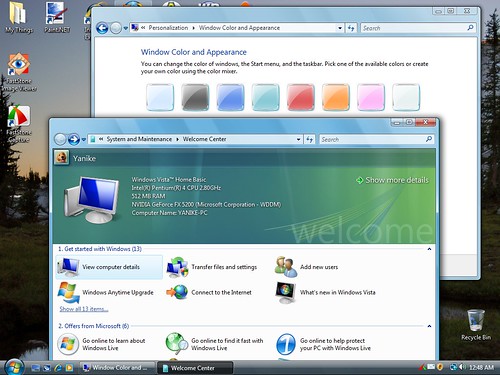
What exactly does WindowBlinds 5.5 support in Vista?

I'm one of the unlucky people who purchased a "Vista Ready" laptop in 2006 with an Intel 915GM chipset. Intel has declined to create WDDM drivers for the 915GM chipset, citing hardware limitations, so that means no Aero for my laptop.

So the only two choices I have for themes on my laptop are Windows Classic and Vista Basic - both of which make me go... Ugh!!!

I've read a lot about what WindowBlinds will be able to do in Vista thanks to DWM... But what about people like me, who can't run DWM? I'd be perfectly happy to be able to apply some older, XP-compatible skins... Anything but Vista Basic!

Thanks,

- Bloody Templar
13,184 views 40 replies
Reply #1 Top
Well for one thing , Intel hardware does not support pixel shading or a good portion of hardware acceleration features that you would find on actual DX9 cards...

Its just the way vista handles drivers differently would be my guess.
Reply #2 Top
I don't think you quite understood my question...

My laptop won't work with Aero because Aero only works with WDDM drivers. Intel is not providing WDDM drivers for any chipset before 945GM. Therefore, I have to use XPDM drivers - aka the XP drivers.

My question is, will WindowBlinds 5.5 support the same level of skinning on Vista that it already does on XP in the absence of DWM? Or does WB 5.5 assume that, since I'm running Vista, I must be running DWM?
Reply #3 Top

WB 5.5 will detect that the DWM cannot run on your computer & will run WB skins without any per pixel transparency (apart from menus).

So what you get on XP now, apart from no semi transparency support.

Reply #4 Top
Niel . .can I get shorter words?

In XP and 5.5, I get transparency.
With the same WB version, the same video card (without DWM), and Vista . . . I lose functionality (per-pixel transparency)?
Reply #5 Top

Yes.  Transparency on Vista requires you to have WDDM drivers.

If your machine does not have WDDM drivers and you want to use per pixel skins, do not upgrade to Vista.

Reply #6 Top
Wow.

Thanks for the info.

Zubaz starts dumpster diving for a new card

(I knew I should have tried harder in the GUIChamps!)
Reply #7 Top

An ATI 9500 or higher or a nvidia 5200 or higher have WDDM drivers.  128MB min really.  If you have 2 screens then 256 might be worthwhile if you have a midrange card.

Personally I would suggest using ATI as I have had some problems with the nvidia drivers on Vista (BSOD type problems)

Reply #8 Top
Thanks again Neil!
Reply #9 Top
Thanks, Neil.

Is the 5.5 version still going to be released today (as per the roadmap)?
Reply #11 Top

I think the release date is next week with a RC released this week.

Reply #13 Top
5.5 on XP includes the new improved UI plus a number of WB tweaks & fixes.  So yes XP users should install 5.5 when we release it.
Reply #14 Top
Get Aero in Vista Home Basic

Start Menu > Click in the "Start Search" box > Type in "run" > Click on "Run" under the list of Programs found > Type "regedit" in the text box and click "Open" or press "Enter" key.

When the "Registry Editor" opens up, click and open the following folders:

"HKEY_CURRENT_USER" then "Software" then "Microsoft" then "Windows" and then "DWM".

Double click on "Composition" type "1" in the "Value data" field and click on the "OK" button.

Double click on "CompositionPolicy" type "2" in the "Value data" field and click on the "OK" button.

Exit out of the Registry Editor.

Start Menu > Click in the "Start Search" box > Type in "command prompt" > Click on "Command Prompt" under the list of Programs found > type in "net stop uxsms" press the "Enter" key > Wait for it to do its thing, then type in "net start uxsms" press "Enter" key.

Screen may flicker to set it up. Then right-click on your desktop and click on "Personalize" > Click on "Window Color and Appearance". You should be able to handle it from here
Reply #15 Top
Just a warning, editing your registry can fry your system.  Use regedit at your own risk.
Reply #16 Top
I ought to also point out that you will not get full aero doing that.  No blur, no flip3d, no taskbar tooltip previews, no semi transparency (apart from the shadows)
Reply #17 Top
Neil:

I'm stuck with a tablet PC that also has a 915 chipset and would like to get something better than plain Vista Basic.

So, are you saying that you tried this workaround to getting Aero? If so, what DID you get as a result?

Did you then go back to Vista basic?

Would like to know what happened before I start hacking the registry.

Thanks
Reply #18 Top
Zubaz calls for screenshots 
Reply #20 Top
I ought to also point out that you will not get full aero doing that.  No blur, no flip3d, no taskbar tooltip previews, no semi transparency (apart from the shadows)


I know it doesn't, but the link below to my thread has programs that do give you taskbar tooltip previews, flip 3d and more.

http://www.winmatrix.com/forums/index.php?showtopic=11879


Enjoy Vista Home Basic
Reply #21 Top

Mark Phelps : If your card does not have WDDM drivers then you will not get per pixel skins.

Those registry hacks, which should not be needed on Home Basic as that theme will be listed under themes anyway if your hardware is capable, will do nothing for you.

If you want an aero look and have 915 graphics then I think you will probably have to stay with XP and WB 5 per pixel skins.

If you do not care about per pixel and just want a different look than Home Basic, WB 5.5 for Vista should work on your hardware.

Reply #22 Top

An ATI 9500 or higher or a nvidia 5200 or higher have WDDM drivers.  128MB min really.  If you have 2 screens then 256 might be worthwhile if you have a midrange card.


Personally I would suggest using ATI as I have had some problems with the nvidia drivers on Vista (BSOD type problems)


I agree, Neil. The video card which I first ordered with my new Dell was an nVidia. I have since found out that the card Dell gave me used shared video memory (even though it said 256MB VRAM in their ad). I called Dell support and made a big stink, and they sent me an ATI x1300 Pro w/256MB ONBOARD VRAM.

Vista runs great with it. And my games and WindowBlinds 5.5 (beta) also runs great. HOWEVER, unless the skins I use were truly designed for Vista, things don't go very well.

By the way, can anyone tell me how to set round borders on skins with round borders whe windows are maximized? Previously, I was able to open skins in SkinStudio, and set the Screen Edge Clip (Top, Bottom, Left, Right) to 0 (zero) to obtain them. However, this apparently does not work with per-pixel skins. Setting them to 0 (zero) does nothing.

Currently, I have to check "Never use per-pixel borders on a skin" to obtain this. I really would like to be able to do both at the same time, have per-pixel borders, and round corners in maximized skins.

Also, I had to uninstall and reinstall Windowblinds several times before it would work under Vista (Home Premium).

Another question: Is the latest release of WindowBlinds 5.5 (5.49o[b].041, and released on 02/01/2007? This is what Stardock Central tells me.

However, this is what "View my system Information" in WB config says:

Your computer has a Windows Experience Index base score of 4.1

Your Windows Graphics Experience score is 4.6

WindowBlinds version : WindowBlinds 5 (5.50 (build 89 x86 - Vista Edition))

WindowBlinds is installed correctly on this PC

WindowBlinds appears to be activated on this PC

You have 2 monitors.

(Dell 2007WFP (Digital)) 1 is attached to Radeon X1300 Series (Microsoft Corporation - WDDM)
(Generic PnP Monitor) 2 is attached to Radeon X1300 Series (Microsoft Corporation - WDDM)

Wblind.dll 2007/02/01 18:48:20
Wblind64.dll 2006/10/09 11:51:37
Wbsrv.dll 2007/02/01 11:32:39


I don't quite understand why Wblind64.dll was installed, since my OS is 32-bit.

Also, when I click on "Skins and Themes" in SDC, I am always getting an error when SDC attempts to download the XML data for any Library I attempt to open.

The error is "There was an error downloading the selected library. Please try again." This happens with ANY of the listed libraries. IS Wincustomize down? (and has been down for a week?)

Anyway, I probably should be submitting this to Stardock Support rather than here. I just hope others may have had the same problems with Object Desktop Network.

Donald McDaniel


Reply #24 Top
You're right, it doesn't work -- I tried it.

Will probably use WB 5.5 and my "old" WB skin that I like so much in XP.

So, I'll try that when WB 5.5 comes out.
Reply #25 Top
Actually, Mark, the problem I was having with downloading using the "Skins and Themes" choice in the Sidebar has been fixed by Stardock. I've been able to download for the last two or three days. NOW if only someone would be willing to show me how to enter a line-feed/carriage return in one of these "Add a Reply" forms. There are a few skins and themes for Vista on WinCustomize right now. But for the most part, all other WB skins and themes seem to work ok. My favorites right now are "Azenis2" and "BlueNite WB5". They really look great in Vista w/Aero. By the way, I've found a half-way decent tweaker for Vista, which pretty much replaces all the features of TweakUI/XP: http://www.totalidea.com It's TweakVista VI. If anyone trys it out, stay away from the Registry tweaks and cleaning, though, at least until the product is a little more mature. I tried EVERYTHING in it, and wound up having to reinstall Vista clean. Anyway, its visual tweaks seem to work ok, and will even remove "shortcut to" and the shortcut arrow overlay from shorcuts. However, it is still a little shaky, because it fails to properly remove itself from memory when one shuts down his machine. TotalIdea claims that they are working with Stardock on this product? Don't know if that's true or not. Perhaps someone from Stardock could comment on that?