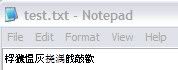
Funny: How to Break Windows Notepad

It's not a bug! It's unintended irony!

Here's a really funny way to break Notepad that a coworker showed me this morning. I bet this is one of those jokes that's been around for ages, but this was the first I ever heard of it, so it's new to me.

This actually works. It will not crash your computer, it just breaks Notepad in that it causes it to display very oddly. No perm damage comes of the following steps.

Here's how to do it:
1. Open up Notepad (not Wordpad, not Word or any other word processor)
2. Type in this sentence exactly (without quotes): "this app can break"
3. Save the file to your hard drive.
4. Close Notepad
5. Open the saved file by double clicking it.

Instead of seeing your sentence, you should see a series of squares. For whatever reason, Notepad can't figure out what to do with that series of characters and breaks :)

Again, it doesn't crash the app or anything, it's just a funny little twise of fate/unintended feature :)
126,248 views 37 replies
Reply #1 Top
Must be another easter egg.  But it works.  You guys have too much time on your hands.
Reply #2 Top
We're IT security, we're supposed to break things in interesting ways!
Reply #3 Top

We're IT security, we're supposed to break things in interesting ways!

I thought that was the IT network engineers.

Reply #4 Top
lol, thats odd indeed. On my computer, it showed up as symbols (chinese or Japanese, not sure which one).

So I took it to babble fish and got the following:

Simp Chinese: 桴 □the worried thoughts ash 挠 □□knocks □
Trad Chinese: 桴 獩 □the ash □湡戠 knocks happy
Japanese: 桴? ? Ash? ? ? 敲 歡

Quite interesting
Reply #5 Top
same
i think it's chinese
Reply #6 Top
googles translator said this
"After 獩 indignant grey harassment 湡 personal sounded Fun"
i translated it from simplified chinese
Reply #7 Top
You should submit this to eeggs.com <---A sweet site full of easter eggs
Reply #9 Top
You don't even have to create the file with notepad!

It breaks on those characters when created by another editor or via the console!


Posted via WinCustomize Browser/Stardock Central
Reply #10 Top
Weird. It worked for me too.
Reply #11 Top
it works but for some reason when you open it and delete all the weird squares and type the same over, save, and open it dosn't do it. Weird.
Reply #12 Top
Yeah, I found the same thing... and after you do that, the next few times you try to create a new file with the same string, it won't work either.
Reply #13 Top
You don't have the asian fonts installed little-whip . It is Chinese
Reply #14 Top
It is Chinese


I see that on this computer. And you are right, on the work one, I did not have them installed, so they got squares. Mystery solved! Microsoft is selling out to the Chinese!
Reply #15 Top
No wonder why Microsoft delays their OSes.
Reply #16 Top
ummmm, it's a windows app so it's already broken
Reply #17 Top
Calculator isnt broken AFAIK...
Reply #18 Top

Calculator isnt broken AFAIK...

Is it based on the Pentium 90?

Reply #20 Top
Is it based on the Pentium 90?


2+2=5 for suffeciently large values of 2
Reply #21 Top
If anyone is interested in what it is doing... I saved a copy of the file after opening the corrupted version. If you open it in a hex editor, you will see that two bytes have been prefixed to the file: FF FE. The FF FE characters at the start of the file signify that the file is a UTF-16 little-endian encoded file.

http://en.wikipedia.org/wiki/UTF-16

Unicode uses 2 bytes instead of 1 bytes like ASCII. The phrase "this app can break" is 18 characters long (include the spaces), which explains why people are seeing 9 Asian or 9 block characters.

That doesn't explain why it happens, but it does explain what is happening.
Reply #22 Top
All ya'll crack me up. Trying to figure out if it's Chinese, Japanese, "Simplified Chinese".

But did any of you try simply changing the letters? Such as:

"this app can brake", or
"this cat can split", or
"xxxx xxx xxx xxxxx", or
"abcd efg hij klmno"?

They all work, and produce different combinations of your "Chinese characters". My guess is, it's a bitshifting bug (or possibly an egg) which is simply a bitshift of the original characters.
Reply #24 Top
I've been learning Chinese for 9.5 years and Japanese for 3.5 years. The characters are CJK (Chinese/Japanese/Korean) characters, but have no meaning when read as a phrase in Chinese or Japanese. Individual characters hold meaning in Chinese and Japanese; the fourth character means "ash" and the last "joy". CJK characters ultimately originate from Chinese, and all the characters probably have meanings, at least in the past.

In short, the bunch of characters are random CJK characters.
Reply #25 Top
Synfin80 is correct, this is a UTF related bug. I, however, do not see any "FEFF" characters, and that would seem to be the real issue to me; UTF encoded file without the BOM.

If I view the raw data of the file created in the "save" step, I get:

$ hexdump break.txt
0000000 6874 7369 6120 7070 6320 6e61 6220 6572
0000010 6b61

Translate those hex values into ascii characters, and you get:

htsia ppc nab erka

Or, as he said, little-endian two-byte groups of the value we started with.
(That means, look, transpose each pair of characters, it's the original!)

Something that turns it into 16-bit little endian runs, but not the bit to turn it into a valid UTF encoded file.

This also happens with "this abc xyz break" and "efgh abc xyz break". But it seems, only when you type it in first thing after starting the program.

I don't know how, but at