Minor error in oversized startbuttons in WB 4.99 RC1

Hi,

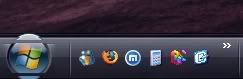
I just discovered a minor error in the latest build of WB 5. When using the Arrow skin, the start menu looks like this:


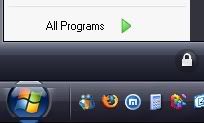
and not like it supposed to look like, and what it looked like in build 4.98 beta:


regards

nimmer

7,635 views 18 replies
Reply #1 Top
I don't have this when I apply "Arrow". Using 4.99 RC1...Dont' have that with VistaXP (Kol's), either...
Reply #2 Top
I have it with both the Arrow and the VistaXP skins using the 4.99 RC 1 build. I do not have it with the 4.98 build.

nimmer


Posted via WinCustomize Browser/Stardock Central
Reply #3 Top
I have the same problem, also oversized start button not there when apply skin only after open start menu, then it looks the same as in nimmer's pic above. WB 4.99[rc].006. AS nimmer stated and showed was working on last build.
Reply #4 Top
Mine is slightly different. Load the skin and there is a line through it like top image. Left clicking on the task bar clears it though. When I bring up the start menu it covers the top of the button. Using 4.99RC. Didn't have this with the last build. This is on the updated version of Arrow. Can't recall whether the button was covered by the start button before.
Reply #5 Top

We made some changes to how oversized startbuttons work which mean the shadow from the startmenu overlaps the start button slightly.  This can be avoided by disabling the shadow on the startmenu in the skin & adding one via WBs per pixel support.

The startmenu should never overlap the startbutton though.

Reply #7 Top
My startbutton looks bad too when I updated to RC. I have no idea how to fix it.

Reply #9 Top

I have the same problem as stated by  and Majic7. Reapply the skin does sort of fix Majic& problem but after a while it happen again. There are times that I experience missing start button glow effect.


Also, when I use oversized start button with perpixel start panel, specially the bottom part, the hover effect stuck to it. Is there any way to avoid it?

Reply #10 Top
I reapply the skin and it didnt work but when I restart it works.
Reply #12 Top
Just updated to latest version a couple of hours ago and I still have the same problem.
Reply #13 Top
@ Neil Banfield: nop, with the latest work fine here.
Reply #14 Top
#6 by Citizen Majic7
Thu, November 24, 2005 6:35 PM


I have the same image problem with the start menu opened covering the button that Majic7 has also. I have the RC version installed and also made sure that the blind was the current Arrow one by deleting it first before installing the RC version of WB5.
DD


Posted via WinCustomize Browser/Stardock Central
Reply #15 Top
Hey Neil, same problem here still. Unloaded WB, uninstalled thru SDC, reboot, install thru SDC, reboot.
My taskbar is set to large in WB config.
This is how start button looks on Arrow ( no shadows )


WindowBlinds 5 RC1 Troubleshooting Report:

STATUS : WB+ SRV+ HLP+ UI+ TRAY+

WindowBlinds is installed correctly on this PC.

WindowBlinds appears to be activated on this PC

Your machine supports per pixel borders on WindowBlinds skins.

You have one monitor in total.

(Plug and Play Monitor) 1 is attached to RADEON 9200 SERIES

Wblind.dll 2005/11/25 19:52:18
Wbsrv.dll 2005/11/25 17:22:06
Wbconfig.exe 2005/11/23 19:48:32
Wbload.exe 2005/11/25 19:30:58
Wbhelp.dll 2004/09/18 16:37:00
Wbui.dll 2005/11/20 12:23:40
Tray.dll 2005/11/02 13:28:26


____________________________________________
WB version installed is 4.99a[rc].003

Reappling skin and restarting computer do not fix.
Reply #16 Top
This issue is not fixed in the final version. I'm still having problem with start panel sits on top of the start button. The funny thing is, if I open the start panel and leave there in about 10 sec, the start button will position itself on top of the start panel.
Reply #17 Top
Not a big deal but I noticed that the tooltip for the start button ("Click Here to Start")is under the startmenu using cyclops.


Posted via WinCustomize Browser/Stardock Central
Reply #18 Top
I just discovered something. Out of the blue my cursor started to go behind the title bar while using Cyclops WB. The buttons still glow and work but the cursor is under them. Switched to Arrow, same thing and additionally the cursor goes behind any transparent borders. Disabled Cursor XP and default cursor works as it should. Whats weird is that the start button glitch disappears when Cursor XP is disabled. Its the free version of Cursor XP.