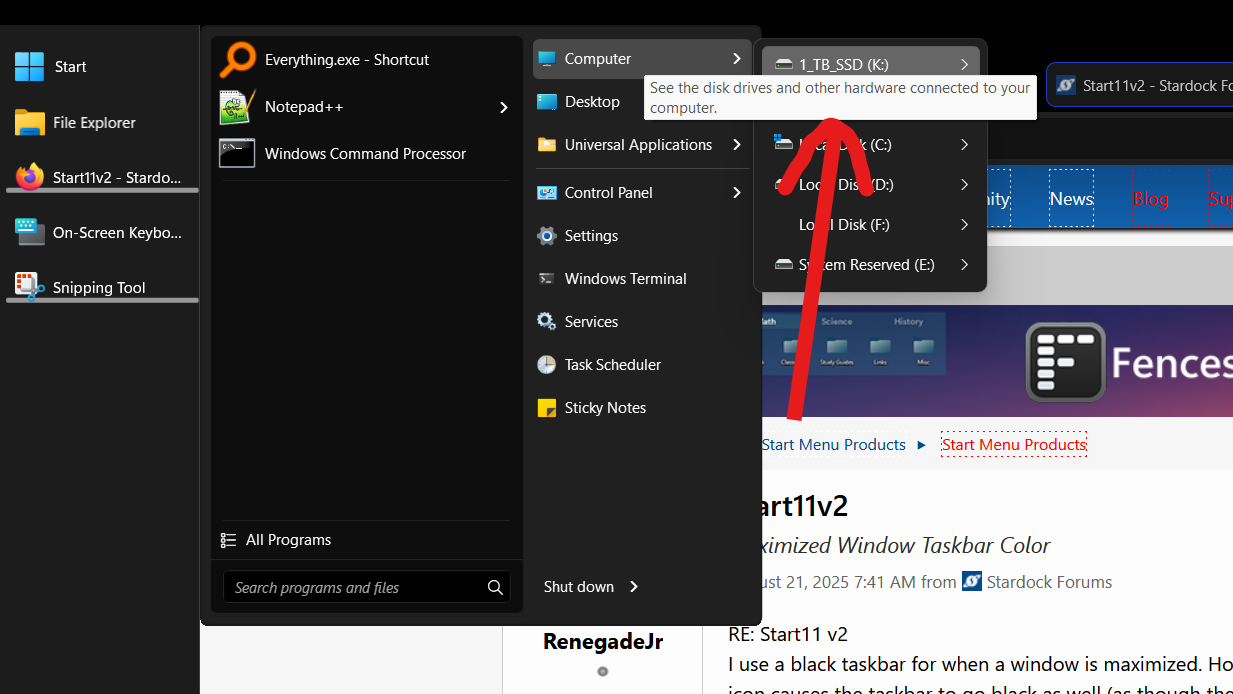
Disable this tooltip how?
When hovering over the buttons, in this case the Computer link, a tooltip appears that is not helpful and it covers what I would like to see. Any way to stop them from appearing? Thank you for this awesome software.

When hovering over the buttons, in this case the Computer link, a tooltip appears that is not helpful and it covers what I would like to see. Any way to stop them from appearing? Thank you for this awesome software.

Hello,
Sorry to hear you are having issues. From what I know, there is no option to disable those, however, to be sure, I have forwarded your problem/question to Stardock Support Team for their assistance. Please keep an eye on this thread for any updates. We appreciate your feedback and patience. Thank you.
Basj,
Stardock Community Assistant
Hi chrisdabum,
I can see how the hover-over tooltip here can be inconvenient, especially when your quick access shortcuts open as menus. My understanding is this is something Windows determines, so I can't make any promises on Start11. I will note the request for our developer in-case they have any other thoughts.
Best regards,
Adam McGuinness
Stardock Support Specialist
I have good news and bad news.
There is indeed a registry key which stops the tooltips showing but there is a small bug with it (it isn't exposed as a setting in v11 so it got slightly broken probably some time ago).
If you are comfortable using regedit then go to HKEY_CURRENT_USER\Software\Stardock\Start8\Start8.ini\Start8 and then right click and create a new string value called "HideTips" and give it a value of 1 and then sign out and in again you will find the tips on those expanding menus go away.
If you are not, then go to C:\Program Files (x86)\Stardock\Start11 and find Start10tweak.exe and run that. There is an option on there to hide the tooltips.
The bad news? The non popup menu ones will currently show a tip of "-1".
We will get that sorted in future updates and see about having this exposed in the main UI for easier access to the setting too.
Welcome Guest! Please take the time to register with us.
Select a reason for giving karma:
You're about to visit an external site:
Sign up here to get the latest news, updates, and special offers delivered directly to your inbox.