
Problem with showing the taskbar with secondary monitor Part 2
 Stardock Forums
Windows Version Number: windows 11 26H2 26300.9550
App Version: 2.81
Good afternoon!
I've already submitted a bug report right here https://forums.stardock.com/541843/problem-with-showing-the-start-menu-icon-on-the-taskbar/page/1#3994562
And only now I was able to find the time to unsubscribe to you. I saw in the release logs that you tried to fix the problem, but unfortunately after the updates it got worse: if previously only the start menu icons disappeared, now the textures on the taskbar may also disappear. The playback process is still the same (shown in the video): I have two monitors in screen expansion mode, on each of the monitors there is a program expanded to fill the entire screen. I restart Explorer, the icon on the start button does not appear, and now the texture on the taskbar on the main monitor does not appear. At the same time, I noticed that this does not always happen: sometimes the texture on the taskbar on the main monitor still appears, and if you try to restart Explorer several times, then after 3-4 times the start button icon may still begin to update (although this also does not always work). I also noticed that if the texture on the taskbar and the start button icon are updated, it takes a very long time (it used to take 5 seconds, no more, now it can take 2-3 times longer). In this case, the texture can be updated immediately if you simply open the start menu, but the start button icon is still the same as before, it is updated only if you take the window on the second monitor out of full-screen mode (minimize it or switch it to windowed mode). But this also began to not always work - previously the Start menu icon was always repaired if I minimized windows on the second monitor, but now this may not help (and opening the Start menu also does not help return the texture to the taskbar on the main monitor), I have to completely restart Start11 through the task manager.
Video with this problem: https://drive.google.com/file/d/11L_hZtxvQIJ1gcaY2n9F-Vq_mXYZ6RaH/view?usp=sharing
I also noticed that if the rounded taskbar mode is turned on, when it goes into rounded mode, on the second monitor it has a sharp and choppy animation - it looks clearly wrong
Video of this laggy animation here: https://drive.google.com/file/d/1493XaOT13RvxUuWuoed1-ADMEk7641WQ/view?usp=sharing
And I also discovered a problem that on the second monitor, when the taskbar is in rounded mode, the clock is displayed incorrectly and extends beyond the edge of the panel; it needs to be indented:
Second monitor: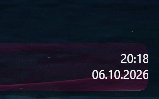
Main monitor: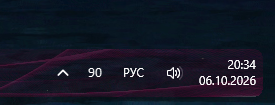
I hope you are able to fix these annoying bugs. Thank you!