There is no so-called UAC prompt when launching a setup program with administrator rights. This was the case here as well. Even after I ran the setup program with administrator rights, the service still did not start automatically.
The program works when you run the EXE directly. So, I don't understand why it doesn't work when I set up `start11.exe` to launch automatically at startup. What is the point of the service if you can theoretically just have the EXE run every time the system starts?
End of kaiubraeutigam's quote
That is useful information, thank you. Regarding your question about the service:
Start11 is designed to be launched by its service at boot, which is why adding Start11.exe to the startup list is not a reliable substitute. Running the EXE by hand only works because you are starting it yourself, after login.
If you press Windows+R, type services.msc and press Enter, then look down the list for Stardock Start11 Service, can you tell us:
- Is it there at all?
- If it is, what does its "Startup type" say (double click to open properties) — Automatic, Manual or Disabled?
If it is set to Manual or Disabled, right-click it, choose Properties, set Startup type to Automatic, click Apply, then click Start. That may fix it.
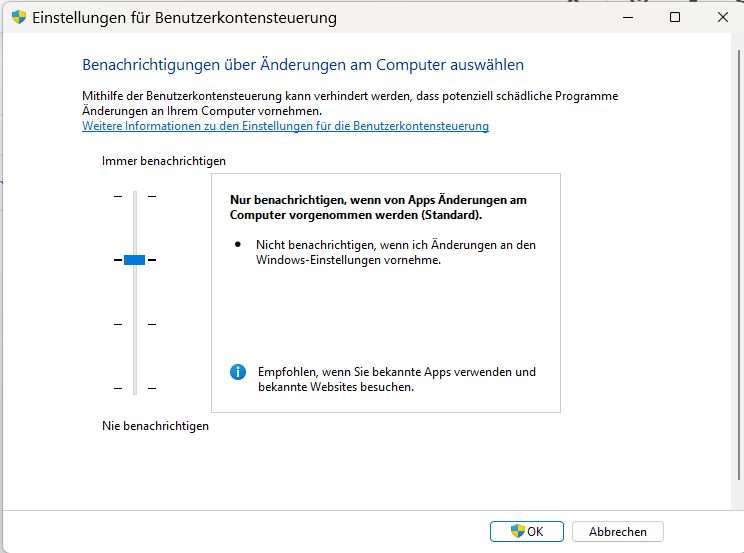
If it's not there, could you also confirm whether User Account Control is switched on? To check that:
Press the Start button, type "User Account" and open "Change User Account Control settings". Let us know:
- Where the UAC slider sits.
- Is your account an Administrator account?
- Or is this a work-managed PC?
Best regards,
Adam McGuinness
Stardock Support Specialist

 Stardock Forums