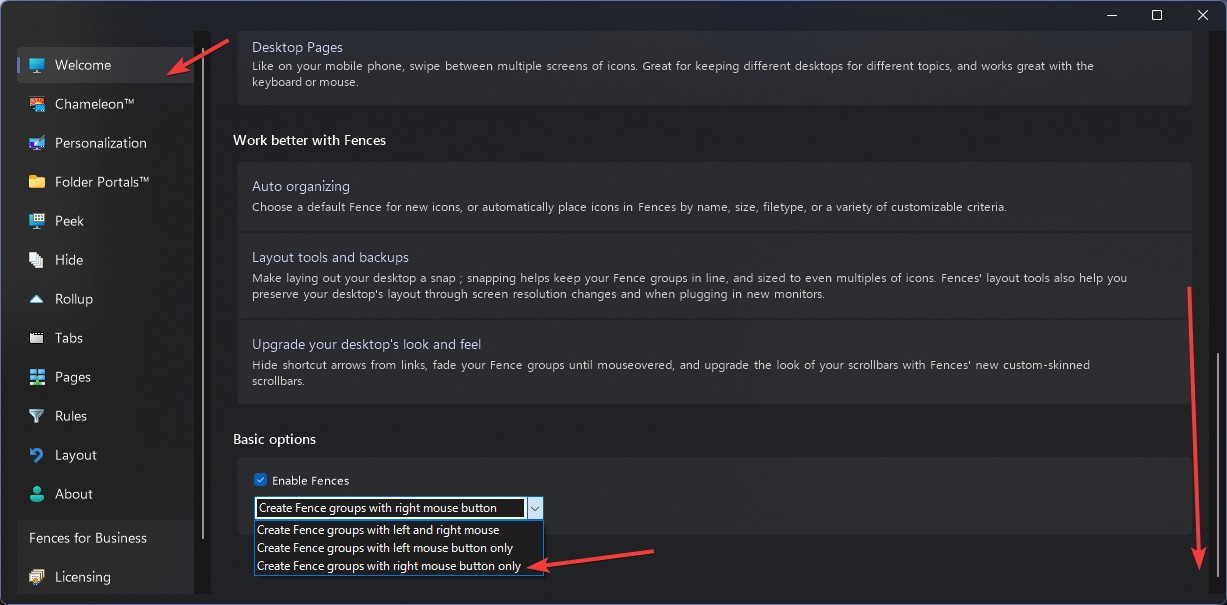
Disabling the "Create Fence / Create Folder Portal here" pop-up when dragging with the left mouse button
from  Stardock Forums
Stardock Forums
Hello,
I tried looking in the FAQ but didn't find a thread about this issue, so forgive me in advanced if there is one and kindly direct me to it.
I used Fences in its v0.95.0 version many years ago, and recently just purchased Fences 6 as the old one didn't support high DPI text appearance on 4k monitors.
I discovered that in the new version, you can either drag with the right mouse button to creating a fence (the original behavior), while you can also drag with the left mouse button, which is quite annoying when you just want to select some icons on the Desktop, and I can't seem to find any option to disable it and to just keep the right mouse button for fence creation.
Does anyone have the same problem?
Thanks