
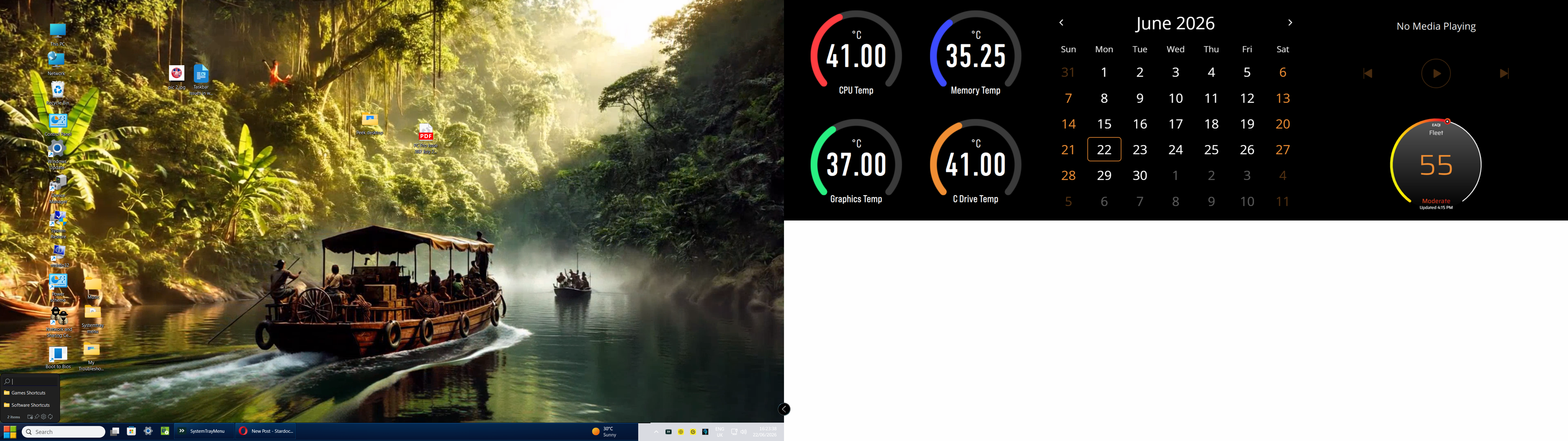
Start 11 taskbar white section on right side

As reported in the forums I have a white section on the right of the taskbar having also had  a taskbar "missing gap" in the centre of the bar mainly after PC games played . I have reduced the missing mid section by  introducing an advanced exception in Windows Blinds which I  use at the same time .

The white section in the bar is something that has appeared since a fairly recent Windows 11 25H2 update 

My system is a self built Asus Z790 E Wifi II. This update also caused Widgets option to disappear from the taskbar which I fixed .

All normal compensations have been tried in logical fashion , I am using a Radeon RX 9060 XT video card

So the question is this error a combination of the 2 products interaction ? 
110 views 3 replies
Reply #1 Top

Hello,

Sorry to hear you are having issues. As I've posted before on your previous post, have you tried restarting explorer.exe on both of your issue and see if the proper parts reappear?

Also, few additional question.

  1. Is the issue appear on any Windowblinds themes? Or only specific theme?
  2. If you disable Start11 enhance taskbar does the issue resolved?
  3. Do you have any other application running in the background that also change how your taskbar look? Such as StartAllBack, ExplorerPatcher, Windhawk, Openshell, DisplayFusion etc.

Thank you,

Basj,

Stardock Community  Assistant.

Reply #2 Top

Hi 

Thanks for the link.

1} The issue is with all Blinds 

2} Enhance Taskbar setting on /off has had no affect 

3} I have Deskscapes running  and Microsoft Widgets and "Icue" from Corsair linked with separate Corsair 14" screen, but no other customised applications

Reply #3 Top

First, please try purge and reinstall steps as mention here : [Windowblinds Purge and Install Steps]. Just make sure to redownload the latest version from your account page. Reboot after the purge. Reinstall and reboot again after the installation. Retest and report back here.

If the issue still appear, we need to know few things.

  1. Your Windows 11 25H2 OS Build number. Use Winver.exe to get this number.
  2. Windowblinds 11 full version number installed.
  3. Start11 full version number installed.

Thank you,

Basj,

Stardock Community  Assistant.