DeskScapes v 26.01 Beta Feedback
With the DeskScapes 26.01 beta release today, we are creating this thread so that users can report any observed issues.
Thank you for your interest and any time you put into making DeskScapes 2026 a better product.
With the DeskScapes 26.01 beta release today, we are creating this thread so that users can report any observed issues.
Thank you for your interest and any time you put into making DeskScapes 2026 a better product.
Known issues
While we appreciate all feedback, please remember that we offer no official support for beta \ preview \ developer channel versions of Windows. If you report issues while in any of those early release channels, you should not expect them to be addressed unless it still exists in a retail version of Windows.
***Reserved***
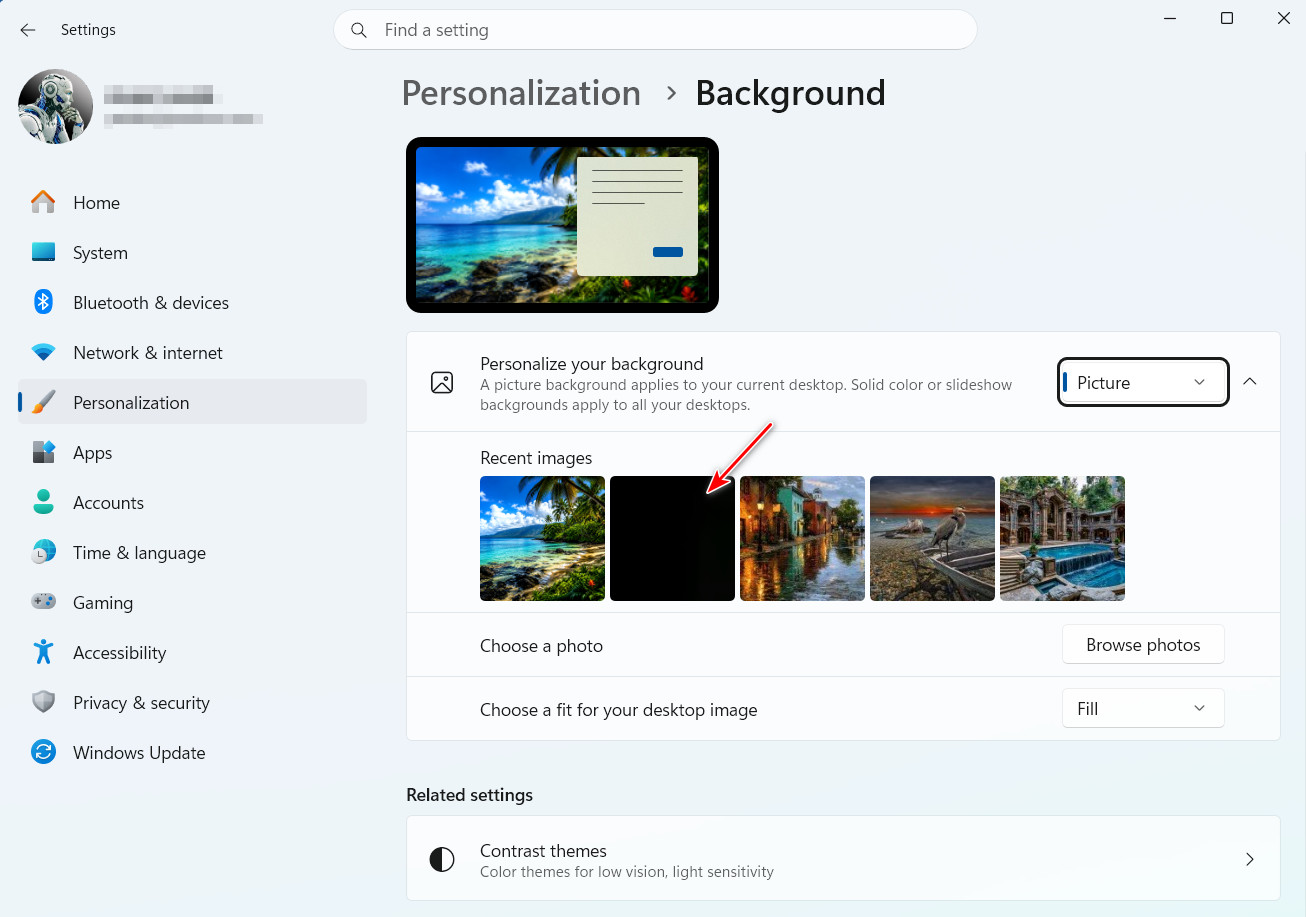
Since DeskScapes 2026, the second image in Desktop Backgrounds is always black. I'm not sure why, or if it even matters, but curious just the same. Also, choosing an image here doesn't seem to disable DeskScapes as it did before.

Since DeskScapes 2026, the second image in Desktop Backgrounds is always black. I'm not sure why, or if it even matters, but curious just the same.
Thanks for the post. I can also see some black background images in the "Recent images" section of Windows settings. It seems like occasionally/rarely, this can happen after I apply a background from DeskScapes. There will be a brief moment where the background turns black, before it correctly loads the background I selected. My guess is that as a result of this, Windows is adding both that black background and the new one to the recent images area.
Also, choosing an image here doesn't seem to disable DeskScapes as it did before.
This I'm not reproducing. If DeskScapes is enabled, the Settings cog will show a "Disable DeskScapes" option. If I click one of Windows' Settings recent images to load a background from there, I see that option in DeskScapes go away. I'm curious if this happens every time for you in this way, and if you are expecting DeskScapes to become disabled in some other way.
Thanks again for the feedback.
Best regards,
Adam McGuinness
Stardock Support Specialist
This I'm not reproducing. If DeskScapes is enabled, the Settings cog will show a "Disable DeskScapes" option. If I click one of Windows' Settings recent images to load a background from there, I see that option in DeskScapes go away. I'm curious if this happens every time for you in this way, and if you are expecting DeskScapes to become disabled in some other way.
If I select an image from the Windows Settings, Personalization> Background, the image is applied to the desktop, but the Info Panel remains active. This is why I assumed DeskScapes was still active, but after opening the DS Config app I see DS is not actually active.
It does seem that in order to disable an Info Pane, you would uncheck where it was first enabled, manually. It doesn't get disabled from the "Disable DeskScapes" option, or from changing backgrounds in Windows. I'll have this logged.
Internal reference: ODNT-12470
Thanks again and best regards,
Adam McGuinness
Stardock Support Specialist
It does seem that in order to disable an Info Pane, you would uncheck where it was first enabled, manually. It doesn't get disabled from the "Disable DeskScapes" option, or from changing backgrounds in Windows. I'll have this logged.
That's actually not a bad thing. It would allow for using a Windows applied background with the Info Pane, and without DeskScapes being enabled. That is unless Stardock doesn't want the Info Pane used without DeskScapes. I'm not sure this situation would survive a computer restart.
A fair point, I can see how someone might want that. And it does seem to keep the Info Pane through restart even with DeskScapes disabled. The only concern may be consistency/clarity. As you expected it to do it, someone else might expect the same.
Welcome Guest! Please take the time to register with us.