Wrong Icons on the task bar

Hi,

when using Start11, the icons on the task bar sometimes get mixed up. I am not sure what exactly triggers it, e.g. if it happens after returning from hiberation or exiting a full screen game. 

Concretely, the wrong icon will be shown for each shortcut / window, i.e. you click on Firefox but get Thunderbird, which is next to it. Usually, one icon is duplicated and then all others are shifted right accordingly.

Killing and restarting the Windows Explorer process fixes the issue (until it reoccurs).

I am running the latest version of Start11 (2.6).

This happens regardless of the option 'Allow Start11 to extend the task bar, i.e. even when it is off.  I have now enabled this option and turned off grouping of icons (I normally have grouping on as I prefer it) - I have not encountered the issue since. But as I prefer grouped icons, I would prefer to see this fixed.

I suspect the problem is related to the difference between the grouped and ungrouped sequence, i.e. grouping is supposed to be on, but some code acts as if it is off and duplicates an icon, but without duplicating the underlying control.

Thanks!

- Florian

736 views 11 replies
Reply #1 Top

Hello,
Sorry to hear you are having issues. I believe this is known issue on v2.6. Please update to 2.7 (Beta). It should be available in your account product page: https://store.stardock.com/myaccount/products

Thank you,
Basj,
Stardock Community Assistant.

+1 Loading…
Reply #3 Top

Great, and yes, please keep us update.

Thank you,

Basj,
Stardock Community Assistant

Reply #4 Top

I am having the same issue with Start11 v2.6. I will also try installing the v2.7 beta to see if it fixes this issue.

Reply #5 Top

Quoting AzJazz1, reply 4

I am having the same issue with Start11 v2.6. I will also try installing the v2.7 beta to see if it fixes this issue.
End of AzJazz1's quote

There was a new Beta released today 2.7.0.2 which I believe has some fixes for this issue.

Reply #6 Top

I am on version 2.7.0.3, and the problem just occurred again.

What I have is this (grouping is enabled, so there should be one icon per application):

[Thunderbird, 1 window] [Firefox, 6 windows] [Chrome, 0 windows (pinned to taskbar)] [...]

What I (sometimes) see is this:

[Thunderbird] [Firefox] [Chrome] [Chrome] [Chrome] [Chrome] [Chrome] [Chrome] [...]

The total number of icons is not increased, the additional Chrome icons replace/overlay the actual icons.

So it is the Chrome icon that is multiplied, even though it is Firefox that has multiple windows while Chrome is not even running. Maybe that helps with pinpointing it.

Reply #7 Top

Quoting v3rb0s3, reply 6

I am on version 2.7.0.3, and the problem just occurred again.

What I have is this (grouping is enabled, so there should be one icon per application):

[Thunderbird, 1 window] [Firefox, 6 windows] [Chrome, 0 windows (pinned to taskbar)] [...]

What I (sometimes) see is this:

[Thunderbird] [Firefox] [Chrome] [Chrome] [Chrome] [Chrome] [Chrome] [Chrome] [...]

The total number of icons is not increased, the additional Chrome icons replace/overlay the actual icons.

So it is the Chrome icon that is multiplied, even though it is Firefox that has multiple windows while Chrome is not even running. Maybe that helps with pinpointing it.
End of v3rb0s3's quote

Perhaps, it is better if you could post a video or screenshot showing your issue, so we can understand it better.

Thank you,

Basj,
Stardock Community Assistant

Reply #8 Top

I have encountered a similar but new issue: Now the context menus are all scrambled.

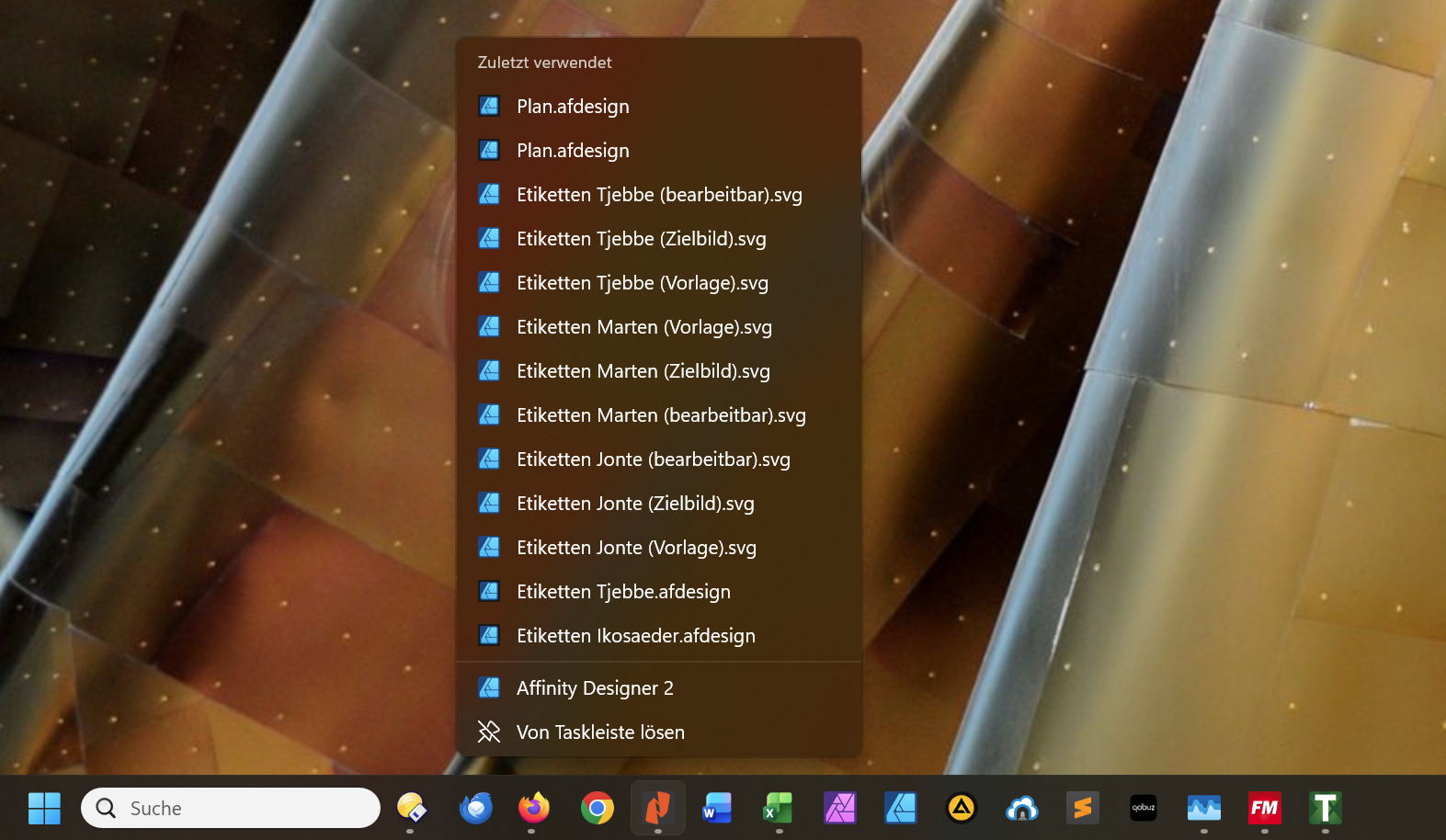
This is me right clicking on Nitor (5th icon), but seeing the context menu for Affinity Designer (9th icon).

Firexfox and Chrome show their own menus, the rest is not just shifted, but scrambled. E.g. Excel's (7th) menu is on Sublime Text (12th), 

The three running applications on the right (taskmanager, FM, T) show the correct menus again for some reason.

Reply #9 Top

Quoting v3rb0s3, reply 8

I have encountered a similar but new issue: Now the context menus are all scrambled.

This is me right clicking on Nitor (5th icon), but seeing the context menu for Affinity Designer (9th icon).


Firexfox and Chrome show their own menus, the rest is not just shifted, but scrambled. E.g. Excel's (7th) menu is on Sublime Text (12th), 

The three running applications on the right (taskmanager, FM, T) show the correct menus again for some reason.
End of v3rb0s3's quote

What build of Windows?

Reply #10 Top

It is Windows 11 Pro, Build 26200.8457.

I have now finally managed to capture a video of the original issue:

Video

- the machine is newly rebooted, I have only just launched Firefox (reopening quite a view windows). I use multiple desktops (Windows feature).

- I click on the first Chrome icon; Chrome opens

- I click on the third Chrome icon, Word opens. The icon (correctly) opens the Word context menu.

- I click on the second Chrome icon, Sublime text opens (we jump to a different desktop where Sublime is already open for a second, that is why the Firefox window briefly appears before I return to the desktop with the raspberry background)

- I use the task manager to restart explorer.exe

- the correct icons appear, leading to the correct apps

Reply #11 Top

Hello again,

Thank you for the video. There is a newer version available. Please download the latest v2.7.1 from your account product download page and use that one. Make sure to reboot after the install. Test it and report back.

Thank you,

Basj,

Stardock Community  Assistant