Power Button - only need Sleep, Restart & Shutdown
from  Stardock Forums
Stardock Forums

How do I remove Switch user, signout, lock & Hibernate?
Start 11 v2.56


 Stardock Forums
How do I remove Switch user, signout, lock & Hibernate?
Start 11 v2.56
Stardock Forums
Top
Hello,
Sorry to hear you are having issues. I don't believe, Start11 have such option. Perhaps, there is option within Windows that can do that. Which Windows and what version and OS Build number, you're current using? Also you're using which Start11 Start menu style you're using now?
Thank you,
Basj,
Stardock Community Assistant.
Stardock Forums
Top
There is a setting in the Registry, but I’m not at my computer right now, so I can’t look it up. Try searching on the internet. If I can find it tomorrow, I’ll PM you with the info.
 Stardock Forums
Top
Stardock Forums
Top
Sent info. in PM this morning. 
Stardock Forums
Top
Windows 11 H2 2025
Start 11 v2 ( which ever is latest - I’m responding from my iPad)
Stardock Forums
Top
Pelaird -
thx for the registry settings.
What about Switch User & Sign Out. Will the registry show those 2 as well?
Stardock Forums
Top
What style (and sub-style, if applicable) Start11 menu are you using?
Stardock Forums
Top
Right now using the Modern Style
Stardock Forums
Top
I'm afraid your stuck with the options below. In other styles, these options are part of the User avatar, which is not available in the Window 7 and Modern styles.
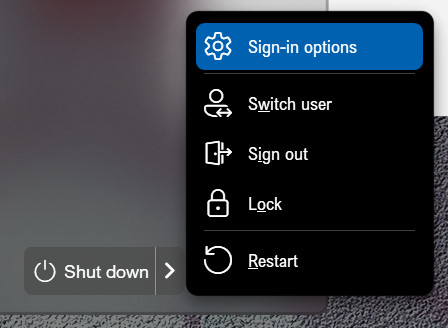
These are the options with the Windows 10 style.
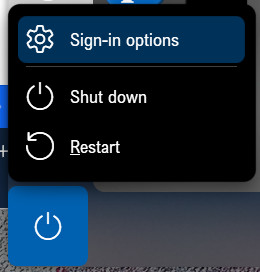

Stardock Forums
Top
not happy. Glad only $14 down the drain.
I’ll try Classic Shell.
take care
Stardock Forums
Top
Sorry. I think they are just trying to offer the options available on the standard Windows 11 Start menu. Stardock does not alter the Windows OS thru Registry hacks, and so it might be unable to remove the items you don’t want.
good luck
Stardock Forums
Top
Sorry to hear that. This is why, Stardock offer those 30 days free trial.
Also, if this is a new purchase I believe you could request for refund. Use the link below and use the Refund option. Include all information details. Remember to record down the ticket number for future reference if needed. Do not raise multiple ticket, that will make your ticket back to the end of the line. Send once and wait. Ticket will be answer by the order they send in.
https://stardock.atlassian.net/servicedesk/customer/portal/4/group/13
Thank you,
Basj,
Stardock Community Assistant
Stardock Forums
Top
Can I ask why you need no sign out option as it may be something we can add.
If you add the registry key "DisableSignInOptionsLink" as type REG_SZ with a value of 1 to HKEY_CURRENT_USER\Software\Stardock\Start8\Start8.ini\Start8 it will hide the sign out options link.
For lock it is controlled by the OS system policy. If lockworkstation is blocked by that then the option will hide.
Likewise the sign out option is controlled by the REST_STARTMENULOGOFF policy
Stardock Forums
Top
I am the one & only user of this pc. Sign out, Switch User & Lock is 100% not necessary. And on hibernate - I prefer sleep mode. I can’t be the only person who has no need for these options. I had Start 11 version 1 and shocked v2 not improved. Hope I don’t have to wait for 3 for those 3 items to be removed.
Now using OpenShell. And yes, my power off menu button only shows: shut down, restart, & sleep. So we know it’s doable.
Welcome Guest! Please take the time to register with us.