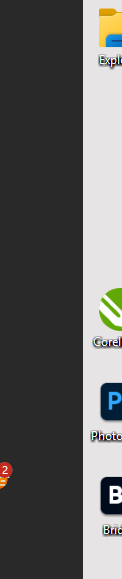
Start 11 sometimes has no Start button
 Stardock Forums
I recently upgraded my PC to Windows 11 (latest release) and straight away installed Start 11 (v2.53). I am using the Windows 10 style start menu, with the taskbar set vertically on the left hand side of my screen.
Several times since installation, when I start my PC there is no Start button at the top of the taskbar - however I can still access the Start menu using the Windows key. Also, there is a funny little icon half hidden off the side of the taskbar with a number on it - I'm assuming that refers to things that didn't load correctly at startup. I have seen that little icon at other times when Outlook has failed to load - it goes away as soon as I start Outlook manually.
I'm not sure if the start button missing is a Start 11 issue or a Windows 11 issue.
Here's a screenshot of the taskbar with no Start button, and the little icon on the side.