SOLVED: Unable to Hide Icon Text

Hi Support,

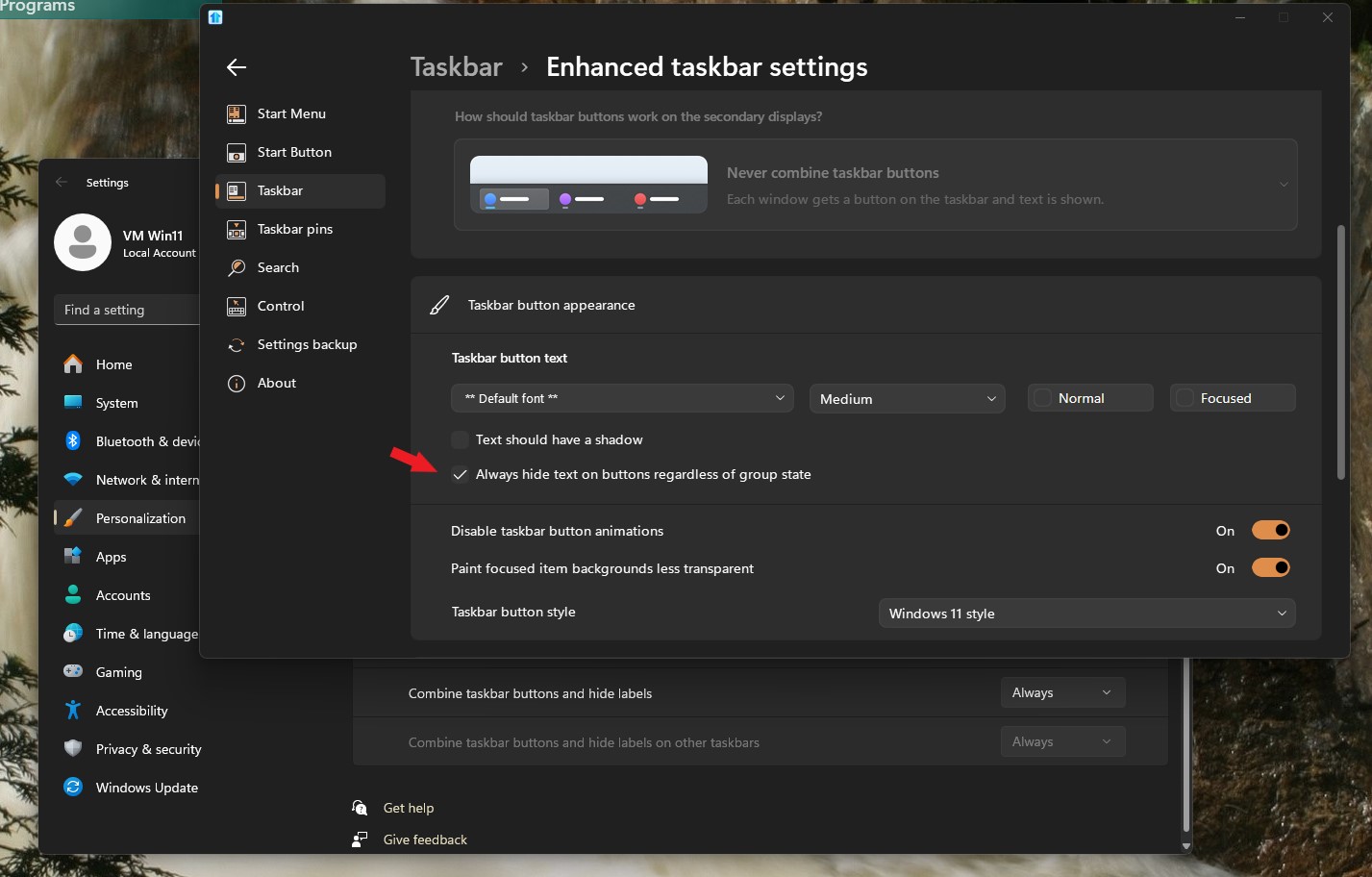
I'm running start11 2.52.3, and for some reason, I can not allow for the stacking of Icons and removal of Text.  Instead, I'm getting multiple icons with the icon text for every screen.  Seems like this is a regression.  I'm also running the following Windows 11 version: 24H2.  I'm finding it difficult to even find the setting to control this.  In the image below, you can see both Putty windows, and both Remote Desktop windows unstacked with text, and WinSCP open, again text is not hidden.

Larry

665 views 2 replies
Reply #1 Top

Hello,
Sorry to hear you are having issues. You can hide text by using this setting.


Thank you.
Basj,
Stardock Community Assistant.

Reply #2 Top

Got it.  The navigation is very confusing.  I think the UX team needs to take a fresh look at the options layout.  But the good thing from my perspective is that you help got me out of the situation I stumbled into.

The UX issues maybe are predicated on the fact that MS is not letting you extend the preferences directly.  I have to get more comfortable digging into the Start11 "Taskbar" vs. the System "Taskbar".  I would be great if MS gave you complete control over the Preferences > Taskbar....

Anyway, been using Object Desktop for nearly two decades.